Warhammer 40,000: Boltgun Boom
Updated
Current Version
1.0.2
Offered By

With your passion for Warhammer 40,000: Boltgun Boom, you shouldn’t have to limit yourself to the small screen of a phone. Play like a pro and take full control of the game using a keyboard and mouse. MEmu gives you everything you’re looking for. Download and play Warhammer 40,000: Boltgun Boom on PC. Play as long as you want — no more worries about battery life, mobile data, or unexpected calls. The all-new MEmu 9 is the best way to play Warhammer 40,000: Boltgun Boom on PC. With our expertly designed keymapping system, Warhammer 40,000: Boltgun Boom feels just like a real PC game. The MEmu multi-instance manager lets you run two or more accounts on the same device at the same time. Most importantly, our exclusive emulation engine unlocks your PC’s full potential, delivering smooth and seamless performance.
Show more
Download Warhammer 40,000: Boltgun Boom on PC with MEmu Android Emulator. Enjoy playing on big screen. TRY BEFORE YOU BUY.
TRY BEFORE YOU BUY
Play the first 3 levels for free. Unlock the full game with a one-time in-app purchase.
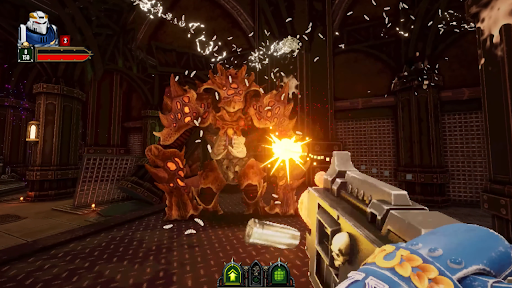
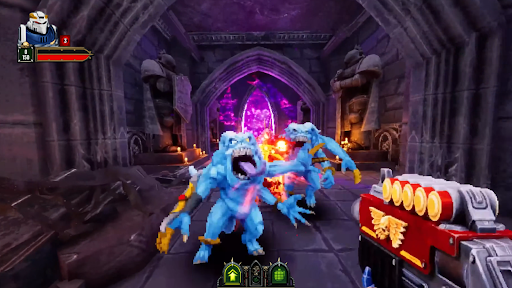
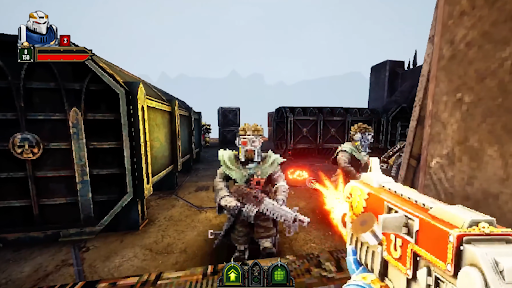
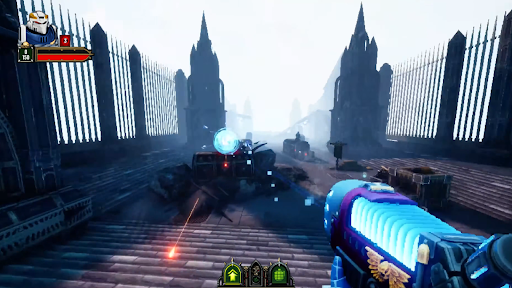
Enter the grim darkness of the far future in Warhammer 40,000: Boltgun Boom, a brutal retro FPS shooter rebuilt for mobile. Become Malum Caedo, a Sternguard Veteran Space Marine, and purge the forces of Chaos in fast-paced first-person combat.
Wield the mighty boltgun and an arsenal of iconic Warhammer 40,000 weapons. Tear through cultists, traitors and daemons with explosive gunplay, relentless movement and the fury of an old-school shooting game.
BECOME A SPACE MARINE
Step into the power armour of Malum Caedo and bring the Emperor’s wrath to enemies of the Imperium. Face overwhelming hordes, towering war machines and the horrors of Chaos.
BRUTAL RETRO FPS COMBAT
Move fast, fire faster and master responsive first-person shooting inspired by classic ’90s action games. Every battlefield rewards aggression, exploration and overwhelming firepower.
MASSIVE SINGLE-PLAYER CAMPAIGNS
Fight across multiple worlds in large campaigns packed with deadly enemies, hidden paths, secrets and atmospheric environments.
BUILT FOR MOBILE
Experience high-speed FPS action with controls and gameplay systems optimized for mobile devices.
A PREMIUM EXPERIENCE
No ads. No energy systems. Just brutal Warhammer 40K shooter action and massive single-player campaigns.
Download now and prepare to purge the enemies of the Imperium.
NOTE:
● The game contains optional in-app purchases. You can disable this feature in the settings menu of your device.
● Check our Privacy Policy at https://www.nitrogames.com/privacy-policy/
● Check our Terms of Service at https://www.nitrogames.com/terms-of-service/
Warhammer 40,000: Boltgun Boom © Copyright Games Workshop Limited 2026. Boltgun Boom, the Boltgun Boom logo, GW, Games Workshop, Space Marine, 40K, Warhammer, Warhammer 40,000, 40,000, the ‘Aquila' Double-headed Eagle logo, and all associated logos, illustrations, images, names, creatures, races, vehicles, locations, weapons, characters, and the distinctive likeness thereof, are either ® or TM, and/or © Games Workshop Limited, variably registered around the world, and used under licence. Auroch Digital and its logos are trademarks or registered trademarks of Auroch Digital. Unreal® Engine, Copyright 1998 – 2026 Epic Games, Inc. Nitro Games is a trademark or a registered trademark of Nitro Games Oyj. All rights reserved to their respective owners.
Show more

1. Download MEmu installer and finish the setup

2. Start MEmu then open Google Play on the desktop

3. Search Warhammer 40,000: Boltgun Boom in Google Play
Install
4. Download and Install Warhammer 40,000: Boltgun Boom
5. On install completion click the icon to start

6. Enjoy playing Warhammer 40,000: Boltgun Boom on PC with MEmu
MEmu Play is the best Android emulator and 100 million people already enjoy its superb Android gaming experience. The MEmu virtualization technology empowers you to play thousands of Android games smoothly on your PC, even the most graphic-intensive ones.
Bigger screen with better graphics; Long duration, without limitation of battery or mobile data.
Full Keymapping support for precise control of keyboard and mouse or gamepad.
Multiple game accounts or tasks on single PC at one time with Multi-Instance manager.
Play Warhammer 40,000: Boltgun Boom on PC by following steps: