
Betano - Online Betting
Updated
Current Version
3.118.0
Offered By

Stop worrying about high battery drain when using Betano - Online Betting on your phone. Free yourself from the tiny screen and enjoy the app on a much larger display. From now on, get a full-screen experience of your app with the convenience of a keyboard and mouse. MEmu offers you all the surprising features you’d expect: quick installation and easy setup, intuitive controls, and no more worries about battery life, mobile data, or unexpected calls. The all-new MEmu 9 is the choice for using Betano - Online Betting on your computer. With the MEmu multi-instance manager, you can run two or more accounts at the same time. Most importantly, our exclusive emulation engine unlocks your PC’s full potential, delivering smooth and enjoyable performance.
Show more
Enjoy superb experience of using Betano - Online Betting on PC with MEMU App Player. It's a powerful free Android emulator which provides you with thousands of android apps for their desktop version. Enjoy connecting with friends and polishing your work with higher efficiency! Betano Brazil: Experience the thrill of sports betting and online casino.
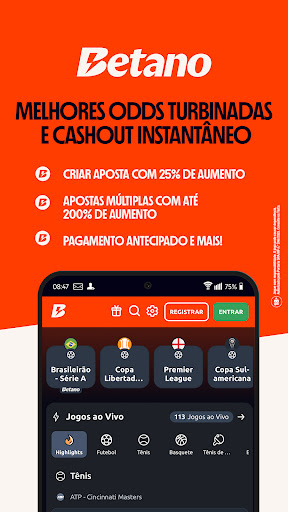
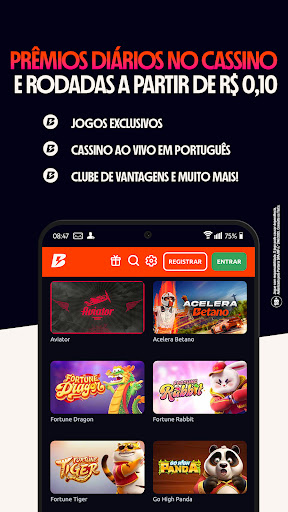


Betano Brazil: Experience the thrill of sports betting and online casino. Trust us.
Betano is the first regulated betting site in Brazil, official sponsor of the Brasileirão, Copa do Brasil, and Flamengo.
Here, trust, excitement, and technology come together to offer a complete experience in sports betting and online casino, with total security and transparency.
With the Betano betting app, you have everything you need in the palm of your hand: live betting, best odds, instant cashout, payments via PIX, and a complete online casino with exclusive games. Here, fans bet with those who understand football and are trustworthy.
Live sports betting
Get on the field with Betano, the online sports betting site that's in the game and alongside the biggest championships in the country.
Follow the Brasileirão, Copa do Brasil, European leagues, and much more - betting live, with markets updated in real time and instant results.
- Boosted odds and exclusive markets
- Instant cashout and early payout
- Multiple bets with up to 200% increase in winnings
- Betano Brasileirão sweepstakes in every round
- Watch and bet with live streaming within the app
Here, every move is a new chance to win.
Online casino and live games
In addition to sports betting, the Betano app offers a complete online casino, with games for all tastes - from classics to exclusive new releases.
- Live casino with tables and dealers in Portuguese
- Online roulette, blackjack, poker and slots
- Free demo slots and the popular Aviator game to play risk-free
- Exclusive games and tournaments with prizes of up to R$2 million per month
- Betano Club with daily benefits and prizes
Enjoy a safe, modern and 100% regulated casino experience in Brazil.
Official Betano App
The Betano betting app was developed to guarantee practicality and security in every bet. With just a few taps, you can deposit via PIX, follow your games, and make instant withdrawals with complete confidence.
App Highlights:
- Secure and fast platform
- Deposits via PIX and instant withdrawals
- 24/7 support in Portuguese
- Exclusive promotions and bonuses
- Intuitive and 100% legal interface
Betano is the first regulated betting site in Brazil, guaranteeing a reliable and transparent experience from start to finish.
The home of Brazilian football
Betano is on the field - sponsoring the Brasileirão, the Copa do Brasil, and Flamengo. We are partners of Brazilian football, bringing emotion, innovation, and confidence to millions of fans and bettors.
When it comes to football betting, those who understand passion and fair play trust Betano.
Why choose Betano?
1st regulated betting site in Brazil
Live sports betting with real-time results
Online casino and live casino with tables in Portuguese
Instant withdrawal and secure platform
Betano Club and daily prizes
Responsible Gaming
18+ | Play responsibly.
Betano is committed to endorsing responsible gaming, promoting awareness, prevention and support for those in need.
Learn more at: https://www.naometeoloco.com/
Download now and experience the game!
Download the Betano Brazil app and discover the thrill of sports betting and online casino games - all in one place.
Bet with those who understand emotion, technology and trust.
Betano. Trust.
Show more

1. Download MEmu installer and finish the setup

2. Start MEmu then open Google Play on the desktop

3. Search Betano - Online Betting in Google Play
Install
4. Download and Install Betano - Online Betting
5. On install completion click the icon to start

6. Enjoy using Betano - Online Betting on PC with MEmu
MEmu Play is the best Android emulator, and 100 million users already enjoy its superb Android app experience. Powered by advanced virtualization technology, it lets you enjoy thousands of Android apps smoothly on your PC—including the most graphics-intensive ones.
Bigger screen with better graphics; Long duration, without limitation of battery or mobile data.
Full Keymapping support for precise control of keyboard and mouse or gamepad.
Multiple game accounts or tasks on single PC at one time with Multi-Instance manager.
Use Betano - Online Betting on PC by following steps: