Bit Tv: Film & Serial
Updated
Current Version
1.0.0
Offered By

Stop worrying about high battery drain when using Bit Tv: Film & Serial on your phone. Free yourself from the tiny screen and enjoy the app on a much larger display. From now on, get a full-screen experience of your app with the convenience of a keyboard and mouse. MEmu offers you all the surprising features you’d expect: quick installation and easy setup, intuitive controls, and no more worries about battery life, mobile data, or unexpected calls. The all-new MEmu 9 is the choice for using Bit Tv: Film & Serial on your computer. With the MEmu multi-instance manager, you can run two or more accounts at the same time. Most importantly, our exclusive emulation engine unlocks your PC’s full potential, delivering smooth and enjoyable performance.
Show more
Enjoy superb experience of using Bit Tv: Film & Serial on PC with MEMU App Player. It's a powerful free Android emulator which provides you with thousands of android apps for their desktop version. Enjoy connecting with friends and polishing your work with higher efficiency! Bit Tv atau BitTv membantu kamu menjelajahi film dan serial dengan tampilan yang ringan, rapi, dan mudah digunakan.
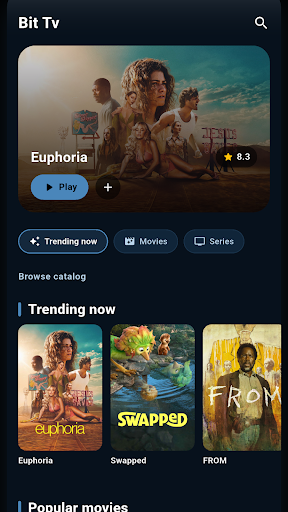
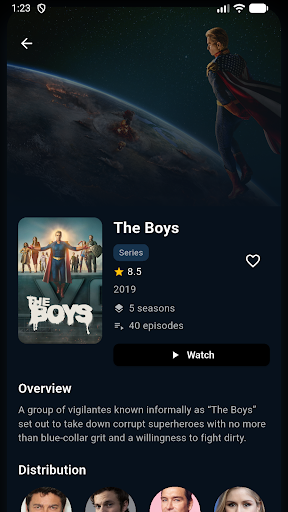
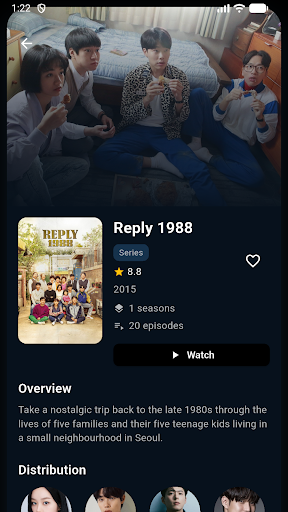
Bit Tv atau BitTv membantu kamu menjelajahi film dan serial dengan tampilan yang ringan, rapi, dan mudah digunakan.
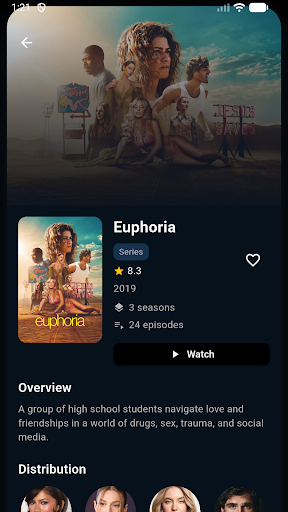
Cari judul favorit, lihat detail cerita, rating, poster, tanggal rilis, pemeran, serta trailer yang tersedia. Bit Tv dirancang untuk membantu kamu menemukan tontonan berikutnya tanpa ribet.
Fitur utama:
Jelajahi film populer, trending, top rated, dan terbaru
Temukan serial pilihan dari berbagai genre
Cari film dan serial berdasarkan judul
Lihat detail lengkap seperti sinopsis, rating, poster, dan pemeran
Simpan film dan serial favorit ke daftar pribadi
Akses trailer jika tersedia
Tampilan modern dengan navigasi sederhana
BitTv cocok untuk kamu yang ingin membuat daftar tontonan, mencari rekomendasi film, mengecek rating, atau menemukan serial baru dengan cepat.
Catatan:
Bit Tv adalah aplikasi katalog dan discovery film/serial. Aplikasi ini tidak menyediakan streaming film atau serial penuh. Informasi konten dapat berasal dari layanan data pihak ketiga dan dapat berubah sewaktu-waktu. Semua merek dagang, poster, dan metadata adalah milik pemilik masing-masing.
Show more

1. Download MEmu installer and finish the setup

2. Start MEmu then open Google Play on the desktop

3. Search Bit Tv: Film & Serial in Google Play
Install
4. Download and Install Bit Tv: Film & Serial
5. On install completion click the icon to start

6. Enjoy using Bit Tv: Film & Serial on PC with MEmu
MEmu Play is the best Android emulator, and 100 million users already enjoy its superb Android app experience. Powered by advanced virtualization technology, it lets you enjoy thousands of Android apps smoothly on your PC—including the most graphics-intensive ones.
Bigger screen with better graphics; Long duration, without limitation of battery or mobile data.
Full Keymapping support for precise control of keyboard and mouse or gamepad.
Multiple game accounts or tasks on single PC at one time with Multi-Instance manager.
Use Bit Tv: Film & Serial on PC by following steps: