
Simulador de Urna 2026 – Vote
Updated
Current Version
3.0.0.2026
Offered By

Stop worrying about high battery drain when using Simulador de Urna 2026 – Vote on your phone. Free yourself from the tiny screen and enjoy the app on a much larger display. From now on, get a full-screen experience of your app with the convenience of a keyboard and mouse. MEmu offers you all the surprising features you’d expect: quick installation and easy setup, intuitive controls, and no more worries about battery life, mobile data, or unexpected calls. The all-new MEmu 9 is the choice for using Simulador de Urna 2026 – Vote on your computer. With the MEmu multi-instance manager, you can run two or more accounts at the same time. Most importantly, our exclusive emulation engine unlocks your PC’s full potential, delivering smooth and enjoyable performance.
Show more
Enjoy superb experience of using Simulador de Urna 2026 – Vote on PC with MEMU App Player. It's a powerful free Android emulator which provides you with thousands of android apps for their desktop version. Enjoy connecting with friends and polishing your work with higher efficiency! Practice your vote and follow a contest created by the community!


Practice your vote and follow a contest created by the community!
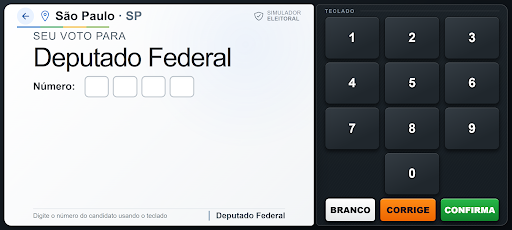
The 2026 Ballot Box Simulator offers an experience inspired by the workings of the electronic ballot box, allowing you to practice the voting steps in a simple, fast, and interactive way.
Choose your location, enter the candidate's number, check the information presented, and finalize your simulation using the Blank, Correct, and Confirm buttons.
In addition to practicing how to vote, you can also follow results generated exclusively by simulations performed by app users.
MAIN FEATURES
Voting Simulation
Practice the voting process in an interface similar to the electronic ballot box.
Candidates and Public Information
Consult names, numbers, ballot names, parties, and photographs made available through public electoral data.
Community Ranking
See which candidates receive the most votes in simulations performed by users.
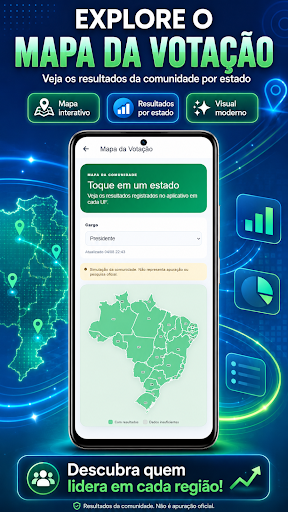
Voting Map
Track the distribution of simulated community votes by state.
Trends and Evolution
See changes in the ranking and the evolution of simulations over time.
Timeline
Track changes in position and new milestones in the community vote.
Detailed Results
See percentages, number of simulated votes, and candidate positions within the app.
⭐ PREMIUM PLAN
Premium may include:
• ad-free access;
• unlocked voting;
• ranking and results;
• voting map;
• trends and timeline;
• analyses and comparisons.
FIRST VOTE FREE
The first vote can be cast for free. For subsequent votes or access to certain features, it may be necessary to watch a rewarded ad, use credits, or have a Premium subscription.
OFFICIAL DATA SOURCE
The public information about candidates presented in the application is obtained from data officially made available by the Superior Electoral Court (TSE).
TSE Open Data Portal:
https://dadosabertos.tse.jus.br/
Candidates for the 2026 Elections:
https://dadosabertos.tse.jus.br/dataset/candidatos-2026
TSE Official Website:
https://www.tse.jus.br/
IMPORTANT — INDEPENDENT APPLICATION
The 2026 Ballot Box Simulator is an independent application intended for entertainment, training, and simulation.
This application:
• Does NOT represent the Superior Electoral Court (TSE), Regional Electoral Courts, or any governmental entity;
• Has NO affiliation, authorization, or connection with the TSE, Electoral Justice, parties, or candidates;
• Does NOT conduct official voting;
• This does NOT replace official electoral services;
• This does NOT present official election results;
• This does NOT constitute an electoral poll.
All votes cast in the application are simulations performed by the users themselves.
Rankings, percentages, maps, trends, timelines, and other results are calculated exclusively based on simulations performed within the application.
This data does NOT represent official votes, electoral court results, or results released by the TSE (Superior Electoral Court).
For official information on elections, candidates, voting, and results, consult the official channels of the Electoral Court.
Disclaimer: This application does not represent a governmental entity. The official sources of the public information used are indicated above.
See also our Privacy Policy.
Show more

1. Download MEmu installer and finish the setup

2. Start MEmu then open Google Play on the desktop

3. Search Simulador de Urna 2026 – Vote in Google Play
Install
4. Download and Install Simulador de Urna 2026 – Vote
5. On install completion click the icon to start

6. Enjoy using Simulador de Urna 2026 – Vote on PC with MEmu
MEmu Play is the best Android emulator, and 100 million users already enjoy its superb Android app experience. Powered by advanced virtualization technology, it lets you enjoy thousands of Android apps smoothly on your PC—including the most graphics-intensive ones.
Bigger screen with better graphics; Long duration, without limitation of battery or mobile data.
Full Keymapping support for precise control of keyboard and mouse or gamepad.
Multiple game accounts or tasks on single PC at one time with Multi-Instance manager.
Use Simulador de Urna 2026 – Vote on PC by following steps: