Obd Mary – Car Scanner for ELM
Updated
Current Version
1.251
Offered By

Stop worrying about high battery drain when using Obd Mary – Car Scanner for ELM on your phone. Free yourself from the tiny screen and enjoy the app on a much larger display. From now on, get a full-screen experience of your app with the convenience of a keyboard and mouse. MEmu offers you all the surprising features you’d expect: quick installation and easy setup, intuitive controls, and no more worries about battery life, mobile data, or unexpected calls. The all-new MEmu 9 is the choice for using Obd Mary – Car Scanner for ELM on your computer. With the MEmu multi-instance manager, you can run two or more accounts at the same time. Most importantly, our exclusive emulation engine unlocks your PC’s full potential, delivering smooth and enjoyable performance.
Show more
Enjoy superb experience of using Obd Mary – Car Scanner for ELM on PC with MEMU App Player. It's a powerful free Android emulator which provides you with thousands of android apps for their desktop version. Enjoy connecting with friends and polishing your work with higher efficiency! Obd Mary is a EOBD OBD-2 car diagnostic scanner, gauge dashboard and trip computer with a number of cool features.
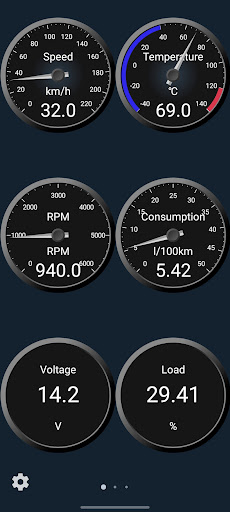
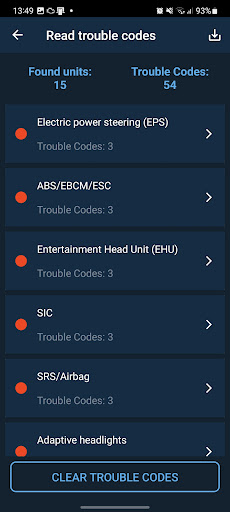
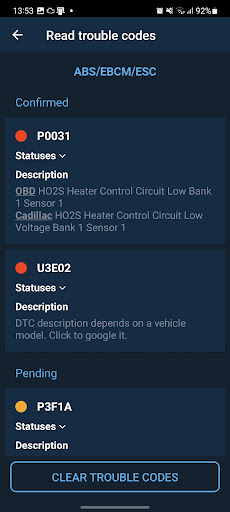
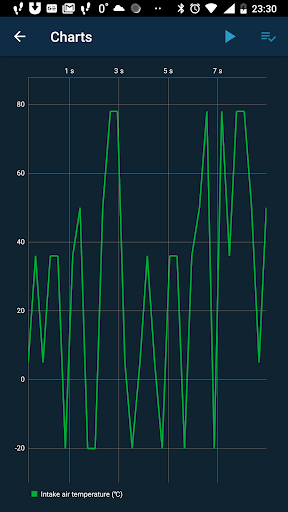
Obd Mary is a EOBD OBD-2 car diagnostic scanner, gauge dashboard and trip computer with a number of cool features.
With our OBD2 Car Scanner OBD Mary it is possible not only read and clear OBD-2 Trouble Codes but also make diagnostics for different vehicle ECU like: ABS, SRS, Airbag, HVAC and etc.
Our Car Scanner OBD Mary supports brands like: Acura, Alfa Romeo, Alpina, Audi, BMW, BYD, Buick, Cadillac, Changan, Chery, Chevrolet, Chrysler, Citroen, Dacia, Daewoo, Daihatsu, Daimler, Datsun, Dodge, DS, Exeed, Fiat, Ford, Geely, General Motors, Genesis, GMC, Great Wall, Haval, Holden, Honda, Hummer, Hyundai, Infiniti, ISUZU, JAC, Jaguar, Jeep, JMC, Kia, KTM, Lada, , Lancia, Land Rover, Lexus, Lifan, Lincoln, Lotus, Mahindra, Mazda, McLaren, Mercedes-Benz, Mercury, MG, Mini, Mitsubishi, Nissan, Opel, Peugeot, Pontiac, Porsche, Proton, RAM, Range Rover, Ravon, Renault, Rivian, Rolls-Royce, Rover, Saab, Samsung, Scion, Seat, Skoda, Smart, SsangYong, Subaru, Suzuki, Toyota, Vauxhall, Volkswagen, Volvo
Attention!!!
1. You need ELM327 Bluetooth or Wi-Fi adapter to connect to a vehicle using this application.
2. Your vehicle can contain some ECUs (electronic control modules), so don't forget to check all ECUs.
3. ELM adapters version 2.1 are often can be corrupted, so try to choose version 1.5 if you have a chose.Quick start guide
1. Download the app
2. Plug in ELM327 adapter into 16-pin diagnostic connector in your vehicle
3. Switch ON ignition
4. Discover your Bluetooth ELM adapter in your Android device settings
5. Select discovered ELM327 adapter in the app settings
6. Try to connect!Diagnostics
You can read and reset trouble codes from OBD2 compliant control units. Can see fault codes descriptions and search it in internet just by click. Freeze-frame data can be read in case if DTC is activated. You can read live parameters like speed, RPM, MAF, coolant temperature.Dashboard
Use our OBD2 app as a gauge dashboard. Create your own set of gauges. You can customize approximately all gauge parameters(sizes, colors, positions of stroke, arrow, texts, labels, backgrounds and etc.) Resize and move gauge in edit mode to desired place just using your fingers. Enjoy your style!Trip computer
Track your trips with our Obd Mary app and ELM327 adapter. Keep the adapter connected all the time inside your car and the app connects to your vehicle and log your trip data:
- trip time;
- fuel consumption;
- fuel cost;
- average speed;
- max speed and etc.Full version
Buy the full version of the Obd Mary app and get full functionality without an ads. When you are buying the app you support future development and support. Thank you.
Contact developer: Fill free to contact us using appropriate button on the main app screen. Use email channel.
Show more

1. Download MEmu installer and finish the setup

2. Start MEmu then open Google Play on the desktop

3. Search Obd Mary – Car Scanner for ELM in Google Play
Install
4. Download and Install Obd Mary – Car Scanner for ELM
5. On install completion click the icon to start

6. Enjoy using Obd Mary – Car Scanner for ELM on PC with MEmu
MEmu Play is the best Android emulator, and 100 million users already enjoy its superb Android app experience. Powered by advanced virtualization technology, it lets you enjoy thousands of Android apps smoothly on your PC—including the most graphics-intensive ones.
Bigger screen with better graphics; Long duration, without limitation of battery or mobile data.
Full Keymapping support for precise control of keyboard and mouse or gamepad.
Multiple game accounts or tasks on single PC at one time with Multi-Instance manager.
Use Obd Mary – Car Scanner for ELM on PC by following steps: