
Darf ich das?
Updated
Current Version
1.3.5
Offered By

Stop worrying about high battery drain when using Darf ich das? on your phone. Free yourself from the tiny screen and enjoy the app on a much larger display. From now on, get a full-screen experience of your app with the convenience of a keyboard and mouse. MEmu offers you all the surprising features you’d expect: quick installation and easy setup, intuitive controls, and no more worries about battery life, mobile data, or unexpected calls. The all-new MEmu 9 is the choice for using Darf ich das? on your computer. With the MEmu multi-instance manager, you can run two or more accounts at the same time. Most importantly, our exclusive emulation engine unlocks your PC’s full potential, delivering smooth and enjoyable performance.
Show more
Enjoy superb experience of using Darf ich das? on PC with MEMU App Player. It's a powerful free Android emulator which provides you with thousands of android apps for their desktop version. Enjoy connecting with friends and polishing your work with higher efficiency! Was darf man eigentlich, und welche Regeln und Gesetze sind in deiner Region gerade gültig?

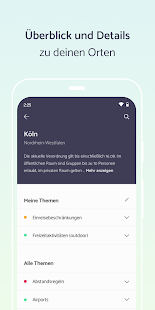
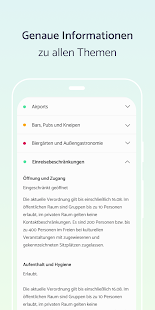
Was darf man eigentlich, und welche Regeln und Gesetze sind in deiner Region gerade gültig?
Derzeit gelten bedingt durch die aktuelle Lage in allen Bundesländern unterschiedliche Regeln, und sogar der nächste Landkreis kann schon wieder anderen Erlassen unterliegen. Es gibt fast täglich neue Gesetze und Verordnungen, die unseren Alltag betreffen. Da informiert zu bleiben kann schwierig sein!
„Darf ich das?“ bietet dir einen genauen Überblick über alle Verordnungen in deiner Region.
Du hast die Möglichkeit, nach Orten und Themen zu filtern und siehst so alle für dich wichtigen Informationen auf einen Blick. Haben die Kinos geöffnet, darf man wieder in Bars und Restaurants? Muss man beim Einkaufen und in Bus und Bahn eine Maske tragen? „Darf ich das?“ bietet dir die Möglichkeit, konkret nach deinem Ort und den Themen zu suchen, die dich wirklich interessieren. Trenn dich von lästigen Online-Suchen und veralteten Informationen in unüberschaubaren Verordnungen und Erlassen.
Die App kann ohne Registrierung und kostenfrei genutzt werden. Es werden keine personenbezogenen Daten erhoben oder gespeichert
Mit „Darf ich das?“ hast du immer die aktuellste Übersicht – schnell, einfach, sicher.
Hinweis: Die angezeigten Informationen zu den Lockerungen und Einschränkungen der einzelnen Bundesländer der Bundesrepublik Deutschland werden von der Tourismus-Wegweiser Webseite des Kompetenzzentrums Tourismus des Bundes unter der Creative Commons Namensnennung 4.0 International Lizenz (CC BY 4.0) zur Verfügung gestellt. Der Betreiber dieser App, die InTradeSys GmbH, ist keine Behörde oder sonstige staatliche Institution und handelt auch nicht im Auftrag einer solchen Behörde.
Show more

1. Download MEmu installer and finish the setup

2. Start MEmu then open Google Play on the desktop

3. Search Darf ich das? in Google Play
Install
4. Download and Install Darf ich das?
5. On install completion click the icon to start

6. Enjoy using Darf ich das? on PC with MEmu
MEmu Play is the best Android emulator, and 100 million users already enjoy its superb Android app experience. Powered by advanced virtualization technology, it lets you enjoy thousands of Android apps smoothly on your PC—including the most graphics-intensive ones.
Bigger screen with better graphics; Long duration, without limitation of battery or mobile data.
Full Keymapping support for precise control of keyboard and mouse or gamepad.
Multiple game accounts or tasks on single PC at one time with Multi-Instance manager.
Use Darf ich das? on PC by following steps: