全民健保行動快易通 | 健康存摺
Updated
Current Version
D
Offered By

Stop worrying about high battery drain when using 全民健保行動快易通 | 健康存摺 on your phone. Free yourself from the tiny screen and enjoy the app on a much larger display. From now on, get a full-screen experience of your app with the convenience of a keyboard and mouse. MEmu offers you all the surprising features you’d expect: quick installation and easy setup, intuitive controls, and no more worries about battery life, mobile data, or unexpected calls. The all-new MEmu 9 is the choice for using 全民健保行動快易通 | 健康存摺 on your computer. With the MEmu multi-instance manager, you can run two or more accounts at the same time. Most importantly, our exclusive emulation engine unlocks your PC’s full potential, delivering smooth and enjoyable performance.
Show more
Enjoy superb experience of using 全民健保行動快易通 | 健康存摺 on PC with MEMU App Player. It's a powerful free Android emulator which provides you with thousands of android apps for their desktop version. Enjoy connecting with friends and polishing your work with higher efficiency! Important function description:.
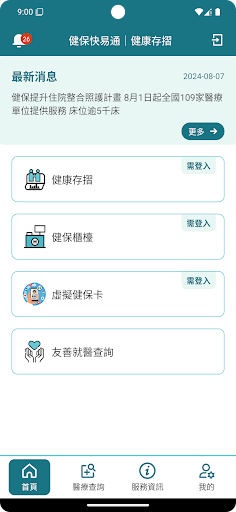
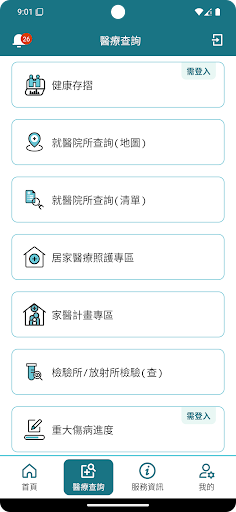
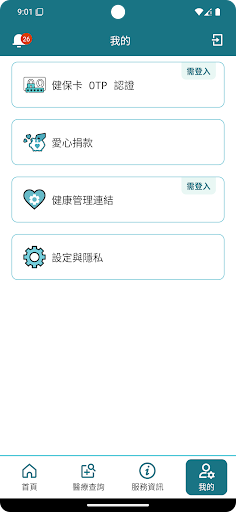
Important function description:
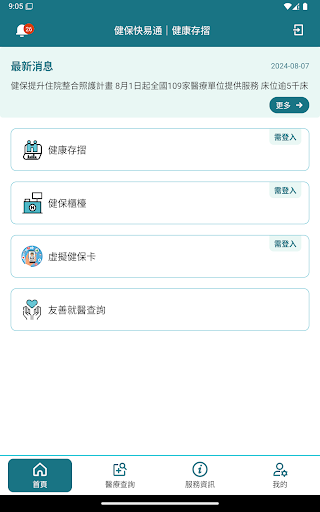
[Health Insurance Reform Diary] provides the "Going to the cloud - a win-win situation for patients and doctors" health insurance reform diary e-book, outlining the reform contents of various important policies and business improvements of the National Health Insurance Department since 105.
[Health Passbook] provides functions for querying medical information and health information, including medication, examination data, imaging or pathology report, etc. You can also apply to query the health passbook of elders or children through family management to protect the health of the whole family.
[Health Insurance Counter] Check premium payment records, pay health premiums online and apply for a health insurance card, check insurance records, apply for insurance certificates and change personal mailing addresses and other health insurance services.
[Virtual Health Insurance Card] In order to realize the vision of smart medical care and digital government, the use of virtual health insurance cards for medical treatment has been comprehensively promoted in the three major fields of "home medical care", "telemedicine" and "video diagnosis and treatment".
[Inquiry about hospitals] Use map-based filtering to search for detailed information such as nearby or specific medical institutions, consultation service hours, etc.
[Medical Inquiry] Provides information on home medical institutions, medication items, special materials, payment standards, price comparisons of self-paid medical materials, refund cases of self-paid medical expenses, and the progress of application for major injury and illness cards.
[Link to "Health App"] In order to help you organize relevant health information, the Health Insurance Department, based on the data items you have agreed to (including: blood pressure, heart rate, blood oxygen concentration, height, weight and body temperature), "Health Insurance Auto Pass App" It will read your "Health App" data items for the past 30 days and present these data in the "Health Passbook" in the "Health Insurance Autotoll App"; for subsequent data updates, please use the "Health Insurance Autotoll App" "My" function item, update data.
[Others] After identity verification, you can provide personal vaccination status inquiry in Taiwan (including novel coronavirus vaccine (COVID-19))!
Remark:
If the Android operating system is upgraded to version 8, 9, or 10, the device will need to be re-authenticated due to changes in the authentication operating system serial number selection method. We apologize for the inconvenience.
Show more

1. Download MEmu installer and finish the setup

2. Start MEmu then open Google Play on the desktop

3. Search 全民健保行動快易通 | 健康存摺 in Google Play
Install
4. Download and Install 全民健保行動快易通 | 健康存摺
5. On install completion click the icon to start

6. Enjoy using 全民健保行動快易通 | 健康存摺 on PC with MEmu
MEmu Play is the best Android emulator, and 100 million users already enjoy its superb Android app experience. Powered by advanced virtualization technology, it lets you enjoy thousands of Android apps smoothly on your PC—including the most graphics-intensive ones.
Bigger screen with better graphics; Long duration, without limitation of battery or mobile data.
Full Keymapping support for precise control of keyboard and mouse or gamepad.
Multiple game accounts or tasks on single PC at one time with Multi-Instance manager.
Use 全民健保行動快易通 | 健康存摺 on PC by following steps: