
WePlay: Играй и Общайся!
Updated
Current Version
4.7.3
Offered By

Stop worrying about high battery drain when using WePlay: Играй и Общайся! on your phone. Free yourself from the tiny screen and enjoy the app on a much larger display. From now on, get a full-screen experience of your app with the convenience of a keyboard and mouse. MEmu offers you all the surprising features you’d expect: quick installation and easy setup, intuitive controls, and no more worries about battery life, mobile data, or unexpected calls. The all-new MEmu 9 is the choice for using WePlay: Играй и Общайся! on your computer. With the MEmu multi-instance manager, you can run two or more accounts at the same time. Most importantly, our exclusive emulation engine unlocks your PC’s full potential, delivering smooth and enjoyable performance.
Show more
Enjoy superb experience of using WePlay: Играй и Общайся! on PC with MEMU App Player. It's a powerful free Android emulator which provides you with thousands of android apps for their desktop version. Enjoy connecting with friends and polishing your work with higher efficiency! [WePlay - Настольные онлайн-игры].
[WePlay - Настольные онлайн-игры]
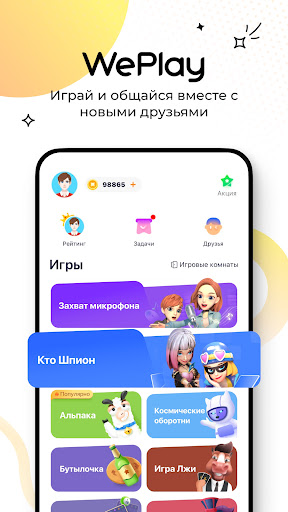
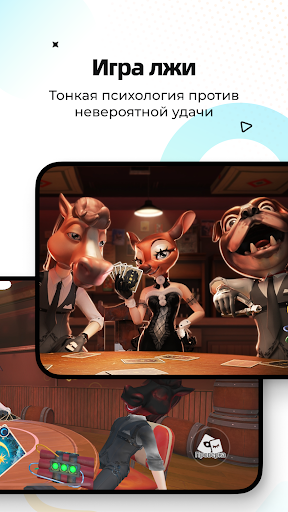
WePlay - это голосовая социальная сеть для вечеринок, которая очень популярна среди молодых людей. Приложение предлагает вам самые популярные казуальные игры для вечеринок и голосовое взаимодействие. Вы получите больше удовольствия, играя и общаясь в чате одновременно! Забудьте о своих проблемах и трудностях, играя реальными людьми и общаясь с ними в чате!
[Играйте вместе с друзьями в настольные онлайн-игры]
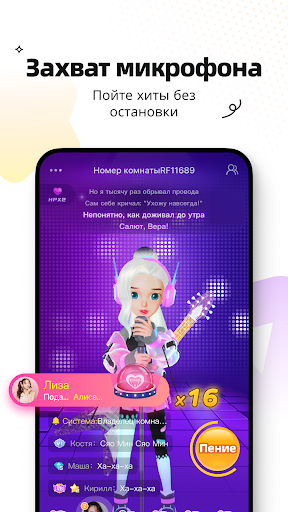
「Захват микрофона」 - это новый вид совместного пения. В игре есть множество популярных песен. Если вы любите петь, то обязательно должны сыграть в эту игру!
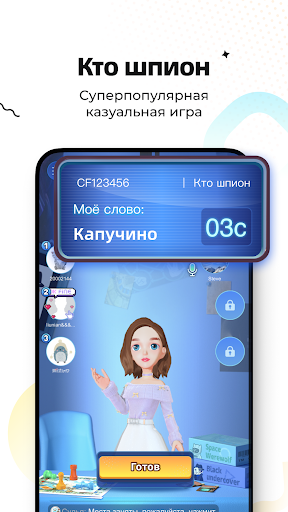
「Кто шпион」 - это любимая интерактивная игра знаменитостей. Сразись со своими друзьями в течение 300 раундов!
「Космические оборотни」 - это на данный момент самая популярная дедуктивная игра, окунись в захватывающее сражение между мирными жителями и оборотнями!
「Альпака」- Испытайте свой интеллект и станьте мастером подбора комбинаций!
「Рисуй и Угадывай」- Соревнования по креативности, проверка взаимопонимания и навыков рисования, граффити и разгадка загадок – это так весело!
[Новые интерактивные функции - Открывайте себя с новых сторон]
「Аватар и Смена нарядов」- Создайте 3D-аватар, настройте лицо, смоделируйте одежду, покажите свою индивидуальность!
「Посты и Площадь」- Тут вы сможете создать свой собственный контент, следите за интерисующими вас темами и не забывайте делиться радостными моментами своей жизни!
Играйте в настольные игры, пойте в караоке, общайтесь и занимайтесь другими интересными делами в WePlay~
Show more

1. Download MEmu installer and finish the setup

2. Start MEmu then open Google Play on the desktop

3. Search WePlay: Играй и Общайся! in Google Play
Install
4. Download and Install WePlay: Играй и Общайся!
5. On install completion click the icon to start

6. Enjoy using WePlay: Играй и Общайся! on PC with MEmu
MEmu Play is the best Android emulator, and 100 million users already enjoy its superb Android app experience. Powered by advanced virtualization technology, it lets you enjoy thousands of Android apps smoothly on your PC—including the most graphics-intensive ones.
Bigger screen with better graphics; Long duration, without limitation of battery or mobile data.
Full Keymapping support for precise control of keyboard and mouse or gamepad.
Multiple game accounts or tasks on single PC at one time with Multi-Instance manager.
Use WePlay: Играй и Общайся! on PC by following steps: