
DanaShort
Updated
Current Version
1.2.1
Offered By

Stop worrying about high battery drain when using DanaShort on your phone. Free yourself from the tiny screen and enjoy the app on a much larger display. From now on, get a full-screen experience of your app with the convenience of a keyboard and mouse. MEmu offers you all the surprising features you’d expect: quick installation and easy setup, intuitive controls, and no more worries about battery life, mobile data, or unexpected calls. The all-new MEmu 9 is the choice for using DanaShort on your computer. With the MEmu multi-instance manager, you can run two or more accounts at the same time. Most importantly, our exclusive emulation engine unlocks your PC’s full potential, delivering smooth and enjoyable performance.
Show more
Enjoy superb experience of using DanaShort on PC with MEMU App Player. It's a powerful free Android emulator which provides you with thousands of android apps for their desktop version. Enjoy connecting with friends and polishing your work with higher efficiency! DanaShort | Ultimate Collection of Binge-Worthy Rebirth & CEO Dramas.



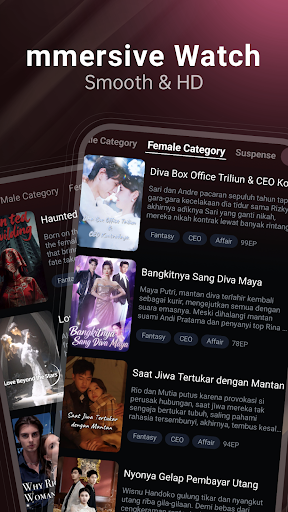
DanaShort | Ultimate Collection of Binge-Worthy Rebirth & CEO Dramas
One episode is all it takes — you won’t be able to stop.
DanaShort is designed for fans of high-intensity dramas: rebirth beginnings, dominant CEOs, and identity flips. No filler, no waiting, just nonstop thrills.
Each episode is only 1–5 minutes — short, fast-paced, and perfect for enjoying high-energy stories anytime, anywhere.
Hot Drama Genres You’ll Love
■ Rebirth & Revenge Dramas
Start over, rewrite your fate. Those who crushed you in the past? Now they all get payback.
■ Dominant CEO Romance
Cold-hearted CEOs × Contract marriages × Intense pursuit — love, hate, and tension at full throttle.
■ Underdog Comeback Stories
From looked down upon to untouchable — rise through the ranks and savor every victory.
■ Sweet Romance Shorts
Marriage first, love later; forced cohabitation; extreme tension and romance — sweetness overload guaranteed.
■ Hidden Identities & Plot Twists
Disguised tycoons, secret identities, shocking reveals — each episode is a high-stakes moment.
■ High-Stakes Family & Power Battles
Power struggles, family betrayals, intertwined love and ambition — emotions run at maximum intensity.
Why Everyone is Hooked on DanaShort
(1)Fast-Paced Stories: Every episode starts strong, delivering thrills instantly.
(2)High Concentration of Rebirth & CEO Themes: Precisely hits the sweet spot for binge-drama fans.
(3)Exclusive Content: Popular IPs signed exclusively for DanaShort.
(4)Daily Updates: New episodes every day — you’ll never run out of stories.
(5)Smart Recommendations: The more you watch, the better it gets at finding what you love.
(6)Auto Resume: Continue exactly where you left off — never miss a climax.
DanaShort
No fluff, no compromises — just pure binge-worthy pleasure.
Show more

1. Download MEmu installer and finish the setup

2. Start MEmu then open Google Play on the desktop

3. Search DanaShort in Google Play
Install
4. Download and Install DanaShort
5. On install completion click the icon to start

6. Enjoy using DanaShort on PC with MEmu
MEmu Play is the best Android emulator, and 100 million users already enjoy its superb Android app experience. Powered by advanced virtualization technology, it lets you enjoy thousands of Android apps smoothly on your PC—including the most graphics-intensive ones.
Bigger screen with better graphics; Long duration, without limitation of battery or mobile data.
Full Keymapping support for precise control of keyboard and mouse or gamepad.
Multiple game accounts or tasks on single PC at one time with Multi-Instance manager.
Use DanaShort on PC by following steps:



























