
freenet FUNK
Updated
Current Version
1.8.3
Offered By

Stop worrying about high battery drain when using freenet FUNK on your phone. Free yourself from the tiny screen and enjoy the app on a much larger display. From now on, get a full-screen experience of your app with the convenience of a keyboard and mouse. MEmu offers you all the surprising features you’d expect: quick installation and easy setup, intuitive controls, and no more worries about battery life, mobile data, or unexpected calls. The all-new MEmu 9 is the choice for using freenet FUNK on your computer. With the MEmu multi-instance manager, you can run two or more accounts at the same time. Most importantly, our exclusive emulation engine unlocks your PC’s full potential, delivering smooth and enjoyable performance.
Show more
Enjoy superb experience of using freenet FUNK on PC with MEMU App Player. It's a powerful free Android emulator which provides you with thousands of android apps for their desktop version. Enjoy connecting with friends and polishing your work with higher efficiency! freenet FUNK - Die Mobilfunkrevolution.
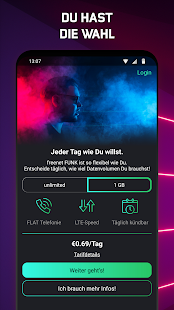
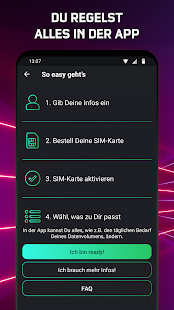
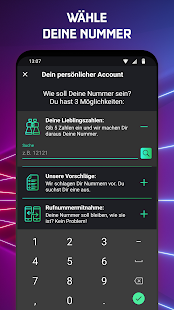
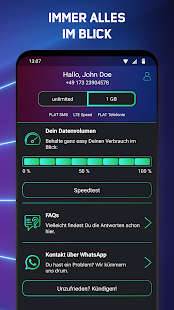
freenet FUNK - Die Mobilfunkrevolution. Sei dabei und sicher Dir den ersten Handyvertrag, den Du per App steuern kannst. Keine Lust auf langfristige Mobilfunkverträge? Bei uns kannst Du täglich kündigen oder den Vertrag wechseln. Ganz easy und flexibel.
Mit der freenet FUNK App bekommst du vollen Zugang zu Deinem Mobilfunk und dem mobilen Internet mit unbegrenzt highspeed LTE-Volumen. Und das auch noch super günstig! Du kannst zwischen 2 Tarifen wählen - und das täglich aufs Neue! Für 1 GB highspeed LTE zahlst du 69 Cent pro Tag, für unbegrenztes Datenvolumen nur 99 Cent pro Tag! Damit kannst Du garantiert soviel im Internet surfen wie Du willst! Wir rechnen täglich ab. Du bist unzufrieden? Es gibt keine Mindestlaufzeit, du kannst jederzeit kündigen! Du brauchst einen kurzen digital Detox? Pausiere einfach in der App. Du hängst an Deiner Rufnummer? Kein Problem, bring sie mit! Wir kontaktieren Deinen aktuellen Anbieter und regeln die Mitnahme für Dich. Die Bezahlung läuft ganz einfach aus der App über PayPal. Keine IBAN, kein BIC, keine TAN.
Was wir Dir bieten:
• Du kannst dein LTE Datenvolumen täglich anpassen
• Du hast keine Mindestlaufzeit und kannst täglich kündigen
• Du kannst alles über die App regeln
Wofür wir stehen:
• Fairness: Du hast keine Servicegebühren und volle Kostenkontrolle.
• Individualität: Du entscheidest täglich, was Du brauchst. Und genau das bekommst Du.
• Transparenz: Alles in einer App. Checke täglich Dein verbrauchtes Datenvolumen und mit wem Du telefoniert hast. Deine Kosten? Findest Du auch in der App.
• Flexibilität: Du kannst pausieren oder jederzeit kündigen. Das geht bei uns von heute auf morgen.
Sei der Boss - mit freenet FUNK!
Show more

1. Download MEmu installer and finish the setup

2. Start MEmu then open Google Play on the desktop

3. Search freenet FUNK in Google Play
Install
4. Download and Install freenet FUNK
5. On install completion click the icon to start

6. Enjoy using freenet FUNK on PC with MEmu
MEmu Play is the best Android emulator, and 100 million users already enjoy its superb Android app experience. Powered by advanced virtualization technology, it lets you enjoy thousands of Android apps smoothly on your PC—including the most graphics-intensive ones.
Bigger screen with better graphics; Long duration, without limitation of battery or mobile data.
Full Keymapping support for precise control of keyboard and mouse or gamepad.
Multiple game accounts or tasks on single PC at one time with Multi-Instance manager.
Use freenet FUNK on PC by following steps: