Mein Laborergebnis
Updated
Current Version
1.4.1
Offered By

Stop worrying about high battery drain when using Mein Laborergebnis on your phone. Free yourself from the tiny screen and enjoy the app on a much larger display. From now on, get a full-screen experience of your app with the convenience of a keyboard and mouse. MEmu offers you all the surprising features you’d expect: quick installation and easy setup, intuitive controls, and no more worries about battery life, mobile data, or unexpected calls. The all-new MEmu 9 is the choice for using Mein Laborergebnis on your computer. With the MEmu multi-instance manager, you can run two or more accounts at the same time. Most importantly, our exclusive emulation engine unlocks your PC’s full potential, delivering smooth and enjoyable performance.
Show more
Enjoy superb experience of using Mein Laborergebnis on PC with MEMU App Player. It's a powerful free Android emulator which provides you with thousands of android apps for their desktop version. Enjoy connecting with friends and polishing your work with higher efficiency! Mein Laborergebnis.
Mein Laborergebnis
Getestete schnell, sicher und einfach über Laborergebnisse informieren.
In vielen Fällen warten Getestete dringend auf eine beruhigende Nachricht aus dem Labor. Hier wollen wir mit "Mein Laborergebnis" eine Lösung anbieten, die für die Getesteten und die beteiligten Labore unproblematisch funktioniert und allen Anforderungen an den Datenschutz genügt.
Um die Arbeitszeiten für die Übermittlung eiliger Laborergebnisse so gering wie möglich zu halten, haben wir für medizinische Labore die Möglichkeit geschaffen, Getesteten das Ergebnis einer Laboruntersuchung, darunter auch COVID-19 Tests, in Echtzeit zu übermitteln.
Getestete erhalten bei der Testung einen QR-Code, welcher eine UUID enthält und direkt auf eine entsprechende Ergebnisseite auf www.mein-laborergebnis.de verweist. Dieser QR-Code wird den Getesteten bei der Probenentnahme mitgegeben. In manchen Fällen können wir auch mit QR-Codes aus vorhandenen Quellen arbeiten.
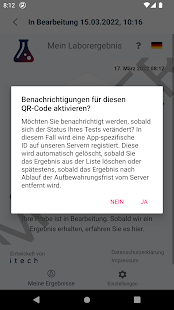
Im Anschluss können die Getesteten den QR-Code einfach mit dieser App scannen, um sich über den Verlauf ihrer Untersuchungen zu informieren, oder die UUID manuell auf www.mein-laborergebnis.de eingeben.
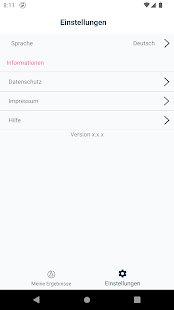
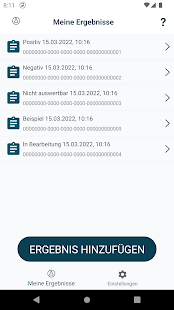
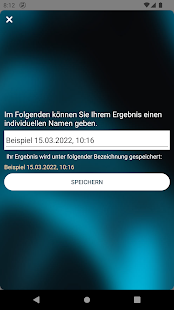
Die App erlaubt es, verschiedene Testergebnisse zu verwalten. Einmal gescannte QR-Codes werden in der App gespeichert und können so ohne Aufwand erneut abgefragt werden. Zur einfacheren Handhabung können die QR-Codes individuell benannt werden oder bereits bekannte Testergebnisse wieder aus der Liste entfernt werden.
Hinweise: Zum Scannen des QR-Codes und Abruf des Testergebnisses wird eine aktive Internetverbindung sowie Zugriff auf die Kamera Ihres Gerätes benötigt. Unser Dienst funktioniert nur mit QR-Codes von Partnerlaboren. Auf Ihrem Begleitschreiben sollte auf "Mein Laborergebnis" verwiesen werden.
Show more

1. Download MEmu installer and finish the setup

2. Start MEmu then open Google Play on the desktop

3. Search Mein Laborergebnis in Google Play
Install
4. Download and Install Mein Laborergebnis
5. On install completion click the icon to start

6. Enjoy using Mein Laborergebnis on PC with MEmu
MEmu Play is the best Android emulator, and 100 million users already enjoy its superb Android app experience. Powered by advanced virtualization technology, it lets you enjoy thousands of Android apps smoothly on your PC—including the most graphics-intensive ones.
Bigger screen with better graphics; Long duration, without limitation of battery or mobile data.
Full Keymapping support for precise control of keyboard and mouse or gamepad.
Multiple game accounts or tasks on single PC at one time with Multi-Instance manager.
Use Mein Laborergebnis on PC by following steps: