mehr-tanken - Save smart!
Updated
Current Version
3.18.0.1
Offered By

Stop worrying about high battery drain when using mehr-tanken - Save smart! on your phone. Free yourself from the tiny screen and enjoy the app on a much larger display. From now on, get a full-screen experience of your app with the convenience of a keyboard and mouse. MEmu offers you all the surprising features you’d expect: quick installation and easy setup, intuitive controls, and no more worries about battery life, mobile data, or unexpected calls. The all-new MEmu 9 is the choice for using mehr-tanken - Save smart! on your computer. With the MEmu multi-instance manager, you can run two or more accounts at the same time. Most importantly, our exclusive emulation engine unlocks your PC’s full potential, delivering smooth and enjoyable performance.
Show more
Enjoy superb experience of using mehr-tanken - Save smart! on PC with MEMU App Player. It's a powerful free Android emulator which provides you with thousands of android apps for their desktop version. Enjoy connecting with friends and polishing your work with higher efficiency! The free app mehr-tanken helps you find the cheapest gas station in Germany and therefore to save money.
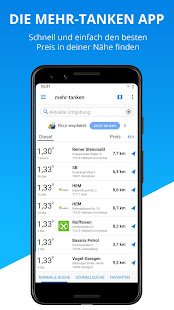
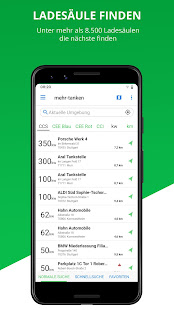
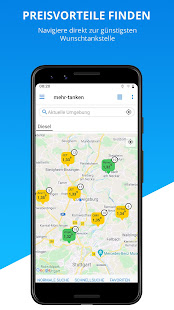
The free app mehr-tanken helps you find the cheapest gas station in Germany and therefore to save money. New: Save time and money while refueling - simply use the mobile payment function directly at the pump to pay at participating gas stations.
Awarded as Germany's best app in the category "fueling" by the F.A.Z Institute and top app 2021 by FOCUS-MONEY.
What MEHR-TANKEN can do for you:
MEHR-TANKEN is officially connected to the Markttransparenzstelle with real-time prices. It provides detailed information on more than 14,000 gas stations across Germany.
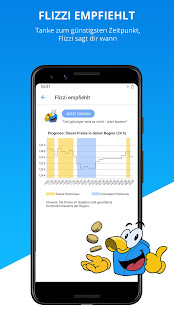
- Flizzi recommends the optimal time to refuel and shows a forecast of the petrol prices for your region
- Personalized search profiles and access to your favorites
- A variety of sorting and filter options (e.g. fuel, gas station brand and payment options)
- Map with direct navigation
- Price alert via push message
- Easy reporting of fuel prices and gas stations
You want MEHR-LADEN?
MEHR-TANKEN also provides detailed information on more than 8,500 charging stations across Germany and the following features:
- Personalized search profiles and access to your favorites
- A variety of sorting and filter options (e.g. plug type, charging power and charging cards)
- Map with direct navigation
Please report questions, suggestions or technical difficulties to support.de@mehr-tanken.de or use the contact form in the app.
MEHR-TANKEN Premium
With MEHR-TANKEN Premium you can enjoy the app without ads, ad tracking and with the best loading time.
If you want to become a Premium Member, you can sign up for automatically renewing subscriptions. Currently we offer these for our monthly (0,99 € / month) and annual (4,99 € / year) subscription.
The payment of the subscription is handled through your Google account. The subscription will automatically renew at the end of the term, unless it is cancelled. You can cancel your subscribtion in your Google Play account. There are no refunds for unused periods.
Terms and conditions: https://mehr-tanken.de/agb
Privacy policy: https://mehr-tanken.de/datenschutz
Show more

1. Download MEmu installer and finish the setup

2. Start MEmu then open Google Play on the desktop

3. Search mehr-tanken - Save smart! in Google Play
Install
4. Download and Install mehr-tanken - Save smart!
5. On install completion click the icon to start

6. Enjoy using mehr-tanken - Save smart! on PC with MEmu
MEmu Play is the best Android emulator, and 100 million users already enjoy its superb Android app experience. Powered by advanced virtualization technology, it lets you enjoy thousands of Android apps smoothly on your PC—including the most graphics-intensive ones.
Bigger screen with better graphics; Long duration, without limitation of battery or mobile data.
Full Keymapping support for precise control of keyboard and mouse or gamepad.
Multiple game accounts or tasks on single PC at one time with Multi-Instance manager.
Use mehr-tanken - Save smart! on PC by following steps: