FikFap
Updated
Current Version
1.0
Offered By

Stop worrying about high battery drain when using FikFap on your phone. Free yourself from the tiny screen and enjoy the app on a much larger display. From now on, get a full-screen experience of your app with the convenience of a keyboard and mouse. MEmu offers you all the surprising features you’d expect: quick installation and easy setup, intuitive controls, and no more worries about battery life, mobile data, or unexpected calls. The all-new MEmu 9 is the choice for using FikFap on your computer. With the MEmu multi-instance manager, you can run two or more accounts at the same time. Most importantly, our exclusive emulation engine unlocks your PC’s full potential, delivering smooth and enjoyable performance.
Show more
Enjoy superb experience of using FikFap on PC with MEMU App Player. It's a powerful free Android emulator which provides you with thousands of android apps for their desktop version. Enjoy connecting with friends and polishing your work with higher efficiency! Fikfap: Your Ultimate Adult Dating App â Effortlessly Connect with Fun PartnersWelcome to Fikfap, the app designed exclusively for adults seeking carefree, enjoyable, and adventurous connections!
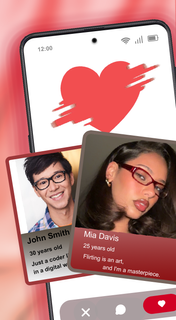


Fikfap: Your Ultimate Adult Dating App â Effortlessly Connect with Fun PartnersWelcome to Fikfap, the app designed exclusively for adults seeking carefree, enjoyable, and adventurous connections! Whether you're looking for casual encounters, no-strings-attached experiences, or exploring your deepest fantasies, Fikfap is here to turn your desires into reality.Why Choose Fikfap?Fikfap isnât just another dating app; itâs a dynamic, open community where everyone can enjoy a revolutionary adult dating experience. Hereâs what makes us unique:Privacy First: Your safety and confidentiality are our top priorities. Rest assured, your personal information is protected on our fully secure platform.User-Friendly Design: With our intuitive interface, navigating the app is simple, allowing you to focus on what truly mattersâbuilding meaningful connections.Diverse Community: Join millions of users from all walks of life. Whether youâre single, married, or in an open relationship, Fikfap offers a space for everyone.Real Users: Say goodbye to fake profiles! Our cutting-edge verification tools ensure authentic and reliable interactions.How It WorksQuick Sign-Up: Create your profile in seconds. Share your interests, upload your best photos, and let the adventure begin!Explore and Connect: Browse profiles, send likes, and start chatting with those who catch your interest.Plan a Meet-Up: Once youâve found the right match, set up a time that works for both of you.Who Is Fikfap For?Fikfap is designed for adults aged 18 and over who seek a casual dating experience. Whether youâre new to adult dating or a seasoned pro, our platform has something for everyone.Singles: Want to add excitement to your life? Fikfap is the perfect platform to explore endless possibilities.Couples: Interested in meeting like-minded individuals or other couples? Fikfap welcomes you!Explorers: Ready to try something new? Our open community helps you discover your desires.Why Wait? Download Fikfap Today!Life is too short to miss out on incredible opportunities. With Fikfap, anything is possible. From passionate encounters to unforgettable memories, we provide everything you need to make your adult dating journey fun and exciting.Join our ever-growing community and experience the magic of Fikfap for yourself. Download now and start connecting!
Show more

1. Download MEmu installer and finish the setup

2. Start MEmu then open Google Play on the desktop

3. Search FikFap in Google Play
Install
4. Download and Install FikFap
5. On install completion click the icon to start

6. Enjoy using FikFap on PC with MEmu
MEmu Play is the best Android emulator, and 100 million users already enjoy its superb Android app experience. Powered by advanced virtualization technology, it lets you enjoy thousands of Android apps smoothly on your PC—including the most graphics-intensive ones.
Bigger screen with better graphics; Long duration, without limitation of battery or mobile data.
Full Keymapping support for precise control of keyboard and mouse or gamepad.
Multiple game accounts or tasks on single PC at one time with Multi-Instance manager.
Use FikFap on PC by following steps: