JioGames: Play Cloud Games
Updated
Current Version
4.1.7
Offered By

Stop worrying about high battery drain when using JioGames: Play Cloud Games on your phone. Free yourself from the tiny screen and enjoy the app on a much larger display. From now on, get a full-screen experience of your app with the convenience of a keyboard and mouse. MEmu offers you all the surprising features you’d expect: quick installation and easy setup, intuitive controls, and no more worries about battery life, mobile data, or unexpected calls. The all-new MEmu 9 is the choice for using JioGames: Play Cloud Games on your computer. With the MEmu multi-instance manager, you can run two or more accounts at the same time. Most importantly, our exclusive emulation engine unlocks your PC’s full potential, delivering smooth and enjoyable performance.
Show more
Enjoy superb experience of using JioGames: Play Cloud Games on PC with MEMU App Player. It's a powerful free Android emulator which provides you with thousands of android apps for their desktop version. Enjoy connecting with friends and polishing your work with higher efficiency! Play PC games on your phone.

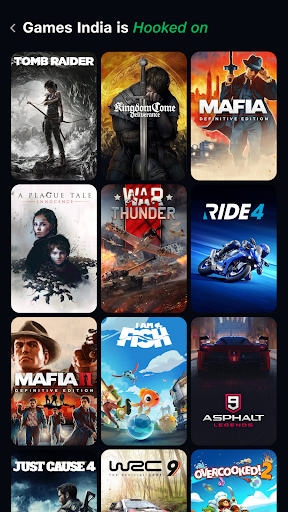
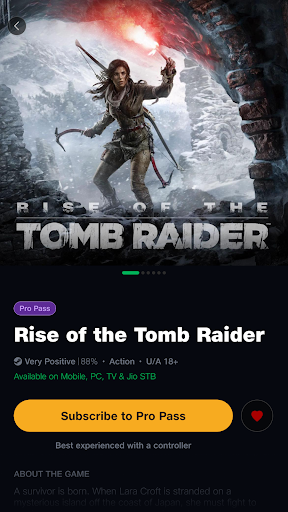
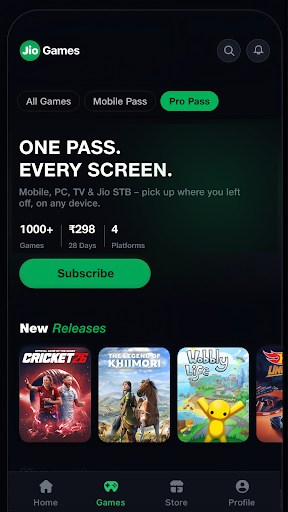
Play PC games on your phone. No downloads, no installs, just play.
JioGames is India's cloud gaming platform, bringing console and PC hits directly to your smartphone. Experience HD graphics and smooth gameplay on your smartphone, powered by cloud streaming technology. Play action, adventure, racing, and horror games from a growing library, new titles every week. Or enjoy premium mobile games with no ads and no in app purchases. Your next game starts with a single tap.
Play from a world class library
No downloads needed. Transform your phone into a powerful gaming console and stream a growing collection of PC and console hits. Pick your favourite and start playing:
Open World and Action: Experience total freedom in sprawling environments. Stream Just Cause 4, Just Cause 3, and Saints Row: The Third. Dive into the gritty streets of Mafia: Definitive Edition and the cult classic action of Sleeping Dogs.
Adventure and Stealth: Play the complete Tomb Raider trilogy, from the legendary Tomb Raider to Rise of the Tomb Raider and Shadow of the Tomb Raider. Or immerse yourself in the dark world of A Plague Tale: Innocence, master the blade in Kingdom Come: Deliverance, and become the ultimate predator in Hitman Absolution.
Racing and Simulators: Feel the rush with Asphalt 9 and the latest MotoGP 25. Master the tracks in WRC 9 and WRC 7, or dive into the nostalgia of Hot Wheels. For a change of pace, take control in Train Sim World 3.
Tactical and Survival: Test your precision in Sniper Ghost Warrior 3. Plan every move, adapt your strategy, and survive against the odds.
Premium Mobile Pass (No Ads, No In App Purchases, No Breaks)
Beyond PC hits, get instant access to a curated library of premium mobile games. Play without ads and without in app purchases, no more forced breaks in your gameplay:
Action and Roguelike: Survive the ever changing castle in the critically acclaimed Dead Cells. Explore the history of gaming in Evoland 2 and break the cycle in the indie hit Loop Hero.
Strategy and Survival: Lead your clan to victory in the massive strategy hit Northgard. Master the dark arts in Cultist Simulator or survive the wilderness in The Bonfire: Forsaken Lands.
Puzzles and Classics: Feed the world's most famous monster in Cut the Rope. Unleash your inner creator in Doodle God, solve mysteries in Broken Sword, and build physics defying structures in Bridge Constructor.
Arcade and Sims: Enjoy elite versions of fan favorites like Dungeon of the Endless: Apogee, Dwarf Journey, and high speed mobile racing.
JioGames Store
Buy game vouchers, gift cards, and in-game currency directly through the app. Get the best deals and top up your favourite games:
Shop and Save: Buy official vouchers for BGMI UC, Valorant Points, and Steam Wallet codes, Moba Legends 5V5, Google Play Recharge Codes.
Console Credits: Top up your Sony PlayStation and Xbox accounts in one place.
Free Games: Play 250+ free to play instant games like Ludo, Carrom, and Cricket. No installation, no waiting, just fun.
Show more

1. Download MEmu installer and finish the setup

2. Start MEmu then open Google Play on the desktop

3. Search JioGames: Play Cloud Games in Google Play
Install
4. Download and Install JioGames: Play Cloud Games
5. On install completion click the icon to start

6. Enjoy using JioGames: Play Cloud Games on PC with MEmu
MEmu Play is the best Android emulator, and 100 million users already enjoy its superb Android app experience. Powered by advanced virtualization technology, it lets you enjoy thousands of Android apps smoothly on your PC—including the most graphics-intensive ones.
Bigger screen with better graphics; Long duration, without limitation of battery or mobile data.
Full Keymapping support for precise control of keyboard and mouse or gamepad.
Multiple game accounts or tasks on single PC at one time with Multi-Instance manager.
Use JioGames: Play Cloud Games on PC by following steps: