K・C GROUP
Updated
Current Version
3.78.0
Offered By

Stop worrying about high battery drain when using K・C GROUP on your phone. Free yourself from the tiny screen and enjoy the app on a much larger display. From now on, get a full-screen experience of your app with the convenience of a keyboard and mouse. MEmu offers you all the surprising features you’d expect: quick installation and easy setup, intuitive controls, and no more worries about battery life, mobile data, or unexpected calls. The all-new MEmu 9 is the choice for using K・C GROUP on your computer. With the MEmu multi-instance manager, you can run two or more accounts at the same time. Most importantly, our exclusive emulation engine unlocks your PC’s full potential, delivering smooth and enjoyable performance.
Show more
Enjoy superb experience of using K・C GROUP on PC with MEMU App Player. It's a powerful free Android emulator which provides you with thousands of android apps for their desktop version. Enjoy connecting with friends and polishing your work with higher efficiency! K・C(ケーシー) GROUPの公式アプリが登場。

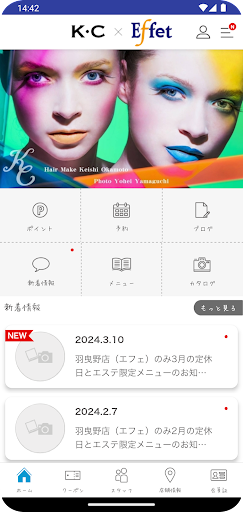
K・C(ケーシー) GROUPの公式アプリが登場。
アプリを通してK・C(ケーシー) GROUPの新着情報やお得な情報をリアルタイムで受け取ることができます。
また、いつでもお手元のスマートフォンから、メニューやヘアスタイル、ご希望のお時間帯のチェック・ご予約などが可能です。
アプリをインストールしていただくことによりK・C(ケーシー) GROUPを、より便利に身近にご利用していただけます。
【主なおすすめ機能】
◆予約機能◆
いつでもお手元のスマートフォンからご希望のお時間帯のチェック・ご予約が可能です。
◆お得なクーポン発行◆
サロンで使用できるお得なクーポンがアプリを通して発行されご利用いただけます。
◆ヘアカタログ◆
サロンおすすめのヘアスタイルをチェックできます。
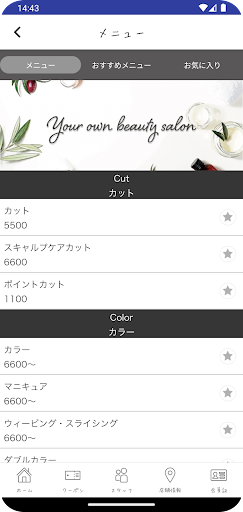
◆メニュー◆
気になるサロンメニューや価格をアプリから簡単にご確認いただけます。
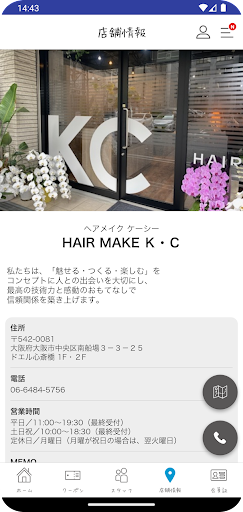
◆アクセス◆
店舗のマップが表示され、地図アプリとも連携しているので、初めてのご来店の時も簡単に見つけることができます。
◆電話ボタンで簡単アクセス◆
ワンタップで簡単にサロンへ電話が可能です。
◆ポイント参照◆
アプリからポイントと利用履歴をいつでもご確認していただけます。
◆新着情報の配信◆
『K・C GROUP』の最新ニュースをいつでも受け取ることができます。
◆動画チャンネル◆
サロンの様子やヘアアレンジなど動画でご覧いただけます。
【ご注意】
・機種の仕様によって表示の仕方が若干異なる場合がございます。
Show more

1. Download MEmu installer and finish the setup

2. Start MEmu then open Google Play on the desktop

3. Search K・C GROUP in Google Play
Install
4. Download and Install K・C GROUP
5. On install completion click the icon to start

6. Enjoy using K・C GROUP on PC with MEmu
MEmu Play is the best Android emulator, and 100 million users already enjoy its superb Android app experience. Powered by advanced virtualization technology, it lets you enjoy thousands of Android apps smoothly on your PC—including the most graphics-intensive ones.
Bigger screen with better graphics; Long duration, without limitation of battery or mobile data.
Full Keymapping support for precise control of keyboard and mouse or gamepad.
Multiple game accounts or tasks on single PC at one time with Multi-Instance manager.
Use K・C GROUP on PC by following steps: