
JTBC NOW
Updated
Current Version
3.5.0
Offered By

Stop worrying about high battery drain when using JTBC NOW on your phone. Free yourself from the tiny screen and enjoy the app on a much larger display. From now on, get a full-screen experience of your app with the convenience of a keyboard and mouse. MEmu offers you all the surprising features you’d expect: quick installation and easy setup, intuitive controls, and no more worries about battery life, mobile data, or unexpected calls. The all-new MEmu 9 is the choice for using JTBC NOW on your computer. With the MEmu multi-instance manager, you can run two or more accounts at the same time. Most importantly, our exclusive emulation engine unlocks your PC’s full potential, delivering smooth and enjoyable performance.
Show more
Enjoy superb experience of using JTBC NOW on PC with MEMU App Player. It's a powerful free Android emulator which provides you with thousands of android apps for their desktop version. Enjoy connecting with friends and polishing your work with higher efficiency! The JTBC mobile app, which will fill boring and dull times with colorful pleasure, has been renewed with JTBC NOW.

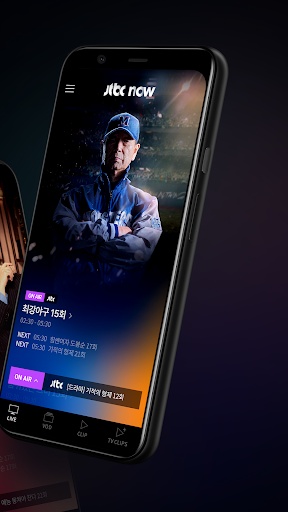
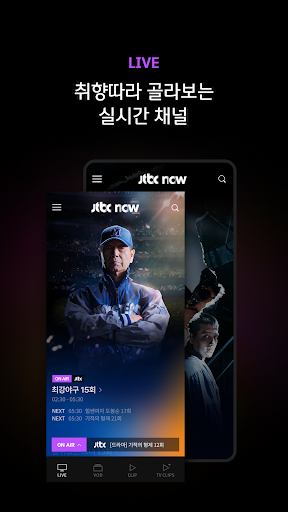
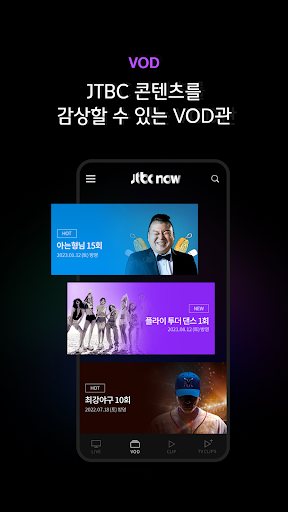
The JTBC mobile app, which will fill boring and dull times with colorful pleasure, has been renewed with JTBC NOW. The main features provided are as follows.
[main function]
1. LIVE: Various real-time channels to choose according to taste
You can watch JTBC real-time on-air and live channels by various topics for free.
2. VOD: JTBC live broadcast replay service
You can watch the most up-to-date, replay videos by broadcast program, and you can conveniently watch several episodes consecutively with the continuous playback function.
3. CLIP: From real-time famous scene clips to behind-the-scenes videos
We provide vivid on-site videos such as pre-release, famous scenes, production presentations, and making videos.
4. TV CLIPS: Providing highlight videos from various broadcasters
You can enjoy major clips of major broadcasting companies such as terrestrial and cable TV, dramas, and current affairs programs on JTBC NOW.
5. Search: You can search for the program name and watch the video of both the currently airing program and the ended program.
6. Pop-up player: Added a pop-up player function that can adjust the size. You can use other apps while watching the video. You can see other contents while watching the video.
However, pop-up players cannot be used in the TV CLIPS menu.
[Guide to setting app access rights]
In accordance with the provisions of Article 22-2 (Agreement on Access Permissions) of the Information and Communications Network Act, which is effective from March 23, 2017, only items essential to the use of the JTBC NOW app service are granted essential access rights.
[Required access rights]
- WIFI connection information: Check connection information such as Internet, network, and Wi-Fi status for smooth service
-Device information: Check information for battery optimization release, push notifications, etc.
[Optional access rights]
- Permission to use system pop-up: Check information to play pop-up player
-Notification: Check information for notification related to service information (For Android 13 or higher, separate request to allow notification according to Google policy)
Various functions will be continuously updated, so please use it a lot.
JTBC website > https://www.jtbc.co.kr/
[Customer Center Information]
Email: jtbchelp@jtbc.co.kr
Phone number: 02-751-6000
Show more

1. Download MEmu installer and finish the setup

2. Start MEmu then open Google Play on the desktop

3. Search JTBC NOW in Google Play
Install
4. Download and Install JTBC NOW
5. On install completion click the icon to start

6. Enjoy using JTBC NOW on PC with MEmu
MEmu Play is the best Android emulator, and 100 million users already enjoy its superb Android app experience. Powered by advanced virtualization technology, it lets you enjoy thousands of Android apps smoothly on your PC—including the most graphics-intensive ones.
Bigger screen with better graphics; Long duration, without limitation of battery or mobile data.
Full Keymapping support for precise control of keyboard and mouse or gamepad.
Multiple game accounts or tasks on single PC at one time with Multi-Instance manager.
Use JTBC NOW on PC by following steps: