
Loopit - Make Playables
Updated
Current Version
1.3.43
Offered By

Stop worrying about high battery drain when using Loopit - Make Playables on your phone. Free yourself from the tiny screen and enjoy the app on a much larger display. From now on, get a full-screen experience of your app with the convenience of a keyboard and mouse. MEmu offers you all the surprising features you’d expect: quick installation and easy setup, intuitive controls, and no more worries about battery life, mobile data, or unexpected calls. The all-new MEmu 9 is the choice for using Loopit - Make Playables on your computer. With the MEmu multi-instance manager, you can run two or more accounts at the same time. Most importantly, our exclusive emulation engine unlocks your PC’s full potential, delivering smooth and enjoyable performance.
Show more
Enjoy superb experience of using Loopit - Make Playables on PC with MEMU App Player. It's a powerful free Android emulator which provides you with thousands of android apps for their desktop version. Enjoy connecting with friends and polishing your work with higher efficiency! Loopit is the AI playable maker that turns any idea into a touchable, interactive mini-app — in a minute or two.
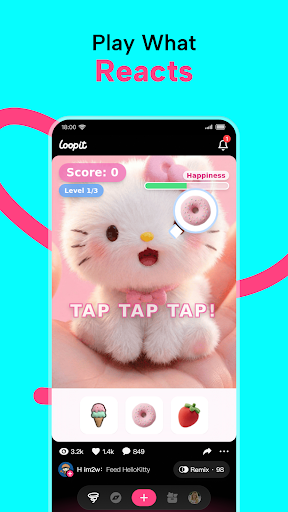
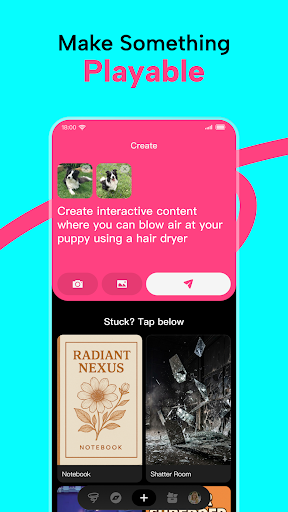
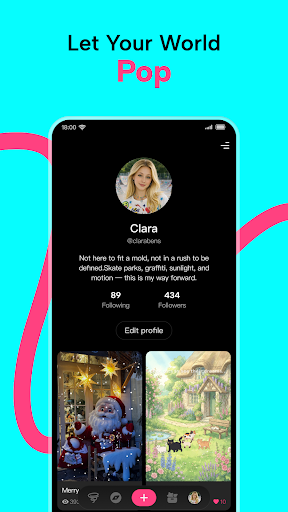
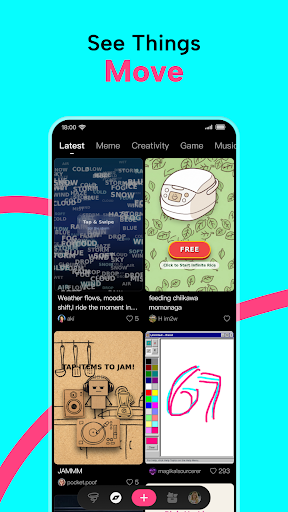
Loopit is the AI playable maker that turns any idea into a touchable, interactive mini-app — in a minute or two. No code. No design skills. Just describe what you want, and AI builds it.
Think of a playable as the next layer of social content. Instead of videos you watch, playables are tiny interactive moments you tap, swipe, shake, and play with. Memes that react. Mini-games you made from a sentence. ASMR toys that respond to your touch. Toys, puzzles, art, simulations — if it reacts, loops, or surprises, it's a playable.
Loopit is where vibe coding meets consumer creativity. While most AI tools generate static images or videos, Loopit generates interactive experiences anyone can make, remix, and share.
AI-Powered Creation
- Just describe your idea — "a game where falling grapefruits balance on a capybara's head," "an ASMR bubble wrap toy," "a meme of my cat dancing to lo-fi." Loopit builds the logic, art, and interaction.
- Your playables react to how people actually use their phones — they can respond to taps, swipes, tilts, shouts, music, even what your camera sees.
- From idea to finished playable before your coffee gets cold. No setup. No coding. No design tools to learn.
Remix, Don't Restart
- See a playable you love in your feed? Remix it in one tap. Change the rules. Swap the visuals. Twist the interaction. Make it yours.
- Every playable on Loopit is a starting point for the next one. Build on what the community made before you.
A Community Built Around Play
- Scroll a feed of playables made by creators around the world — every post is something you play with, not something you watch.
- Follow your favorite creators. Build playlists of your favorites. Connect with people who make stuff that's actually fun.
A New Kind of Creator Platform
Loopit exists to close the gap between imagination and experience — so ideas don't just stay imagined, they're lived. A place where the line between consumer and creator disappears, because making is as easy as scrolling.
Whether you've never made anything before or you're a seasoned creator looking for the next medium, Loopit lets you publish in a form that didn't exist a year ago.
Free to Play. Free to Create.
No paywalls. No coding. No limits.
Loopit. Make everything playable.
Show more

1. Download MEmu installer and finish the setup

2. Start MEmu then open Google Play on the desktop

3. Search Loopit - Make Playables in Google Play
Install
4. Download and Install Loopit - Make Playables
5. On install completion click the icon to start

6. Enjoy using Loopit - Make Playables on PC with MEmu
MEmu Play is the best Android emulator, and 100 million users already enjoy its superb Android app experience. Powered by advanced virtualization technology, it lets you enjoy thousands of Android apps smoothly on your PC—including the most graphics-intensive ones.
Bigger screen with better graphics; Long duration, without limitation of battery or mobile data.
Full Keymapping support for precise control of keyboard and mouse or gamepad.
Multiple game accounts or tasks on single PC at one time with Multi-Instance manager.
Use Loopit - Make Playables on PC by following steps:



























