MagentaTV: TV & Streaming
Updated
Current Version
1.0.3035
Offered By

Stop worrying about high battery drain when using MagentaTV: TV & Streaming on your phone. Free yourself from the tiny screen and enjoy the app on a much larger display. From now on, get a full-screen experience of your app with the convenience of a keyboard and mouse. MEmu offers you all the surprising features you’d expect: quick installation and easy setup, intuitive controls, and no more worries about battery life, mobile data, or unexpected calls. The all-new MEmu 9 is the choice for using MagentaTV: TV & Streaming on your computer. With the MEmu multi-instance manager, you can run two or more accounts at the same time. Most importantly, our exclusive emulation engine unlocks your PC’s full potential, delivering smooth and enjoyable performance.
Show more
Enjoy superb experience of using MagentaTV: TV & Streaming on PC with MEMU App Player. It's a powerful free Android emulator which provides you with thousands of android apps for their desktop version. Enjoy connecting with friends and polishing your work with higher efficiency! The new MagentaTV – now even better!
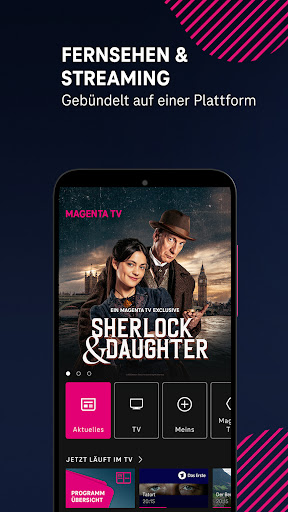
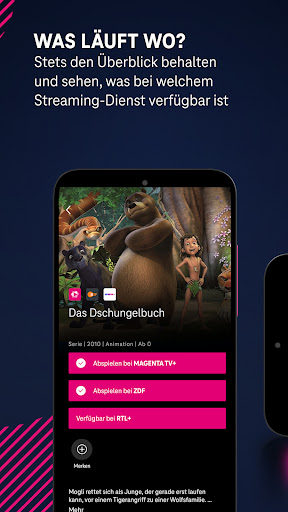
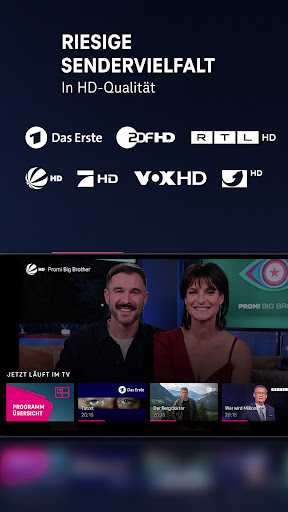
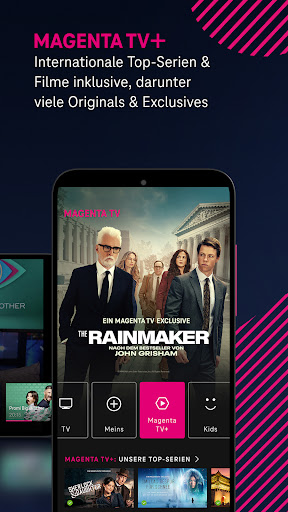
The new MagentaTV – now even better! Your platform for television and streaming. Over 180 TV channels, including over 160 public and private channels in outstanding HD quality. Plus exclusive movies and series included, and access to streaming services like Netflix and Disney+.
HIGHLIGHTS:
• Over 180 TV channels, 160 of them in HD
• MagentaTV+: Huge and unique selection of series & movies included
• Greater overview with your personal quick-start bar: all your favorite streaming services like Netflix, Disney+, and many more at a glance
• Up to 3 simultaneous streams – at home and on the go
• Enjoy TV & streaming throughout the EU
WATCH LIVE AND TIME-STIPRED TV:
• You decide when your favorite program airs – live or as a recording
• Record TV programs individually or as a series with 100 hours of online storage
• Quickly find content with the comprehensive search
• Many convenient features, e.g. B. Restart, Timeshift, and Free Content at a Glance
• Electronic Program Guide (EPG): Which programs are currently airing live on TV or starting in the next 14 days?
MAGENTA TV+ ALWAYS INCLUDES: SERIES AND FILMS ON DEMAND
• Exclusive German premieres such as the British drama series "Sherlock & Daughter," about England's most famous detective and his new partner; the new US legal drama "The Rainmaker," based on the bestselling novel of the same name by John Grisham; or "Smilla's Feeling for Snow"—a dystopian thriller about the struggle for resources
• Shows & documentaries—produced by and for MagentaTV, e.g., "Mr. Raue Travels!"
• International premium series & films: all seasons of "Yellowstone" (including season 5, part 2) and "Suits," and the hit film "Beyond Faith"
• ARD Plus & ZDF select with the largest archive of "Tatort" episodes and true cult classics
• Popular series and films for kids & teens from ARD, ZDF, Nick+, and others
MAGENTA MUSIC - AVAILABLE FREE:
Exclusive live broadcasts of Telekom Street Gigs or festivals like Lollapalooza and concerts by world-famous stars
ADDITIONAL STREAMING SERVICES:
Expand your MagentaTV experience with attractive streaming services:
RTL+ Premium: Series, reality shows, live sports, films, music, audiobooks, podcasts, event livestreams & missed programs
Netflix: Huge selection of award-winning series, films, and documentaries from around the world World
Disney+
Brand-new originals, blockbusters, binge-worthy series, and more
Paramount+
Blockbusters, new originals, and favorite series for the whole family
Apple TV+
New Apple Originals every month – always ad-free
DAZN
All Bundesliga Friday and Sunday matches, 121 UEFA Champions League matches including conference coverage, top European leagues and cup competitions. Plus the NFL, NBA, and combat sports (UFC and boxing)
WOW
The latest series, current blockbusters, and the best live sports from Sky
MAGENTA SPORT
All matches of the 3rd League, the DEL, the Women's Bundesliga, and the Euroleague Basketball
REQUIREMENTS AND NOTES:
MagentaTV can only be used in conjunction with subscriptions starting February 15, 2024. Information on subscribing and the offer can be found on the Telekom website under "TV".
• For legal reasons, there are restrictions on certain channels, which, for example, can only be received on Telekom networks when using the service within Germany. Not all programs are available for Cloud Recorder, Timeshift, and Restart either.
• You can also use MagentaTV with your smartphone, tablet, MagentaTV One, MagentaTV Stick, Apple TV, Fire TV, and in your web browser.
• MagentaTV products and services meet the requirements of the German Accessibility Strengthening Act (BFSG). You can find more information here.
YOUR FEEDBACK:
We appreciate ratings and comments.
Your feedback helps us improve the app.
Thank you & enjoy!
Your Telekom
Show more

1. Download MEmu installer and finish the setup

2. Start MEmu then open Google Play on the desktop

3. Search MagentaTV: TV & Streaming in Google Play
Install
4. Download and Install MagentaTV: TV & Streaming
5. On install completion click the icon to start

6. Enjoy using MagentaTV: TV & Streaming on PC with MEmu
MEmu Play is the best Android emulator, and 100 million users already enjoy its superb Android app experience. Powered by advanced virtualization technology, it lets you enjoy thousands of Android apps smoothly on your PC—including the most graphics-intensive ones.
Bigger screen with better graphics; Long duration, without limitation of battery or mobile data.
Full Keymapping support for precise control of keyboard and mouse or gamepad.
Multiple game accounts or tasks on single PC at one time with Multi-Instance manager.
Use MagentaTV: TV & Streaming on PC by following steps: