Manus AI
Updated
Current Version
26.0.0
Offered By

Stop worrying about high battery drain when using Manus AI on your phone. Free yourself from the tiny screen and enjoy the app on a much larger display. From now on, get a full-screen experience of your app with the convenience of a keyboard and mouse. MEmu offers you all the surprising features you’d expect: quick installation and easy setup, intuitive controls, and no more worries about battery life, mobile data, or unexpected calls. The all-new MEmu 9 is the choice for using Manus AI on your computer. With the MEmu multi-instance manager, you can run two or more accounts at the same time. Most importantly, our exclusive emulation engine unlocks your PC’s full potential, delivering smooth and enjoyable performance.
Show more
Enjoy superb experience of using Manus AI on PC with MEMU App Player. It's a powerful free Android emulator which provides you with thousands of android apps for their desktop version. Enjoy connecting with friends and polishing your work with higher efficiency! Leave it to Manus.
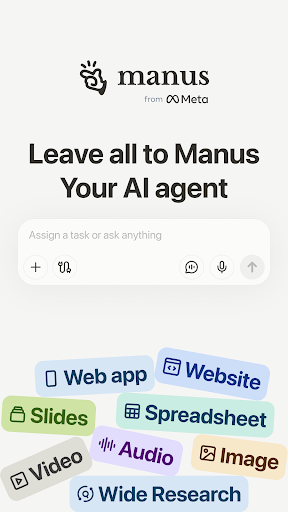

Leave it to Manus
Manus from Meta is a general AI agent that bridges mind and action: it doesn't just think, it delivers results. Manus excels at various tasks in work and life, getting everything done while you rest.
From Idea to Execution
Whereas other AI tools stop at brainstorming, Manus sees your ideas to execution. Using its own "computer", Manus breaks down your task into a to-do list, executes these subtasks, and delivers your final result.
Your Trusted Colleague
Manus works asynchronously in the cloud, meaning that you can simply close your devices and Manus will notify you when your task is complete. You can also stop and edit your prompt at any time.
Stunning & Structured Slides
With a single prompt, Manus generates entire slide decks tailored to your needs. Whether you're presenting in a boardroom, a classroom, or online, Manus ensures your message lands. Once you are done, export or share it with colleagues and peers.
Free & Unlimited Chat
Ask any question, get instant answers. Need more power? One-click upgrade to Agent Mode with advanced capabilities from asking simple questions to creating comprehensive outputs.
Design & Deploy Websites
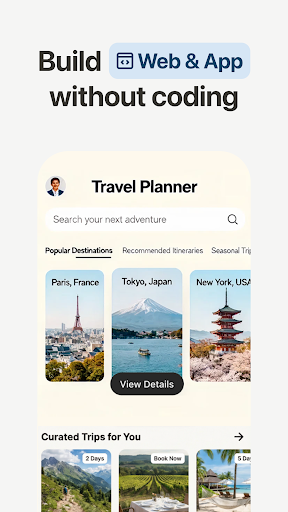
Manus turns any file into an engaging website with one prompt. Spreadsheets, slides, images, resumes, books... All your files can be more sharable, interactive, and visually impressive as a website.
Image & Video Generation
For both image and video, Manus transforms simple prompts into complete stories. Whether it's creating a poster froma piece of crumpled paper or a high fashion concept, Manus brings your inner artist to life.
Reclaim your time
Tasks that used to take 20 hours can be reduced to one with Manus. Whether that's turning complex data into visual representations or automating repetitive routines, leave it to Manus so that you can turn your attention to engaging tasks.
Privacy Policy: https://manus.im/privacy
Terms of Use: https://manus.im/terms
Show more

1. Download MEmu installer and finish the setup

2. Start MEmu then open Google Play on the desktop

3. Search Manus AI in Google Play
Install
4. Download and Install Manus AI
5. On install completion click the icon to start

6. Enjoy using Manus AI on PC with MEmu
MEmu Play is the best Android emulator, and 100 million users already enjoy its superb Android app experience. Powered by advanced virtualization technology, it lets you enjoy thousands of Android apps smoothly on your PC—including the most graphics-intensive ones.
Bigger screen with better graphics; Long duration, without limitation of battery or mobile data.
Full Keymapping support for precise control of keyboard and mouse or gamepad.
Multiple game accounts or tasks on single PC at one time with Multi-Instance manager.
Use Manus AI on PC by following steps: