Moggr - Haircut & Looksmax AI
Updated
Current Version
3.3
Offered By

Stop worrying about high battery drain when using Moggr - Haircut & Looksmax AI on your phone. Free yourself from the tiny screen and enjoy the app on a much larger display. From now on, get a full-screen experience of your app with the convenience of a keyboard and mouse. MEmu offers you all the surprising features you’d expect: quick installation and easy setup, intuitive controls, and no more worries about battery life, mobile data, or unexpected calls. The all-new MEmu 9 is the choice for using Moggr - Haircut & Looksmax AI on your computer. With the MEmu multi-instance manager, you can run two or more accounts at the same time. Most importantly, our exclusive emulation engine unlocks your PC’s full potential, delivering smooth and enjoyable performance.
Show more
Enjoy superb experience of using Moggr - Haircut & Looksmax AI on PC with MEMU App Player. It's a powerful free Android emulator which provides you with thousands of android apps for their desktop version. Enjoy connecting with friends and polishing your work with higher efficiency! Take a selfie, upload, and unlock AI-driven looksmaxxing insights with Moggr.
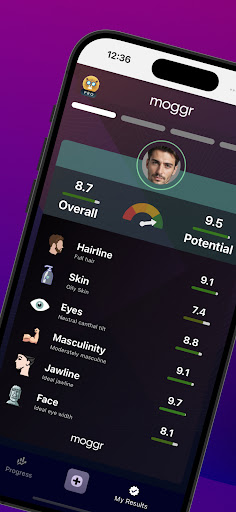
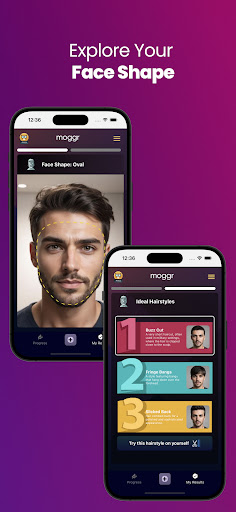
Take a selfie, upload, and unlock AI-driven looksmaxxing insights with Moggr. Dive into your skin quality, age you look, masculinity or femininity metrics in just seconds, all through the lens of looksmaxxing. Explore personalized looksmaxxing recommendations designed to elevate your appearance. Engage with your looksmaxxing journey, track your progress, and achieve the ultimate looksmaxxing transformation. Embrace looksmaxxing with Moggr and become the best version of yourself!
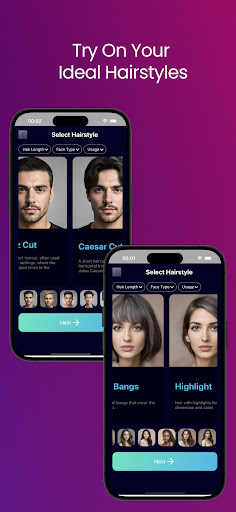
Discover the ultimate hairstyle transformation experience with our new feature! Try on 50 stunning hairstyles for both men and women with our blazing fast and highly accurate hairstyle engine. Using 8 advanced AI models, you can see exactly how each hairstyle will look on you, ensuring you find the perfect style that suits your personality and preferences. Whether you're looking for a bold new look or a subtle change, our app provides unparalleled precision and variety. Explore endless possibilities and redefine your style with ease and confidence. Download now and unlock your best look today!
With Moggr, you can personalize your look to enhance your natural beauty and boost your confidence. Measure your face symmetry with ease, as Moggr calculates symmetry points for each facial feature and provides precise scores. Understand how your face aligns with Da Vinci's golden ratio, divided into three equal parts. Discover if your mid face ratio is the ideal 1:1 and identify your most photogenic side for the best selfies. Receive expert tips to improve facial symmetry, targeting your eyes, nose, jawline, cheekbones, and mouth. Embrace your journey to a perfectly balanced and stunning appearance with Moggr.
Unlock the secrets of your face with Moggr's face shape finder and eye shape finder. Our advanced AI analyzes the unique contours of your face and eyes, providing detailed insights and recommendations tailored to your features. Discover which face shape you have—round, oval, square, oblong, heart, or diamond—and how to enhance it with the perfect hairstyles, accessories, and sunglasses. Learn about your eye shape—almond, deep-set, hooded, round, and more—and find the best makeup techniques and sunglasses to make your eyes stand out. With Moggr, you can personalize your look to match your natural beauty and boost your confidence.
Show more

1. Download MEmu installer and finish the setup

2. Start MEmu then open Google Play on the desktop

3. Search Moggr - Haircut & Looksmax AI in Google Play
Install
4. Download and Install Moggr - Haircut & Looksmax AI
5. On install completion click the icon to start

6. Enjoy using Moggr - Haircut & Looksmax AI on PC with MEmu
MEmu Play is the best Android emulator, and 100 million users already enjoy its superb Android app experience. Powered by advanced virtualization technology, it lets you enjoy thousands of Android apps smoothly on your PC—including the most graphics-intensive ones.
Bigger screen with better graphics; Long duration, without limitation of battery or mobile data.
Full Keymapping support for precise control of keyboard and mouse or gamepad.
Multiple game accounts or tasks on single PC at one time with Multi-Instance manager.
Use Moggr - Haircut & Looksmax AI on PC by following steps: