
OsmAnd — Maps & GPS Offline
Updated
Current Version
4.9.10
Offered By

Stop worrying about high battery drain when using OsmAnd — Maps & GPS Offline on your phone. Free yourself from the tiny screen and enjoy the app on a much larger display. From now on, get a full-screen experience of your app with the convenience of a keyboard and mouse. MEmu offers you all the surprising features you’d expect: quick installation and easy setup, intuitive controls, and no more worries about battery life, mobile data, or unexpected calls. The all-new MEmu 9 is the choice for using OsmAnd — Maps & GPS Offline on your computer. With the MEmu multi-instance manager, you can run two or more accounts at the same time. Most importantly, our exclusive emulation engine unlocks your PC’s full potential, delivering smooth and enjoyable performance.
Show more
Enjoy superb experience of using OsmAnd — Maps & GPS Offline on PC with MEMU App Player. It's a powerful free Android emulator which provides you with thousands of android apps for their desktop version. Enjoy connecting with friends and polishing your work with higher efficiency! OsmAnd is an offline world map application based on OpenStreetMap (OSM), which allows you to navigate taking into account the preferred roads and vehicle dimensions.
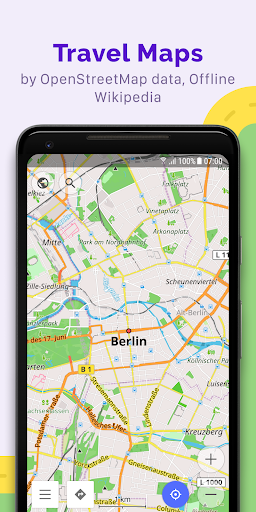
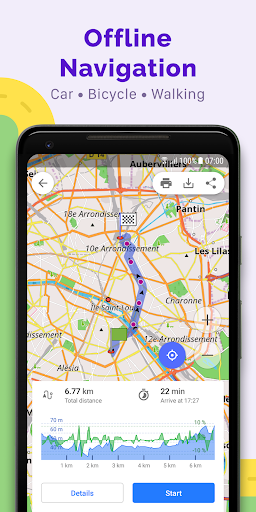
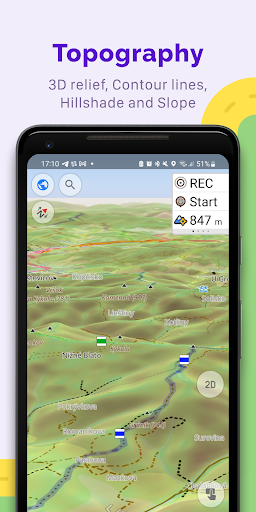
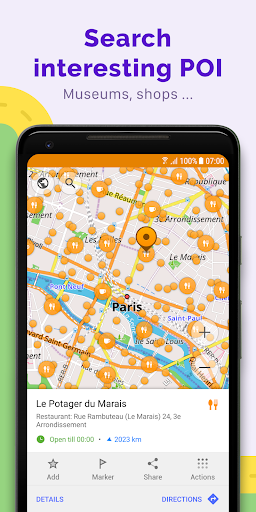
OsmAnd is an offline world map application based on OpenStreetMap (OSM), which allows you to navigate taking into account the preferred roads and vehicle dimensions. Plan routes based on inclines and record GPX tracks without an internet connection.
OsmAnd is an open source app. We do not collect user data and you decide what data the app will have access to.
Main features:
Map view
• Choice of places to be displayed on the map: attractions, food, health and more;
• Search for places by address, name, coordinates, or category;
• Map styles for the convenience of different activities: touring view, nautical map, winter and ski, topographic, desert, off-road, and others;
• Shading relief and plug-in contour lines;
• Ability to overlay different sources of maps on top of each other;
GPS Navigation
• Plotting a route to a place without an Internet connection;
• Customizable navigation profiles for different vehicles: cars, motorcycles, bicycles, 4x4, pedestrians, boats, public transport, and more;
• Change the constructed route, taking into account the exclusion of certain roads or road surfaces;
• Customizable information widgets about the route: distance, speed, remaining travel time, distance to turn, and more;
Route Planning and Recording
• Plotting a route point by point using one or multiple navigation profiles;
• Route recording using GPX tracks;
• Manage GPX tracks: displaying your own or imported GPX tracks on the map, navigating through them;
• Visual data about the route - descents/ascents, distances;
• Ability to share GPX track in OpenStreetMap;
Creation of points with different functionality
• Favourites;
• Markers;
• Audio/video notes;
OpenStreetMap
• Making edits to OSM;
• Updating maps with a frequency of up to one hour;
Additional features
• Compass and radius ruler;
• Mapillary interface;
• Night theme;
• Wikipedia;
• Large community of users around the world, documentation, and support;
Paid features:
Maps+ (in-app or subscription)
• Android Auto support;
• Unlimited map downloads;
• Topo data (Contour lines and Terrain);
• Nautical depths;
• Offline Wikipedia;
• Offline Wikivoyage - Travel guides.
OsmAnd Pro (subscription)
• OsmAnd Cloud (backup and restore);
• Cross-platform;
• Hourly map updates;
• Weather plugin;
• Elevation widget;
• Customise route line;
• External sensors support (ANT+, Bluetooth);
• Online Elevation profile.
Show more

1. Download MEmu installer and finish the setup

2. Start MEmu then open Google Play on the desktop

3. Search OsmAnd — Maps & GPS Offline in Google Play
Install
4. Download and Install OsmAnd — Maps & GPS Offline
5. On install completion click the icon to start

6. Enjoy using OsmAnd — Maps & GPS Offline on PC with MEmu
MEmu Play is the best Android emulator, and 100 million users already enjoy its superb Android app experience. Powered by advanced virtualization technology, it lets you enjoy thousands of Android apps smoothly on your PC—including the most graphics-intensive ones.
Bigger screen with better graphics; Long duration, without limitation of battery or mobile data.
Full Keymapping support for precise control of keyboard and mouse or gamepad.
Multiple game accounts or tasks on single PC at one time with Multi-Instance manager.
Use OsmAnd — Maps & GPS Offline on PC by following steps: