Offline Map Navigation
Updated
Current Version
1735070271
Offered By

Stop worrying about high battery drain when using Offline Map Navigation on your phone. Free yourself from the tiny screen and enjoy the app on a much larger display. From now on, get a full-screen experience of your app with the convenience of a keyboard and mouse. MEmu offers you all the surprising features you’d expect: quick installation and easy setup, intuitive controls, and no more worries about battery life, mobile data, or unexpected calls. The all-new MEmu 9 is the choice for using Offline Map Navigation on your computer. With the MEmu multi-instance manager, you can run two or more accounts at the same time. Most importantly, our exclusive emulation engine unlocks your PC’s full potential, delivering smooth and enjoyable performance.
Show more
Enjoy superb experience of using Offline Map Navigation on PC with MEMU App Player. It's a powerful free Android emulator which provides you with thousands of android apps for their desktop version. Enjoy connecting with friends and polishing your work with higher efficiency! Ever found yourself lost with no cellphone tower signal ?
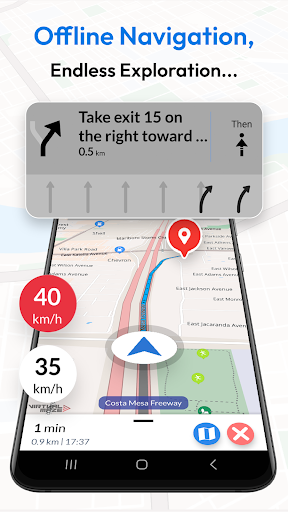
Ever found yourself lost with no cellphone tower signal ? Use our offline maps to locate yourself, search for places and get accurate turn-by-turn driving directions to navigate safely back home.
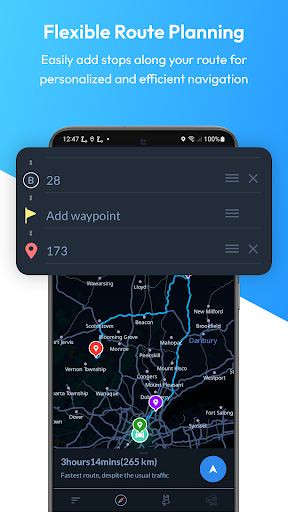
Planning a holiday ? Search offline and find nearby hotels, restaurants, and other points of interest easily during your trips. Our app ensures efficient travel planning with precise ETA, weather updates, and the ability to add multiple way-points.
Whether you're driving, biking, cycling, or walking, always have peace of mind with our app by your side. Offline Map Navigation is your trustworthy backup, ready to assist you whenever you need it most.
Key Features:
• Turn-by-Turn Navigation: Receive route instructions.
• Multiple Modes: Find the fastest routes for car, motorbike, bicycle, or walking.
• Supports Android Auto & Automotive - use Offline Map Navigation on your car’s display
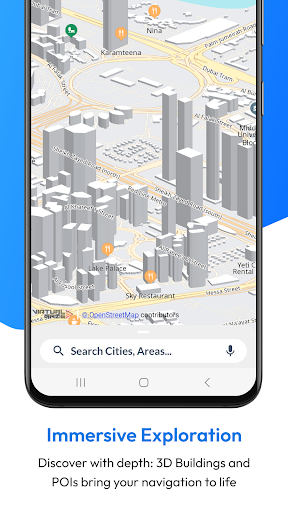
• Offline Points of Interest: Locate nearby hotels, restaurants, hospitals, ATMs, banks, charging stations, and shopping places without an internet connection.
• Junction View: Navigate complex intersections with ease.
• Voice Guidance: Get accurate voice instructions in multiple languages.
• Lane Guidance: Clear information on turn lanes.
• EV Routing: Includes charging station information for electric vehicles.
• Weather Updates: Real-time weather details for your location.
• Multi-Stop Routes: Add multiple way-points for optimised paths and precise ETA.
• Automatic Rerouting: Stay on track with instant rerouting.
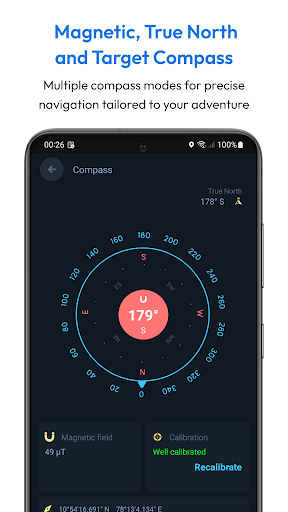
• Target Compass: Navigate directly to any destination with precision.
• Alternative Routes: Choose from multiple route suggestions.
• Share Routes: Easily share route instructions.
• Save Locations: Save favourite locations for quick access.
• Fast GPS: Enjoy quick GPS updates.
• Day and Night Modes: Clear maps for any time of day.
• Downloadable Maps: Use maps offline.
• Offline Search: Find locations and addresses without internet.
• Over-speed Alerts: Stay safe with speed alerts.
• Local Events: Discover local events.
• User-Created Attractions: Explore attractions created by users.
• Full Offline Functionality: All features work both online and offline.
Why Choose Offline Map Navigation?
• Save on Roaming Charges: Use offline maps to save money.
• Efficient Travel Planning: Save locations, add way-points, and find optimised routes.
• Share Trip Plans: Easily share your trip details.
• Multi-Language Support: Available in various languages.
• Comprehensive Coverage: Access maps and navigation for various regions worldwide.
• User-Friendly Interface: Enjoy an intuitive and easy-to-use interface.
• Regular Updates: Benefit from regular updates and improvements.
• High Accuracy: Depend on precise and reliable navigation.
• Customisation Options: Personalise your navigation experience with various settings.
• Community Contributions: Explore user-generated content and local insights.
• Privacy Focused: Navigate securely with a focus on privacy.
Wear OS Integration:
Synchronise with your Wear OS smartwatch for seamless turn-by-turn navigation.
Steps to Use Wear OS Support:
1. Install the app on both your Android device and Wear OS smartwatch.
2. Open the app on both devices and complete the setup.
3. Start navigation on your mobile device.
4. Receive navigation instructions on your Wear OS device.
Disclaimer:
Offline Map Navigation is a GPS-based app that uses your location while using the app or all the time, even in the background, for accurate positioning and navigation guidance.
Show more

1. Download MEmu installer and finish the setup

2. Start MEmu then open Google Play on the desktop

3. Search Offline Map Navigation in Google Play
Install
4. Download and Install Offline Map Navigation
5. On install completion click the icon to start

6. Enjoy using Offline Map Navigation on PC with MEmu
MEmu Play is the best Android emulator, and 100 million users already enjoy its superb Android app experience. Powered by advanced virtualization technology, it lets you enjoy thousands of Android apps smoothly on your PC—including the most graphics-intensive ones.
Bigger screen with better graphics; Long duration, without limitation of battery or mobile data.
Full Keymapping support for precise control of keyboard and mouse or gamepad.
Multiple game accounts or tasks on single PC at one time with Multi-Instance manager.
Use Offline Map Navigation on PC by following steps:






















![[3D Platformer] Super Bear Adventure PC](https://dl.memuplay.com/new_market/img/com.Earthkwak.Platformer.icon.2024-09-08-15-16-43.png)









