PakWheels: Buy & Sell Cars PC

Download PakWheels: Buy & Sell Cars on PC

PakWheels: Buy & Sell Cars PC

PakWheels: Buy & Sell Cars

  • Updated

  • Current Version

    11.12.33

  • Offered By

    PakWheels: Buy & Sell Cars PC

Features of PakWheels: Buy & Sell Cars on PC

Stop worrying about high battery drain when using PakWheels: Buy & Sell Cars on your phone. Free yourself from the tiny screen and enjoy the app on a much larger display. From now on, get a full-screen experience of your app with the convenience of a keyboard and mouse. MEmu offers you all the surprising features you’d expect: quick installation and easy setup, intuitive controls, and no more worries about battery life, mobile data, or unexpected calls. The all-new MEmu 9 is the choice for using PakWheels: Buy & Sell Cars on your computer. With the MEmu multi-instance manager, you can run two or more accounts at the same time. Most importantly, our exclusive emulation engine unlocks your PC’s full potential, delivering smooth and enjoyable performance.

Show more

Screenshots & Video of PakWheels: Buy & Sell Cars PC

Enjoy superb experience of using PakWheels: Buy & Sell Cars on PC with MEMU App Player. It's a powerful free Android emulator which provides you with thousands of android apps for their desktop version. Enjoy connecting with friends and polishing your work with higher efficiency! Established since 2003, PakWheels.
APP Info

Established since 2003, PakWheels.com has helped millions of Pakistanis to Buy & Sell Cars, Bikes, and Auto Parts. Thousands of used cars listed for sale in Pakistan.

Looking to buy a used car or bike?


PakWheels app is the best car app in Pakistan. Do your car research – find out about the latest cars & bike prices, reviews and specifications, upcoming cars & bikes, popular car & bike models, and watch cars & bikes reviews videos. Calculate on-road new car prices, compare car & bike features. Get assistance with an auto loan/car finance.

You can buy and sell used cars & bikes quickly using the PakWheels App, which has 200,000+ vehicles for sale. Buy your car accessories and auto parts online.

Benefits of downloading PakWheels App:

Features For Buyers


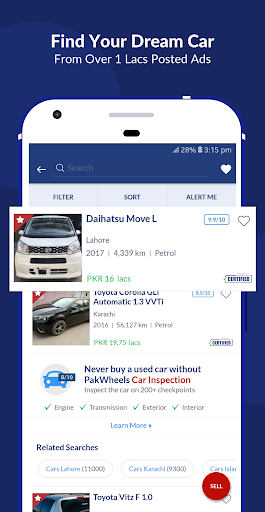
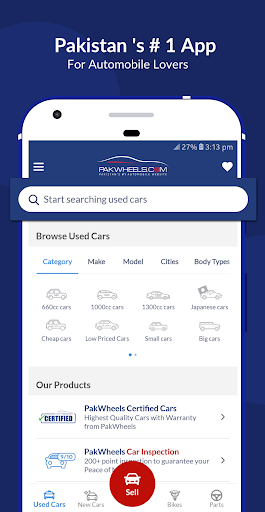
✔️ Search from 200,000+ Used Cars, Used Bikes, Auto parts & Car Accessories
✔️ Smart Search Filter - Search Cars by budget, City, Category, Make, Model, Transmission, CC, Body Type Generation, Color and Registration City
✔️ Save your favorite used cars/bikes ads to access them later
✔️ Create alerts and get notified
✔️ Check the latest market prices for New Cars & Bikes
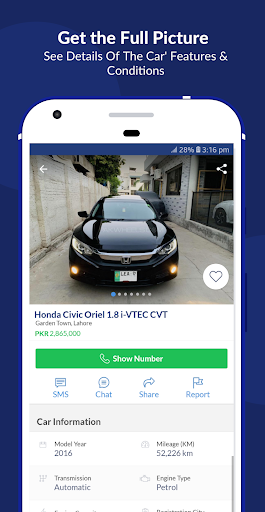
✔️ Compare Cars features and specifications
✔️ Research specifications and features of local and imported cars
✔️ Calculate accurate on-road prices, for domestic cars in Pakistan
✔️ Search cars by category: Japanese Cars, Hybrid Cars, Imported Cars, Luxury Cars, Automatic Cars, 1000cc Cars, Sports Cars and Modified Cars
✔️ PakWheels offers various Auto Parts & Car Accessories. Buy genuine spare parts online
✔️ PakWheels auto store has Suzuki, Honda, Toyota Spare parts and Accessories
✔️ Book Car inspection service with 200+ checkpoints using PakWheels app.
✔️ Get the original Japanese/Imported auction sheet verified using PakWheels app.

Features For Sellers


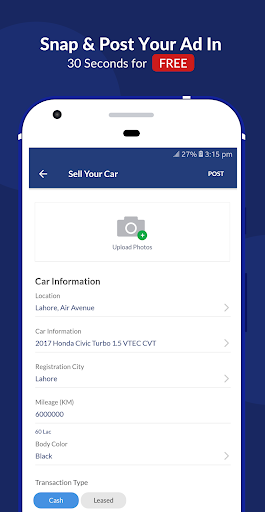
✔️ Post an Ad for your car, bike, or auto part and sell it quickly – Ad posting is FREE!
✔️ More than 3 million buyers every month
✔️ Manage your ads and respond to buyer’s queries directly from the app
✔️ BOOST your Ads to stay on top of search listings
✔️ FEATURE your Ads for maximum visibility

That’s not all. Here are some more ways the PakWheels app will help:

Sell Used Cars with Ease


Want to get rid of the car selling process, use PakWheels “Sell it For Me” service and leave the rest to us.

Buy & Sell Used Bike Quickly


You can find a variety of used and new bikes on PakWheels app. Post FREE AD online and sell your motorcycle.

Buy & Sell Car Accessories/Auto Parts


PakWheels Auto Store is your one-stop shop for genuine auto parts. Use PakWheels app to buy and sell spare parts by categories like Interior, Exterior, Engine & Mechanical, Tyres & Wheels, Brakes and Car Care Accessories.

Latest Car News, and Reviews Videos


Read authentic and latest auto industry news on PakWheels blog and watch cars & Bikes owner reviews on PakWheels app before buying.

Cool Rider Section


Enjoy cool rides pictures uploaded on PakWheels App.

PakWheels Android App is the most downloaded and top-rated car & Bike buying and selling app in Pakistan. Download now and experience the new way of doing car & Bike research.

Think Wheels, Think PakWheels!

Let's Connect:


Show more

How to Download PakWheels: Buy & Sell Cars on PC

  • PakWheels: Buy & Sell Cars PC

    1. Download MEmu installer and finish the setup

  • PakWheels: Buy & Sell Cars PC

    2. Start MEmu then open Google Play on the desktop

  • PakWheels: Buy & Sell Cars PC

    3. Search PakWheels: Buy & Sell Cars in Google Play

  • PakWheels: Buy & Sell Cars PC Install

    4. Download and Install PakWheels: Buy & Sell Cars

  • PakWheels: Buy & Sell Cars PC

    5. On install completion click the icon to start

  • PakWheels: Buy & Sell Cars PC
    PakWheels: Buy & Sell Cars PC PakWheels: Buy & Sell Cars PC

    6. Enjoy using PakWheels: Buy & Sell Cars on PC with MEmu

Why Use MEmu for PakWheels: Buy & Sell Cars

MEmu Play is the best Android emulator, and 100 million users already enjoy its superb Android app experience. Powered by advanced virtualization technology, it lets you enjoy thousands of Android apps smoothly on your PC—including the most graphics-intensive ones.

  • Bigger screen with better graphics; Long duration, without limitation of battery or mobile data.

  • Full Keymapping support for precise control of keyboard and mouse or gamepad.

  • Multiple game accounts or tasks on single PC at one time with Multi-Instance manager.

Ready to Use?

PakWheels: Buy & Sell Cars - FAQs

  • How to use PakWheels: Buy & Sell Cars on PC?

    Use PakWheels: Buy & Sell Cars on PC by following steps:

    • Download MEmu, then install and launch it
    • Login to Google Play Store, install the app
    • Enjoy using the app on PC with MEmu
  • What are the minimum system requirements to run PakWheels: Buy & Sell Cars on PC?
    • Intel or AMD Processor
    • Microsoft Windows 7 and above
    • 2GB of memory
    • 5GB of free disk space
    • Hardware Virtualization Technology