Photon Camera
Updated
Current Version
1.28.3.1
Offered By

Stop worrying about high battery drain when using Photon Camera on your phone. Free yourself from the tiny screen and enjoy the app on a much larger display. From now on, get a full-screen experience of your app with the convenience of a keyboard and mouse. MEmu offers you all the surprising features you’d expect: quick installation and easy setup, intuitive controls, and no more worries about battery life, mobile data, or unexpected calls. The all-new MEmu 9 is the choice for using Photon Camera on your computer. With the MEmu multi-instance manager, you can run two or more accounts at the same time. Most importantly, our exclusive emulation engine unlocks your PC’s full potential, delivering smooth and enjoyable performance.
Show more
Enjoy superb experience of using Photon Camera on PC with MEMU App Player. It's a powerful free Android emulator which provides you with thousands of android apps for their desktop version. Enjoy connecting with friends and polishing your work with higher efficiency! Photon Camera: Professional Photography in Your Pocket.
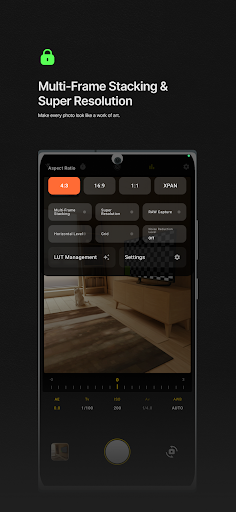
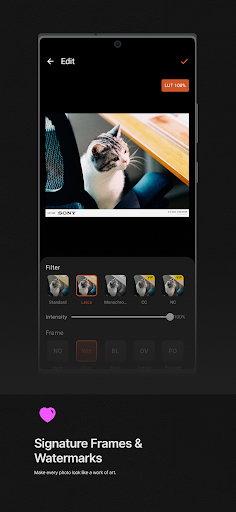
Photon Camera: Professional Photography in Your Pocket
The app is now open-source on GitHub: https://github.com/bjzhou/PhotonCamera
You are welcome to join the Telegram group to chat and share, though we may not be able to provide immediate responses to questions regarding App usage.
Telegram: https://t.me/photoncameraapp
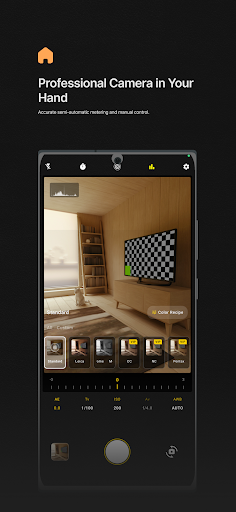
Photon Camera is a hardcore camera app designed for enthusiasts who demand more than just snapshots. We strip away the over-processed AI look to bring back the authentic joy of optical photography. Whether you are a pro needing manual exposure or a street photographer chasing that perfect film look, Photon Camera transforms your device into a powerful creative tool.
Key Features:
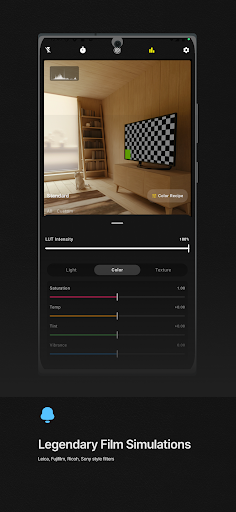
Iconic Film Simulations Our advanced color engine meticulously recreates the signature looks of legendary camera brands. Get the perfect shot straight out of the camera.
Classic Styles: Includes presets inspired by Leica (Vivid/Monochrome), Fuji (NC/CC film simulations), Ricoh (High Contrast B&W), and Sony (Creative Looks FL/VV).
Adjustable Intensity: Fine-tune the filter strength or import your own LUTs for full creative control.
Pro-Grade Manual Controls Take full command of your exposure with controls similar to a DSLR or Mirrorless camera.
Semi-Auto Metering: Features Shutter Priority (Tv) and ISO Priority modes for dynamic lighting conditions.
Professional Monitoring: Includes a real-time Histogram for exposure safety and Focus Peaking to ensure tack-sharp images.
Intuitive UI: Adjust EV, Shutter Speed, ISO, and White Balance effortlessly with our ergonomic dial interface.
Signature Frames & Watermarks Turn your photos into art pieces ready for social media.
Elegant Borders: Choose from Polaroid styles, minimalist Black/White borders, and film strips.
Smart Watermarks: Automatically display your EXIF data (Shutter, ISO, Aperture, Model) on the frame, giving your photos a professional gallery look.
Custom Logos: Add branding elements to match your unique style.
Precise Composition Tools
Multi-Aspect Ratios: Shoot in classic 3:2, standard 4:3, cinematic 16:9, or artistic 1:1.
Level & Grid: Built-in 3D horizon level and grid lines help you nail the perfect composition every time.
Why Photon Camera?
Zero Ads: A clean, immersive interface designed for focus.
Fast Capture: Optimized performance to catch fleeting moments.
Privacy First: Your photos stay on your device.
Download Photon Camera today and rediscover the art of light.
Show more

1. Download MEmu installer and finish the setup

2. Start MEmu then open Google Play on the desktop

3. Search Photon Camera in Google Play
Install
4. Download and Install Photon Camera
5. On install completion click the icon to start

6. Enjoy using Photon Camera on PC with MEmu
MEmu Play is the best Android emulator, and 100 million users already enjoy its superb Android app experience. Powered by advanced virtualization technology, it lets you enjoy thousands of Android apps smoothly on your PC—including the most graphics-intensive ones.
Bigger screen with better graphics; Long duration, without limitation of battery or mobile data.
Full Keymapping support for precise control of keyboard and mouse or gamepad.
Multiple game accounts or tasks on single PC at one time with Multi-Instance manager.
Use Photon Camera on PC by following steps: