Castle Clashers!
Updated
Current Version
1.19.0
Offered By

With your passion for Castle Clashers!, you shouldn’t have to limit yourself to the small screen of a phone. Play like a pro and take full control of the game using a keyboard and mouse. MEmu gives you everything you’re looking for. Download and play Castle Clashers! on PC. Play as long as you want — no more worries about battery life, mobile data, or unexpected calls. The all-new MEmu 9 is the best way to play Castle Clashers! on PC. With our expertly designed keymapping system, Castle Clashers! feels just like a real PC game. The MEmu multi-instance manager lets you run two or more accounts on the same device at the same time. Most importantly, our exclusive emulation engine unlocks your PC’s full potential, delivering smooth and seamless performance.
Show more
Download Castle Clashers! on PC with MEmu Android Emulator. Enjoy playing on big screen. Castle Busters is a real-time 1v1 PvP strategy game where your castle is your weapon.
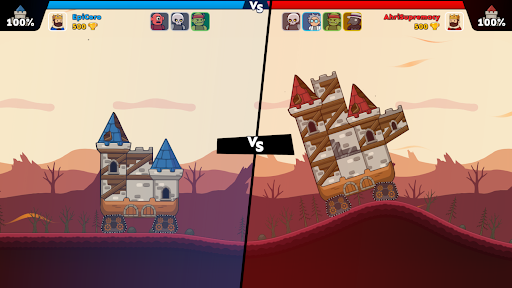
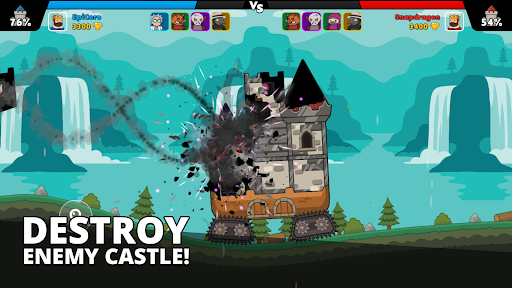
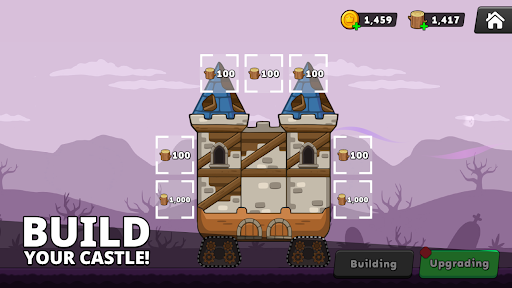
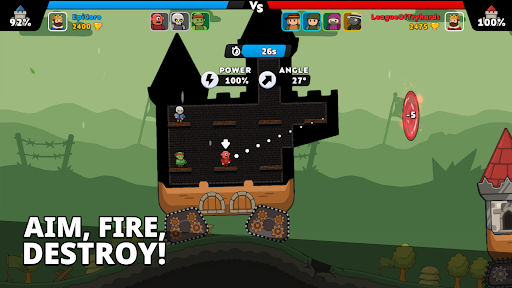
Castle Busters is a real-time 1v1 PvP strategy game where your castle is your weapon. Draft your units, blast through destructible walls, and crush rival players in fast online multiplayer battles.
No scripted waves. No waiting. Just you, your rival, and a castle that won't survive the match intact.
BREAK EVERY WALL. RULE EVERY ARENA.
Your castle isn't just your base, it's your weapon. Every wall you destroy opens a new angle. Every floor you collapse exposes an enemy. In Castle Busters, the battlefield falls apart in real time, and the player who reads it best wins.
WHY PLAYERS LOVE CASTLE BUSTERS
Fully destructible castles. Blast holes through walls to create firing lines and collapse floors to drop enemy units. No two PvP matches ever play out the same way.
Real-time 1v1 PvP. Fast online multiplayer matches packed with tactical decisions where every shot counts and every second of hesitation hands your rival a new opening.
Build your loadout. Draft up to 8 unique units: knights, archers, bombers and siege engines. Each one changes how you attack, the angles you threaten, and how you defend your keep.
Deep upgrades. Level up units, unlock new perks, and reinforce the parts of your castle that matter most. The longer you play, the sharper your arsenal gets.
Ranked arenas. Climb from Bronze to Legend and battle real players on seasonal leaderboards.
The Forge. Earn epic rewards by upgrading your squad and stronghold. The deeper you go, the meaner the meta gets.
Play your way. Precision snipes, brute-force sieges, decoy walls or collapse traps. Every strategy can win if you execute it right.
CORE GAMEPLAY
Aim and fire from inside your castle using your drafted units. The walls between you and your enemy aren't obstacles, they're opportunities. Destroy supports to collapse towers onto enemy positions. Carve a sightline through three floors to land a shot no one saw coming. Bait your opponent into breaking through where they shouldn't. In Castle Busters, defense is never passive. It's a trap.
Win by wiping out all enemy units, or by turning their castle into rubble. Arena hazards shift your angles and destructible terrain means every PvP battle is a puzzle that builds itself in real time.
DRAFT YOUR ARMY
Knights to break the front line. Archers to punish exposed units. Bombers to crack open walls and towers. Siege engines to flatten whole sections of an enemy castle. Mix and match up to 8 units into a loadout that fits your playstyle: patient and surgical, or fast and chaotic. Then upgrade each unit to unlock power spikes that open entirely new ways to play and clash.
META AND PROGRESSION
Your units grow with you. Level them up to unlock new perks, power spikes and fresh tactical options. Your castle evolves too. Reinforce the walls and towers that matter most, then test your build in multiplayer PvP. Ranked ladders and arenas introduce new obstacles, tighter matchups and fresh unit unlocks the deeper you climb. At the top of every leaderboard are players who have spent hundreds of hours perfecting their builds. You'll need to outthink them, not just outshoot them.
WHO IT'S FOR
If you love real-time strategy games, 1v1 PvP duels, tower-and-castle warfare, or fast online multiplayer battles you can finish in a few minutes, Castle Busters is built for you. Easy to pick up, hard to master, and impossible to play the same way twice.
BUILD. BREAK. REPEAT.
Some builds are patient. Some are pure chaos. None of them are wrong if they win the battle. Draft your squad, fortify your keep, sharpen your aim. The arena is open. Go break something.
FREE TO PLAY
Castle Busters is free to download and play. Some in-game items are available for purchase. A network connection is required. Suitable for players 13+.
Support: castlebusters-support@voodoo.io
Privacy Policy: https://www.voodoo.io/privacy
Discord: https://discord.gg/FWHEtZRBRr
TikTok: https://www.tiktok.com/@castle_busters
Show more

1. Download MEmu installer and finish the setup

2. Start MEmu then open Google Play on the desktop

3. Search Castle Clashers! in Google Play
Install
4. Download and Install Castle Clashers!
5. On install completion click the icon to start

6. Enjoy playing Castle Clashers! on PC with MEmu
MEmu Play is the best Android emulator and 100 million people already enjoy its superb Android gaming experience. The MEmu virtualization technology empowers you to play thousands of Android games smoothly on your PC, even the most graphic-intensive ones.
Bigger screen with better graphics; Long duration, without limitation of battery or mobile data.
Full Keymapping support for precise control of keyboard and mouse or gamepad.
Multiple game accounts or tasks on single PC at one time with Multi-Instance manager.
Play Castle Clashers! on PC by following steps: