Predict the winner soccer 2026
Updated
Current Version
3.3.0
Offered By

Stop worrying about high battery drain when using Predict the winner soccer 2026 on your phone. Free yourself from the tiny screen and enjoy the app on a much larger display. From now on, get a full-screen experience of your app with the convenience of a keyboard and mouse. MEmu offers you all the surprising features you’d expect: quick installation and easy setup, intuitive controls, and no more worries about battery life, mobile data, or unexpected calls. The all-new MEmu 9 is the choice for using Predict the winner soccer 2026 on your computer. With the MEmu multi-instance manager, you can run two or more accounts at the same time. Most importantly, our exclusive emulation engine unlocks your PC’s full potential, delivering smooth and enjoyable performance.
Show more
Enjoy superb experience of using Predict the winner soccer 2026 on PC with MEMU App Player. It's a powerful free Android emulator which provides you with thousands of android apps for their desktop version. Enjoy connecting with friends and polishing your work with higher efficiency! A brand-new version, rebuilt from scratch especially for the big soccer events of 2026.
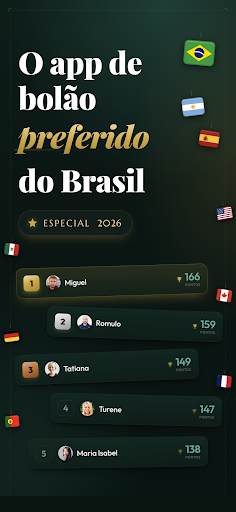
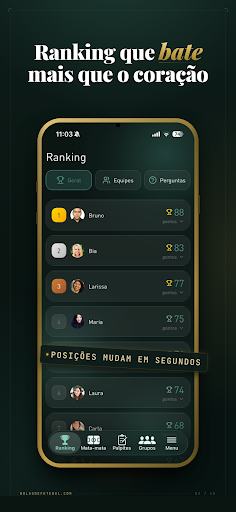
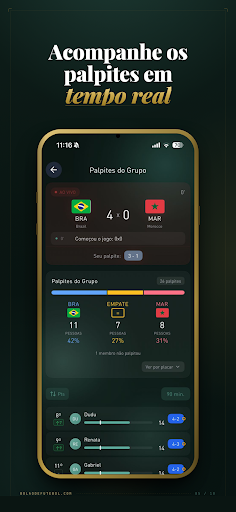
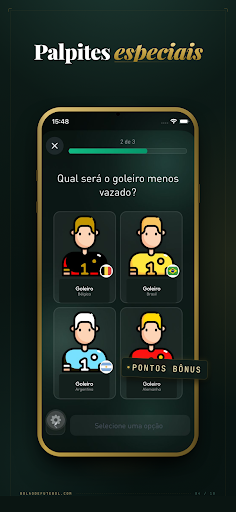
A brand-new version, rebuilt from scratch especially for the big soccer events of 2026. Our beloved app now packs 8 innovations no other app offers, turbo-charged special questions, and 4 extra independent competitions running at the same time. Keep reading and you'll fall in love.
EASY TO PICK
This app was designed to be easy peasy for everyone. Your buddies, coworkers, neighbors, cousins... even your grandma will be making picks and having a blast.
Any phone can download the app. We're on every store.
FUN GUARANTEED
Every piece of Soccer Pick'em Pool 2026 was built to crank up the fun. We've run pools for many tournaments and polished the app with 8 spectacular innovations:
- 4 extra, independent competitions, including SPECIAL QUESTIONS and other side contests that score points outside the main pool.
- Create fully customizable groups: change the rules, the scoring weights, add more championships, pick how to make picks, and more.
- Special questions to get your crew hooked on the pool: who's the top scorer? Which national team goes far? Every answer scores points and sparks that classic group chat debate.
- Top-notch scoring system: more risk = more points.
- Ranking automatically split into tiers: you'll need to download the app to see how much more fun your group will have. The fun is more than tripled, trust me! Your crew will love it.
- "Your Grandma Will Beat You" system. Here's how it works: we show the favorites for every match so anyone can see which team is on a roll and make a safe pick. Folks who know nothing about soccer will compete on even ground with everyone.
- You can create teams inside your group: Men vs. Women, Sales vs. Admin, Family A vs. Family B.
- Performance stats for every member of the group, a true breakdown of each person's strategy.
But that's not all, buddy:
- Real-time updates with our "THE FLASH" system.
- Unlimited groups! Invite as many people as you want to your group. Free? YES! With ads? NO!
- Create as many pools as you want, with friends, family, coworkers...
- Inviting friends is easy, just do it through WhatsApp.
- Result simulations: "What happens if France ties? What if Brazil makes a comeback?"
- And much more!
Inside the app, check out the "TIPS FOR RUNNING A POOL WITH YOUR FRIENDS" section. It's packed with everything you need to make your pool even more fun during the tournament. You'll love the tips!
Rebuilt from scratch, with love and care, for the 2026 events. Have a blast, friends.
Show more

1. Download MEmu installer and finish the setup

2. Start MEmu then open Google Play on the desktop

3. Search Predict the winner soccer 2026 in Google Play
Install
4. Download and Install Predict the winner soccer 2026
5. On install completion click the icon to start

6. Enjoy using Predict the winner soccer 2026 on PC with MEmu
MEmu Play is the best Android emulator, and 100 million users already enjoy its superb Android app experience. Powered by advanced virtualization technology, it lets you enjoy thousands of Android apps smoothly on your PC—including the most graphics-intensive ones.
Bigger screen with better graphics; Long duration, without limitation of battery or mobile data.
Full Keymapping support for precise control of keyboard and mouse or gamepad.
Multiple game accounts or tasks on single PC at one time with Multi-Instance manager.
Use Predict the winner soccer 2026 on PC by following steps: