SnapEdit - AI photo editor
Updated
Current Version
7.2.5
Offered By

Stop worrying about high battery drain when using SnapEdit - AI photo editor on your phone. Free yourself from the tiny screen and enjoy the app on a much larger display. From now on, get a full-screen experience of your app with the convenience of a keyboard and mouse. MEmu offers you all the surprising features you’d expect: quick installation and easy setup, intuitive controls, and no more worries about battery life, mobile data, or unexpected calls. The all-new MEmu 9 is the choice for using SnapEdit - AI photo editor on your computer. With the MEmu multi-instance manager, you can run two or more accounts at the same time. Most importantly, our exclusive emulation engine unlocks your PC’s full potential, delivering smooth and enjoyable performance.
Show more
Enjoy superb experience of using SnapEdit - AI photo editor on PC with MEMU App Player. It's a powerful free Android emulator which provides you with thousands of android apps for their desktop version. Enjoy connecting with friends and polishing your work with higher efficiency! SnapEdit is a one of the best photo editing apps using AI with a mission to make your editing easy, smooth and fun.
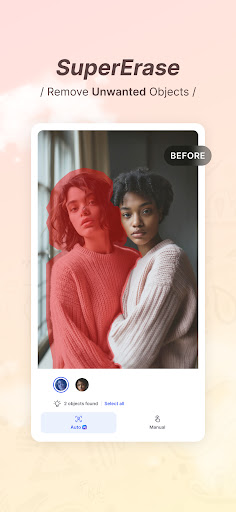
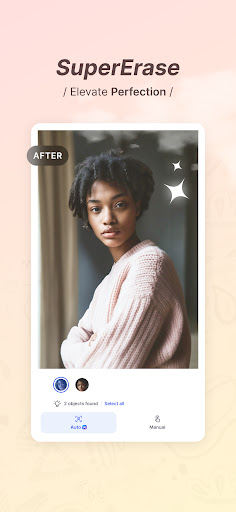
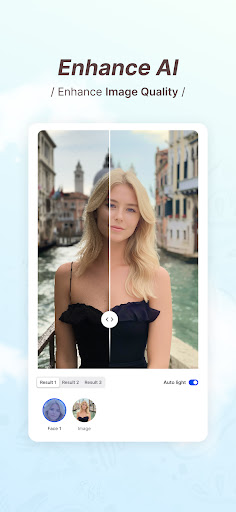

SnapEdit is a one of the best photo editing apps using AI with a mission to make your editing easy, smooth and fun.
Transform your photos like never before with SnapEdit, the ultimate photo editing app designed to effortlessly remove unwanted objects, enhance image quality, and create stunning visual masterpieces. Download SnapEdit now and unlock a world of possibilities for your photos!
KEY FEATURES:
ONE-TOUCH OBJECT REMOVAL: Say goodbye to photobombers, unwanted elements, or distracting objects in your pictures. With just a single touch, SnapEdit intelligently analyzes your photo and seamlessly removes any undesired elements, leaving behind a clean and polished image.
SUPER ERASE (PRO required): Specialized model designed to remove larger distractions. Makes them vanish in a flash, leaving your photos sleek, clean, and distraction-free.
IMAGE ENHANCEMENT: Elevate your photo quality with SnapEdit’s powerful image enhancement tools. Adjust brightness, contrast, saturation, and more to bring out the hidden details and make your images truly captivating. Enhance colors, sharpen edges, and create a professional finish with ease.
SKY REPLACEMENT: The gloomy weather is just not what you want? Bring the best out of your picture with our sky replacement. Replace the gray, boring sky in your photo with a brand new sky. Choose from clear blue sky, sunny, sunset, storm and even fantasies skies.
BACKGROUND REMOVAL MADE EASY: Need to change the backdrop of your photo? No problem! SnapEdit offers a seamless background removal feature that allows you to isolate the main subject with incredible precision. Replace the background with a solid color, a custom image, or a transparent background for endless creative possibilities.
ARTISTIC FILTERS and ANIME EFFECTS: Unleash your artistic side with a wide range of filters and effects. Transform your photos into stunning works of art with a single tap. From vintage to modern, black and white to vibrant colors, SnapEdit offers a plethora of options to suit your unique style.
EASY-TO-USE: SnapEdit’s user-friendly interface ensures a seamless editing experience for both beginners and professionals. Effortlessly navigate through the app’s features, apply edits, and instantly preview changes. The intuitive design ensures that editing your photos becomes a breeze.
HIGH-QUALITY RESULTS: SnapEdit utilizes cutting-edge algorithms to deliver high-quality results without compromising on detail or resolution. Your edited photos will retain their clarity and sharpness, ensuring that every detail shines through.
SAVE AND SHARE WITH EASE: Once you’re satisfied with your masterpiece, save your edited photos in high resolution to your device’s gallery. Share your creations directly from the app to social media platforms like Instagram, Facebook, and more, and impress your friends and followers with your stunning imagery.
Unlock the true potential of your photos with SnapEdit. Download now and experience the power of one-touch object removal, image enhancement, background removal, and an array of artistic filters. Create captivating visuals that leave a lasting impression and showcase your unique vision. Get SnapEdit today and start transforming your photos like a pro!
Show more

1. Download MEmu installer and finish the setup

2. Start MEmu then open Google Play on the desktop

3. Search SnapEdit - AI photo editor in Google Play
Install
4. Download and Install SnapEdit - AI photo editor
5. On install completion click the icon to start

6. Enjoy using SnapEdit - AI photo editor on PC with MEmu
MEmu Play is the best Android emulator, and 100 million users already enjoy its superb Android app experience. Powered by advanced virtualization technology, it lets you enjoy thousands of Android apps smoothly on your PC—including the most graphics-intensive ones.
Bigger screen with better graphics; Long duration, without limitation of battery or mobile data.
Full Keymapping support for precise control of keyboard and mouse or gamepad.
Multiple game accounts or tasks on single PC at one time with Multi-Instance manager.
Use SnapEdit - AI photo editor on PC by following steps: