VYBS: Play & Earn Rewards PC

Download VYBS: Play & Earn Rewards on PC

VYBS: Play & Earn Rewards PC

VYBS: Play & Earn Rewards

  • Updated

  • Current Version

    1.83.0

  • Offered By

    VYBS: Play & Earn Rewards PC

Features of VYBS: Play & Earn Rewards on PC

Stop worrying about high battery drain when using VYBS: Play & Earn Rewards on your phone. Free yourself from the tiny screen and enjoy the app on a much larger display. From now on, get a full-screen experience of your app with the convenience of a keyboard and mouse. MEmu offers you all the surprising features you’d expect: quick installation and easy setup, intuitive controls, and no more worries about battery life, mobile data, or unexpected calls. The all-new MEmu 9 is the choice for using VYBS: Play & Earn Rewards on your computer. With the MEmu multi-instance manager, you can run two or more accounts at the same time. Most importantly, our exclusive emulation engine unlocks your PC’s full potential, delivering smooth and enjoyable performance.

Show more

Screenshots & Video of VYBS: Play & Earn Rewards PC

Enjoy superb experience of using VYBS: Play & Earn Rewards on PC with MEMU App Player. It's a powerful free Android emulator which provides you with thousands of android apps for their desktop version. Enjoy connecting with friends and polishing your work with higher efficiency! Turn your playtime into PAYTIME - Earn Rewards by doing what you love - Playing Games!
APP Info

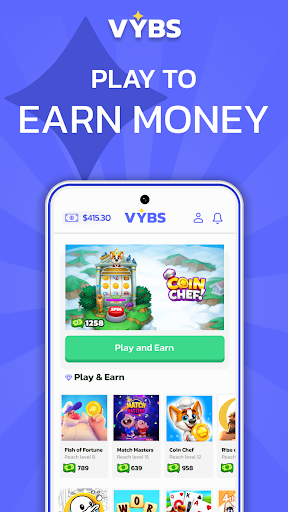
Turn your playtime into PAYTIME - Earn Rewards by doing what you love - Playing Games!
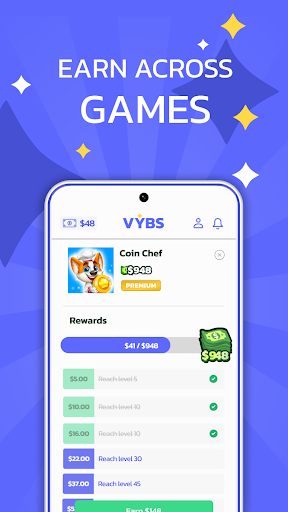

Get Paid to Play Games - Discover the ultimate reward platform built for mobile gamers - VYBS.

For all gamers out there, get rewarded and earn money playing games.

Imagine playing games for real money. With VYBS, it's possible. We reward you for doing what you love.

VYBS - Play Games and Earn Rewards, a platform works:


1⃣ Explore a curated collection of fantastic mobile games across various categories like Casual, Puzzle, Strategy, and more.
2⃣ Play: Directly dive into your favorite games through VYBS and don't play just for fun, play to earn rewards.
3⃣ Earn: The more you play, the more VYBS Points you earn. Simple!
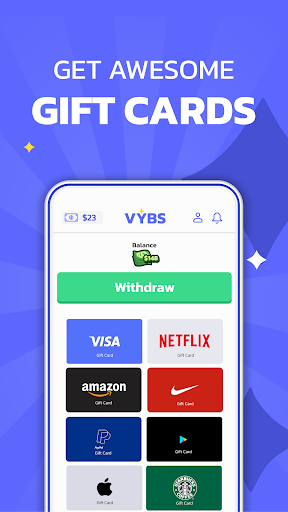
4⃣ Redeem: Exchange your Vybs Points for an epic variety of gift cards.

Love gaming? Now, you can get paid to play games! Start using Vybs now, play to earn gift cards, and make money online! Get rewards for playing games and start earning money!

Claim Exclusive Rewards You'll Love:


Play to Earn Gift Cards to popular stores and services like PayPal, DoorDash, Sephora, Walmart, and much more! Stop gaming for nothing, play games for gift cards, and get paid while doing something fun! We turn your mobile gaming into a win-win!

Stop gaming for nothing, earn money playing games, and never look back!


Whether you're looking to get paid real money to play games or play games for gift cards, Vybs has you covered! Pick your favorite game, start playing through the app, and be rewarded for your playtime. Yes, it's possible to play games for money and gift cards!

What Makes Vybs - Play Games for Money App Unique:


Huge collection of games: We partner with top game developers to bring you a wide range of awesome games across every genre—from puzzles to strategy and everything in between.
Simple and gamer-friendly: The app is easy to navigate, and designed to make your gaming experience smooth and fun.
Valuable rewards: Get paid to play games; we offer rewards you'll actually want.


Play Games, Earn Rewards - Simple!


Vybs - Play Games to Earn Gift Cards App isn't just about rewards; it's about empowering you as a gamer and leveling up your mobile gaming experience. We help you discover new games, track your progress, and connect with a community of like-minded players. Discover amazing rewards and valuable gift cards - Make money playing games!

Get paid to play games - Start Using Vybs Today!


Make money playing games with Vybs, discover the ultimate platform, and join the gaming revolution! Join our growing gaming community, and do what you love - earn money playing games.

For complete T&C & Privacy Policy, please visit our website: https://www.vybs.co

For support: Support@vybs.co


*The merchants do not endorse and are not affiliated with the Vybs loyalty program. All brand names, logos, and trademarks are the property of their respective owners. Any games displayed are for illustrative purposes only and may not be available to all users or in all regions.

Show more

How to Download VYBS: Play & Earn Rewards on PC

  • VYBS: Play & Earn Rewards PC

    1. Download MEmu installer and finish the setup

  • VYBS: Play & Earn Rewards PC

    2. Start MEmu then open Google Play on the desktop

  • VYBS: Play & Earn Rewards PC

    3. Search VYBS: Play & Earn Rewards in Google Play

  • VYBS: Play & Earn Rewards PC Install

    4. Download and Install VYBS: Play & Earn Rewards

  • VYBS: Play & Earn Rewards PC

    5. On install completion click the icon to start

  • VYBS: Play & Earn Rewards PC
    VYBS: Play & Earn Rewards PC VYBS: Play & Earn Rewards PC

    6. Enjoy using VYBS: Play & Earn Rewards on PC with MEmu

Why Use MEmu for VYBS: Play & Earn Rewards

MEmu Play is the best Android emulator, and 100 million users already enjoy its superb Android app experience. Powered by advanced virtualization technology, it lets you enjoy thousands of Android apps smoothly on your PC—including the most graphics-intensive ones.

  • Bigger screen with better graphics; Long duration, without limitation of battery or mobile data.

  • Full Keymapping support for precise control of keyboard and mouse or gamepad.

  • Multiple game accounts or tasks on single PC at one time with Multi-Instance manager.

Ready to Use?

VYBS: Play & Earn Rewards - FAQs

  • How to use VYBS: Play & Earn Rewards on PC?

    Use VYBS: Play & Earn Rewards on PC by following steps:

    • Download MEmu, then install and launch it
    • Login to Google Play Store, install the app
    • Enjoy using the app on PC with MEmu
  • What are the minimum system requirements to run VYBS: Play & Earn Rewards on PC?
    • Intel or AMD Processor
    • Microsoft Windows 7 and above
    • 2GB of memory
    • 5GB of free disk space
    • Hardware Virtualization Technology
lyzs
lyzs