APSX2 - PS2 Emulator
Diupdate
Versi Saat Ini
Ditawarkan Oleh

Dengan sepenuh kebulatan hati Anda dalam memainkan APSX2 - PS2 Emulator, tangan Anda tak seharusnya hanya terbatas pada layar kecil handphone Anda.Bermainlah layaknya seorang profesional dan dapatkan kendali penuh dalam permainan Anda dengan papan ketik dan tetikus.MEmu menawarkan seluruh hal yang Anda harapkan.Unduh dan mainkan APSX2 - PS2 Emulator pada PC. Bermainlah selama yang Anda inginkan, tanpa keterbatasan dari baterai, data seluler dan panggilan yang mengganggu.MEmu 9 baru merupakan pilihan terbaik untuk memainkan APSX2 - PS2 Emulator pada PC. Dipersiapkan bersama teknologi ahli kami, sistem pemetaan kunci preset yang canggih menjadikan APSX2 - PS2 Emulator sebagai permainan PC sejati.Manajer banyak hal dari MEmu memungkinkan Anda untuk memainkan 2 atau banyak akun pada perangkat yang sama.Dan yang terpenting, mesin emulasi eksklusif kami bisa melepaskan potensi penuh PC Anda, membuat segalanya berjalan lancar.
Tampilkan Lebih banyak
Unduh APSX2 - PS2 Emulator di PC dengan Emulator Android MEmu. Nikmati permainan pada layar yang besar. Bring your PlayStation 2 game library to Android with APSX2, a powerful PS2 emulator built for phones, tablets, and handheld gaming devices.
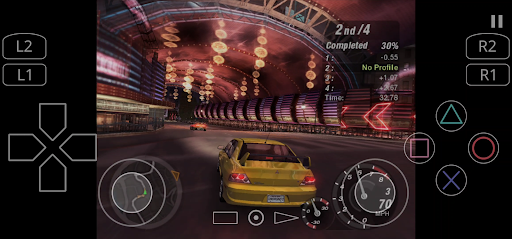
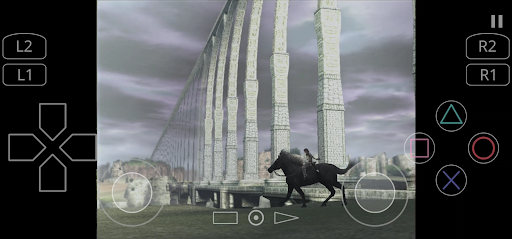
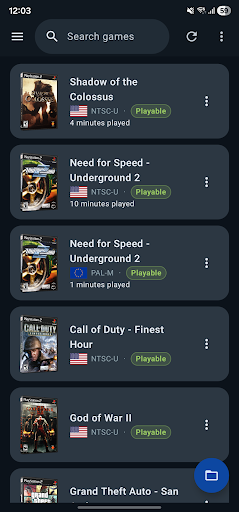
Bring your PlayStation 2 game library to Android with APSX2, a powerful PS2 emulator built for phones, tablets, and handheld gaming devices.
Play your own legally obtained PS2 game backups with enhanced graphics, save states, controller support, customizable touch controls, RetroAchievements, widescreen patches, and flexible performance options.
PLAY PS2 GAMES ON ANDROID
Rediscover classic PlayStation 2 games wherever you go. APSX2 provides a smooth and customizable emulation experience designed for modern Android hardware.
KEY FEATURES
◆ Wide Game Compatibility
Play a broad selection of PlayStation 2 games. Compatibility and performance may vary depending on the game, device hardware, graphics renderer, and selected settings.
◆ HD Graphics and Resolution Upscaling
Render games above their original resolution for sharper and clearer visuals. Depending on your device, APSX2 can support resolutions such as 1080p, 1440p, or 4K.
◆ Vulkan and OpenGL Support
Choose between Vulkan and OpenGL graphics renderers to find the best balance of performance, compatibility, and visual quality for your device.
◆ RetroAchievements Integration
Sign in to RetroAchievements, unlock achievements in supported games, and track your progress while playing.
◆ Save States
Save your progress at almost any moment and continue exactly where you stopped. Save states are ideal for shorter mobile gaming sessions.
◆ Virtual Memory Cards
Use virtual PS2 memory cards for traditional in-game saving and loading.
◆ Bluetooth and USB Controller Support
Connect compatible Xbox, PlayStation, Razer, and other Android gamepads for a traditional console-style experience.
◆ Customizable Touch Controls
Play without a physical controller using adjustable on-screen controls, including analog sticks, a D-pad, shoulder buttons, and action buttons.
◆ Widescreen and Game Patches
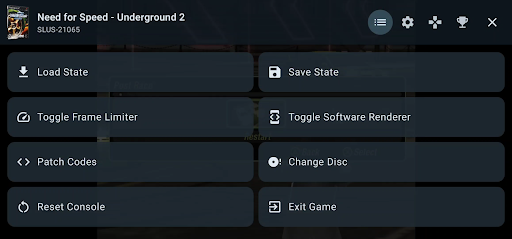
Use compatible widescreen patches to play supported games in 16:9 without stretching the image. Additional patches may improve compatibility, visuals, or gameplay.
◆ Flexible Performance Options
Adjust graphics resolution, frame-rate behavior, emulation speed, audio, and other advanced options to match your device’s capabilities.
IMPORTANT REQUIREMENTS
◆ PS2 BIOS Required
APSX2 requires a PlayStation 2 BIOS file to operate. The BIOS is not included with the app. You must provide a BIOS file legally obtained from a PlayStation 2 console you own, where permitted by applicable law.
◆ Games Are Not Included
APSX2 does not include, host, sell, or provide downloads for games. You must supply your own legally obtained PlayStation 2 game backup files.
◆ Modern Hardware Recommended
PlayStation 2 emulation is demanding. For the best experience, a modern 64-bit Android device with a Snapdragon 845 or equivalent processor, at least 4 GB of RAM, and Vulkan or OpenGL support is recommended.
Performance depends on the game, device hardware, graphics drivers, thermal limits, and selected settings. Some games may experience slowdowns, graphical glitches, audio issues, or compatibility problems.
LEGAL DISCLAIMER
APSX2 is an independent Android application for PlayStation 2 emulation. It is not affiliated with, authorized by, endorsed by, licensed by, or sponsored by Sony Interactive Entertainment.
“PlayStation” and “PlayStation 2” are trademarks of Sony Interactive Entertainment.
APSX2 does not include or distribute PS2 game images or PS2 BIOS files. Users must provide their own legally obtained content and comply with applicable law.
Tampilkan Lebih banyak

1. Unduh dan instal MEmu APP

2. Menjalankan MEmu lalu buka Google Play di halaman

3. Cari APSX2 - PS2 Emulator di Google Play
Install
4. Unduh dan instal APSX2 - PS2 Emulator
5. Setelah insatl APP selesai,klik ikon untuk mulai

6. Nikmati bermain APSX2 - PS2 Emulator di PC dengan MEmu
MEmu App Player adalah emulator Android gratis terbaik dan 50 Juta orang sudah menikmati pengalaman luar biasa dalam bermain gim Android. Teknologi virtualisasi MEmu memberi kekuasaan untuk memainkan ribuan gim Android dengan lancar di PC anda, bahkan gim dengan grafis yang paling tinggi.
Layar lebih besar dengan grafis yang lebih baik; durasi panjang, tanpa batasan baterai atau data seluler.
Didukung penuh oleh Pemetaan tombol yang lengkap untuk keakuratan kontrol keyboard dan mouse maupun gamepad.
Membuka beberapa akun game atau tugas di waktu yang sama hanya pada satu PC, dengan Multi-Instance manager.
Play APSX2 - PS2 Emulator on PC by following steps: