APSX2 - PS2 Emulator
Mise à jour
Version actuelle
Proposée par

Avec toute la passion que vous avez à jouer APSX2 - PS2 Emulator, vos mains ne sont pas sensées se limiter à l’infime écran de votre téléphone. Jouez comme un pro et ayez le contrôle total de votre jeu à l’aide du clavier et de la souris. MEmu satisfait toutes vos attentes. Téléchargez et jouez APSX2 - PS2 Emulator sur PC. Jouez aussi longtemps que vous souhaitez sans aucune limitation de batterie, de données mobiles et d’appels embêtants. La toute nouvelle version de MEmu 9 est la meilleure option de jouer APSX2 - PS2 Emulator sur PC. Réalisé par nos experts, l’e magnifique système d’affectation de touches prédéfini fait de APSX2 - PS2 Emulator un jeu réaliste sur PC. Le gestionnaire multi-instances de MEmu permet 2 ou plusieurs comptes de jeu sur le même appareil. Et le plus important, le moteur d’émulation exclusif peut libérer le plein potentiel de votre PC, ce qui facilite tout.
Afficher plus
Téléchargez APSX2 - PS2 Emulator avec le simulateur d’Android MEmu sur votre PC. Profitez de jouer sur un grand écran. Bring your PlayStation 2 game library to Android with APSX2, a powerful PS2 emulator built for phones, tablets, and handheld gaming devices.
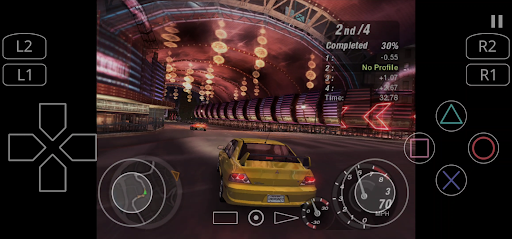
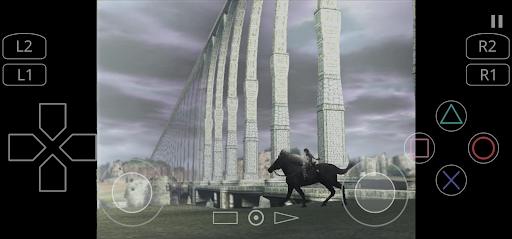
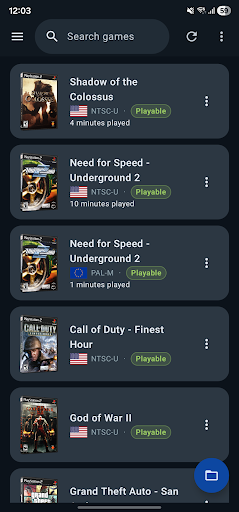
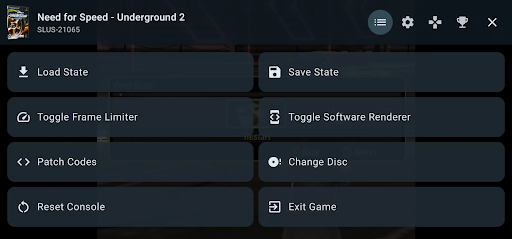
Bring your PlayStation 2 game library to Android with APSX2, a powerful PS2 emulator built for phones, tablets, and handheld gaming devices.
Play your own legally obtained PS2 game backups with enhanced graphics, save states, controller support, customizable touch controls, RetroAchievements, widescreen patches, and flexible performance options.
PLAY PS2 GAMES ON ANDROID
Rediscover classic PlayStation 2 games wherever you go. APSX2 provides a smooth and customizable emulation experience designed for modern Android hardware.
KEY FEATURES
◆ Wide Game Compatibility
Play a broad selection of PlayStation 2 games. Compatibility and performance may vary depending on the game, device hardware, graphics renderer, and selected settings.
◆ HD Graphics and Resolution Upscaling
Render games above their original resolution for sharper and clearer visuals. Depending on your device, APSX2 can support resolutions such as 1080p, 1440p, or 4K.
◆ Vulkan and OpenGL Support
Choose between Vulkan and OpenGL graphics renderers to find the best balance of performance, compatibility, and visual quality for your device.
◆ RetroAchievements Integration
Sign in to RetroAchievements, unlock achievements in supported games, and track your progress while playing.
◆ Save States
Save your progress at almost any moment and continue exactly where you stopped. Save states are ideal for shorter mobile gaming sessions.
◆ Virtual Memory Cards
Use virtual PS2 memory cards for traditional in-game saving and loading.
◆ Bluetooth and USB Controller Support
Connect compatible Xbox, PlayStation, Razer, and other Android gamepads for a traditional console-style experience.
◆ Customizable Touch Controls
Play without a physical controller using adjustable on-screen controls, including analog sticks, a D-pad, shoulder buttons, and action buttons.
◆ Widescreen and Game Patches
Use compatible widescreen patches to play supported games in 16:9 without stretching the image. Additional patches may improve compatibility, visuals, or gameplay.
◆ Flexible Performance Options
Adjust graphics resolution, frame-rate behavior, emulation speed, audio, and other advanced options to match your device’s capabilities.
IMPORTANT REQUIREMENTS
◆ PS2 BIOS Required
APSX2 requires a PlayStation 2 BIOS file to operate. The BIOS is not included with the app. You must provide a BIOS file legally obtained from a PlayStation 2 console you own, where permitted by applicable law.
◆ Games Are Not Included
APSX2 does not include, host, sell, or provide downloads for games. You must supply your own legally obtained PlayStation 2 game backup files.
◆ Modern Hardware Recommended
PlayStation 2 emulation is demanding. For the best experience, a modern 64-bit Android device with a Snapdragon 845 or equivalent processor, at least 4 GB of RAM, and Vulkan or OpenGL support is recommended.
Performance depends on the game, device hardware, graphics drivers, thermal limits, and selected settings. Some games may experience slowdowns, graphical glitches, audio issues, or compatibility problems.
LEGAL DISCLAIMER
APSX2 is an independent Android application for PlayStation 2 emulation. It is not affiliated with, authorized by, endorsed by, licensed by, or sponsored by Sony Interactive Entertainment.
“PlayStation” and “PlayStation 2” are trademarks of Sony Interactive Entertainment.
APSX2 does not include or distribute PS2 game images or PS2 BIOS files. Users must provide their own legally obtained content and comply with applicable law.
Afficher plus

1. Téléchargez l'installateur MEmu et terminez l'installation

2. Démarrez MEmu puis ouvrez Google Play sur la page d'accueil

3. Recherchez APSX2 - PS2 Emulator dans Google Play
Install
4. Téléchargez et installez APSX2 - PS2 Emulator
5. Une fois l'installation terminée, cliquez sur l'icône pour démarrer

6. Profitez de jouer APSX2 - PS2 Emulator sur PC avec MEmu
Le lecteur d'application MEmu est le meilleur émulateur Android gratuit, et 50 millions de personnes profitent déjà de sa fantastique expérience de jeu Android. La technologie de virtualisation MEmu vous donne la possibilité de jouer à des milliers de jeux Android sur votre PC sans aucune difficulté, même aux plus gourmands.
L’écran plus grand avec de meilleurs graphismes; Une longue durée, sans limitation de batterie ou de données mobiles.
Soutien du Keymapping pour un contrôle précis du clavier et de la souris ou de la manette de jeu
Plusieurs comptes de jeu ou tâches sur un seul PC en même temps avec le gestionnaire de multi-instance.
Play APSX2 - PS2 Emulator on PC by following steps: