The Coolest Chess 3D
Diupdate
Versi Saat Ini
0.09
Ditawarkan Oleh

Dengan sepenuh kebulatan hati Anda dalam memainkan The Coolest Chess 3D, tangan Anda tak seharusnya hanya terbatas pada layar kecil handphone Anda.Bermainlah layaknya seorang profesional dan dapatkan kendali penuh dalam permainan Anda dengan papan ketik dan tetikus.MEmu menawarkan seluruh hal yang Anda harapkan.Unduh dan mainkan The Coolest Chess 3D pada PC. Bermainlah selama yang Anda inginkan, tanpa keterbatasan dari baterai, data seluler dan panggilan yang mengganggu.MEmu 9 baru merupakan pilihan terbaik untuk memainkan The Coolest Chess 3D pada PC. Dipersiapkan bersama teknologi ahli kami, sistem pemetaan kunci preset yang canggih menjadikan The Coolest Chess 3D sebagai permainan PC sejati.Manajer banyak hal dari MEmu memungkinkan Anda untuk memainkan 2 atau banyak akun pada perangkat yang sama.Dan yang terpenting, mesin emulasi eksklusif kami bisa melepaskan potensi penuh PC Anda, membuat segalanya berjalan lancar.
Tampilkan Lebih banyak
Unduh The Coolest Chess 3D di PC dengan Emulator Android MEmu. Nikmati permainan pada layar yang besar. chess 3d is a unique medieval-style chess game.
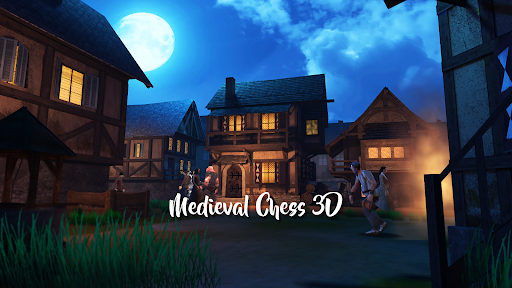
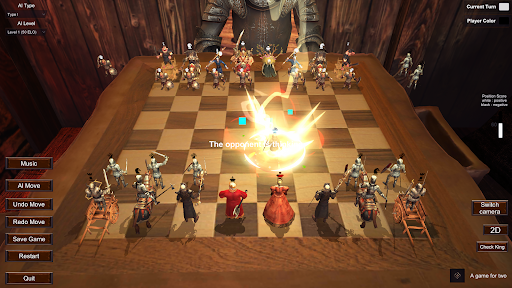
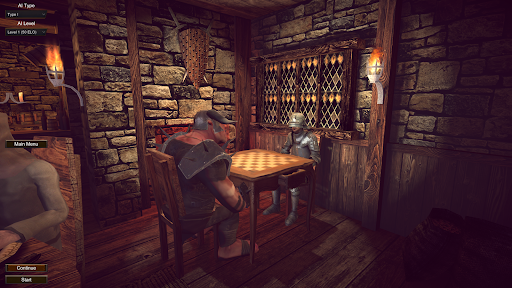
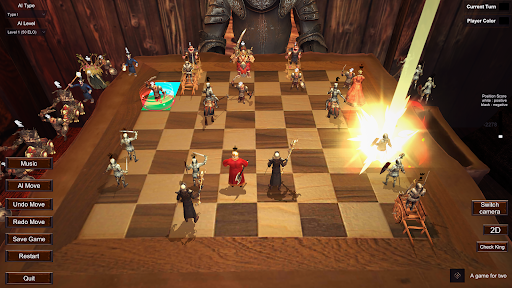
chess 3d is a unique medieval-style chess game. It takes you into the medieval World of Warcraft and the great showdown between humans and orcs. It combines traditional chess gameplay with vivid and interesting anthropomorphic chess pieces, creating a You are presented with an unprecedented immersive battlefield experience, with a relaxed and humorous game atmosphere and music style. We are in a medieval tavern. In this game, you will play the role of a wise man in the medieval kingdom, commanding your heroic chess pieces in A fierce battle takes place on the ancient chessboard. Each chess piece is no longer a cold wooden doll, but a lifelike hero with its own characteristics. Some of them wear armor and hold swords, while others wear robes and hold wands. Each has unique skills and background stories.
Game features:
chess 3d Anthropomorphic chess pieces: Each chess piece is a hero in a medieval kingdom, with a unique personality and abilities. Through carefully designed character settings, players can have a deeper understanding of the background story of each chess piece and enhance the sense of immersion in the game.
Vivid visual effects: The game uses exquisite medieval-style graphics, making players feel like they are in a medieval tavern. Gorgeous chess piece design and realistic scene rendering bring players an immersive gaming experience.
Full of strategy: Ultra-high AI system, free switching of AI levels, which can reach up to level 11 The game retains the core gameplay of chess, which requires players to have excellent strategic vision and tactical thinking. . Players need to develop the best offensive and defensive strategies based on the opponent's layout and the abilities of the pieces.
Rich and diverse game modes: We can use one mobile phone and two players to compete together.
chess 3d is a fun and chess game. Whether you are a chess enthusiast or a novice player, you will find fun and challenge in this game. Would you like to collect this game? Thank you for your support and encouragement, thank you.
Tampilkan Lebih banyak

1. Unduh dan instal MEmu APP

2. Menjalankan MEmu lalu buka Google Play di halaman

3. Cari The Coolest Chess 3D di Google Play
Install
4. Unduh dan instal The Coolest Chess 3D
5. Setelah insatl APP selesai,klik ikon untuk mulai

6. Nikmati bermain The Coolest Chess 3D di PC dengan MEmu
MEmu App Player adalah emulator Android gratis terbaik dan 50 Juta orang sudah menikmati pengalaman luar biasa dalam bermain gim Android. Teknologi virtualisasi MEmu memberi kekuasaan untuk memainkan ribuan gim Android dengan lancar di PC anda, bahkan gim dengan grafis yang paling tinggi.
Layar lebih besar dengan grafis yang lebih baik; durasi panjang, tanpa batasan baterai atau data seluler.
Didukung penuh oleh Pemetaan tombol yang lengkap untuk keakuratan kontrol keyboard dan mouse maupun gamepad.
Membuka beberapa akun game atau tugas di waktu yang sama hanya pada satu PC, dengan Multi-Instance manager.
Play The Coolest Chess 3D on PC by following steps: