Barcode Scanner
Diupdate
Versi Saat Ini
5.0.13 (186)
Ditawarkan Oleh

Hentilah khawatir tentang biaya berlebihan saat menggunakan Barcode Scanner di ponsel Anda, bebaskan diri Anda dari layar kecil dan nikmati menggunakan aplikasi pada tampilan yang lebih besar. Mulai sekarang, dapatkan pengalaman full-screen di aplikasi Anda dengan keyboard dan mouse. MEmu menyediakan semua fitur mengejutkan yang Anda harapkan: cepat menginstal dan mudah menggunakan, kontrol intuitif, tidak ada lagi batasan baterai, data seluler dan panggilan yang mengganggu. MEmu 9 yang baru adalah pilihan terbaik untuk menggunakan Barcode Scanner di komputer Anda. Bersandi dengan absorpsi kami, manajer multi-instance memungkinkan pembukaan 2 akun atau lebih pada saat yang bersamaan. Dan yang paling penting, mesin emulasi eksklusif kami dapat melepaskan potensi penuh PC Anda, menjadikan semuanya lancar dan menyenangkan.
Tampilkan Lebih banyak
Unduh Barcode Scanner di PC dengan Emulator Android MEmu. Nikmati permainan pada layar yang besar. add the power of the Cognex Mobile Barcode SDK to your development toolkit today!
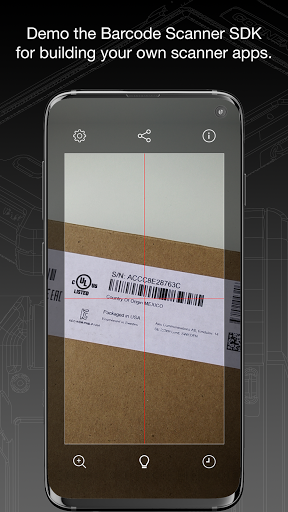
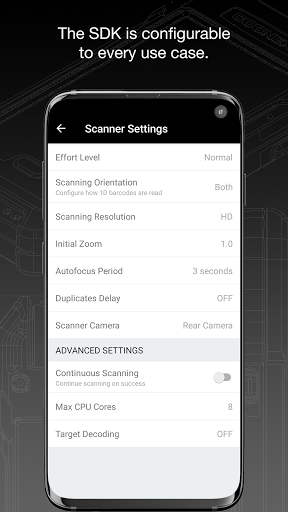
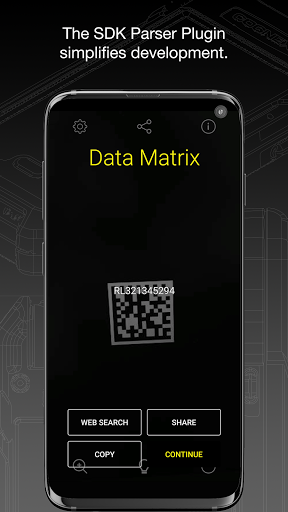
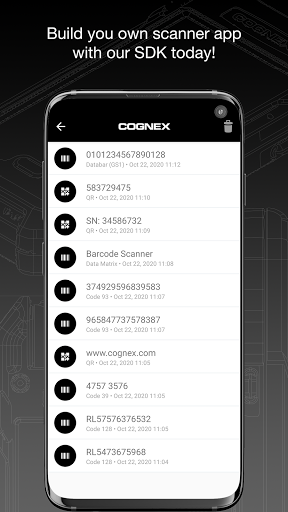
add the power of the Cognex Mobile Barcode SDK to your development toolkit today!
Quickly scan driver’s licenses and disks; deliver accurate results to consumers scanning products; make connections at trade shows; scan airline and train boarding passes; expedite package and food delivery; keep the warehouse organized all with the same powerful barcode scanning technology used by many of today’s Fortune 500 companies.
Download the Cognex Barcode Scanner application for your mobile device to see how the Cognex Mobile Barcode SDK can add new interactivity to your apps and enable a host of marketing, industry, and enterprise automatic identification and data capture (AIDC) workflows.
Our API delivers outstanding value to developers through four pillars: simplicity, reliability, efficiency, and speed.
Simplicity - The SDK’s high-level API make adding barcode scanning to your application simple. But don’t worry: the SDK is quite flexible and will allow the programmer to customize the user experience and tune scanning features.
Reliability - The Cognex Mobile Barcode SDK is the most reliable and accurate barcode reading technology available for mobile applications and smartphone integration, regardless of platform, development framework, or barcode symbology.
Efficiency - As a tool developed with the logistics, manufacturing, healthcare, and commercial services industries in mind, it is built with efficiency for the end-user, as well as simplicity for the application developer.
Speed - The Cognex Mobile Barcode SDK is tuned to provide fast and reliable barcode reading for smartphones and tablets. For damaged codes, challenging lighting conditions, or harsh environments, the SDK leverages advanced algorithms to be able to scan the toughest barcodes..
The Cognex Mobile Barcode SDK supports all major barcode symbologies, including Aztec Code, Codabar, Code 11, Code 25 (Interleaved, Industrial and ITF-14), Code 39, Code 93, Code 128, Data Matrix, DotCode, EAN, ISBN, GS1 DataBar, MaxiCode, MSI Plessey, PDF417, Postal Code, QR Code (Micro and Standard), TELEPEN and UPC barcode types, as well as all GS1 sub-types like GS1 QR Code, GS1 DataMatrix and GS1-128.
The Cognex Mobile Barcode SDK is available for the most powerful cross-platform development frameworks, including: Xamarin, Cordova, Flutter, React Native, and NativeScript.
Or deploy a barcode scanning Progressive Web App (PWA) using the Cognex Mobile Barcode SDK for Web. Add barcode scanning to virtually any web application or website without the need for a native component. The Cognex Mobile Barcode SDK for Web leverages the power of your browser’s Web Assembly capabilities to bring world class barcode scanning to mobile and desktop browsers alike.
You can add powerful data capture parser plugins to the Cognex Mobile Barcode SDK at no additional cost when you purchase an SDK license. Plugins include industry standard parsers such as AAMVA (US and Canadian Driver’s Licenses), GS1, IUID, Structured Carrier Messages (MaxiCode), and more!
Put us to the test in your real-world conditions and use cases.
To learn more, contact us via email at sdksales@cognex.com or visit https://cmbdn.cognex.com.
Tampilkan Lebih banyak

1. Unduh dan instal MEmu APP

2. Menjalankan MEmu lalu buka Google Play di halaman

3. Cari Barcode Scanner di Google Play
Install
4. Unduh dan instal Barcode Scanner
5. Setelah insatl APP selesai,klik ikon untuk mulai

6. Nikmati bermain Barcode Scanner di PC dengan MEmu
MEmu Play adalah emulator Android gratis terbaik dan 50 Juta orang sudah menikmati pengalaman luar biasa dalam Aplikasi Android. Teknologi virtualisasi MEmu memberi kekuasaan untuk memainkan ribuan Aplikasi Android dengan lancar di PC anda, bahkan Aplikasi dengan grafis yang paling tinggi.
Layar lebih besar dengan grafis yang lebih baik; durasi panjang, tanpa batasan baterai atau data seluler.
Didukung penuh oleh Pemetaan tombol yang lengkap untuk keakuratan kontrol keyboard dan mouse maupun gamepad.
Membuka beberapa akun game atau tugas di waktu yang sama hanya pada satu PC, dengan Multi-Instance manager.
Use Barcode Scanner on PC by following steps: