Barcode Scanner
Đã cập nhật
Phiên bản hiện tại
5.0.13 (186)
Cung cấp bởi

Bạn không cần phải lo lắng về việc sạc quá mức khi sử dụng Barcode Scanner trên điện thoại của bạn, không phải sử dụng trên màn hình nhỏ bé và tận hưởng ứng dụng trên màn hình lớn hơn rất nhiều. Từ bây giờ, bạn hãy trải nghiệm ứng dụng của bạn toàn màn hình bằng bàn phím và chuột. MEmu cung cấp cho bạn tất cả các tính năng đáng ngạc nhiên mà bạn mong đợi: cài đặt nhanh, cài đặt dễ dàng, điều khiển trực quan, không còn giới hạn về pin, dữ liệu di động và các cuộc gọi làm phiền. MEmu 9 hoàn toàn mới là sự lựa chọn tốt nhất để sử dụng Barcode Scanner trên máy tính của bạn. Được mã hóa với sự hợp nhất của chúng tôi, trình quản lý multi-instance giúp mở 2 tài khoản trở lên cùng một lúc. Và điều quan trọng nhất là, công cụ mô phỏng độc quyền của chúng tôi có thể tận dụng hết toàn bộ tiềm năng trên PC của bạn, giúp mọi thứ vận hành trơn tru và thú vị.
Nhiều hơn
Tải Barcode Scanner trên PC với Trình giả lập Android MEmu. Tận hưởng trải nghiệm chơi game trên màn hình lớn add the power of the Cognex Mobile Barcode SDK to your development toolkit today!
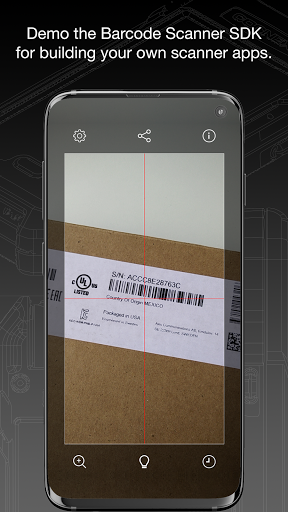
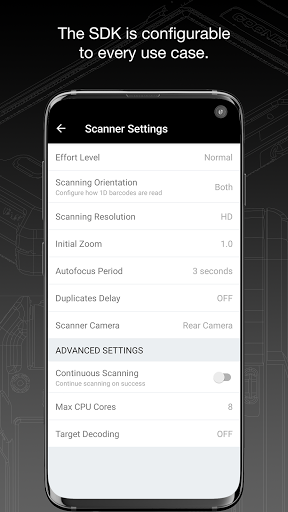
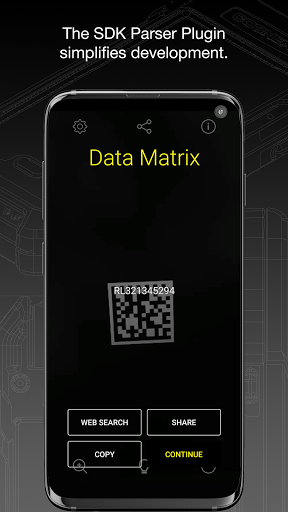
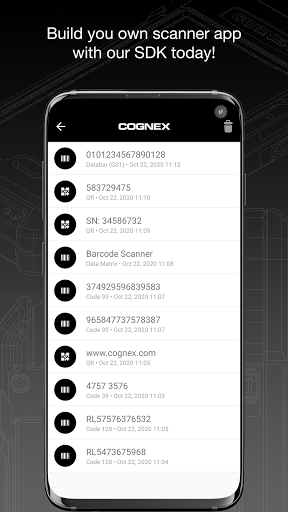
add the power of the Cognex Mobile Barcode SDK to your development toolkit today!
Quickly scan driver’s licenses and disks; deliver accurate results to consumers scanning products; make connections at trade shows; scan airline and train boarding passes; expedite package and food delivery; keep the warehouse organized all with the same powerful barcode scanning technology used by many of today’s Fortune 500 companies.
Download the Cognex Barcode Scanner application for your mobile device to see how the Cognex Mobile Barcode SDK can add new interactivity to your apps and enable a host of marketing, industry, and enterprise automatic identification and data capture (AIDC) workflows.
Our API delivers outstanding value to developers through four pillars: simplicity, reliability, efficiency, and speed.
Simplicity - The SDK’s high-level API make adding barcode scanning to your application simple. But don’t worry: the SDK is quite flexible and will allow the programmer to customize the user experience and tune scanning features.
Reliability - The Cognex Mobile Barcode SDK is the most reliable and accurate barcode reading technology available for mobile applications and smartphone integration, regardless of platform, development framework, or barcode symbology.
Efficiency - As a tool developed with the logistics, manufacturing, healthcare, and commercial services industries in mind, it is built with efficiency for the end-user, as well as simplicity for the application developer.
Speed - The Cognex Mobile Barcode SDK is tuned to provide fast and reliable barcode reading for smartphones and tablets. For damaged codes, challenging lighting conditions, or harsh environments, the SDK leverages advanced algorithms to be able to scan the toughest barcodes..
The Cognex Mobile Barcode SDK supports all major barcode symbologies, including Aztec Code, Codabar, Code 11, Code 25 (Interleaved, Industrial and ITF-14), Code 39, Code 93, Code 128, Data Matrix, DotCode, EAN, ISBN, GS1 DataBar, MaxiCode, MSI Plessey, PDF417, Postal Code, QR Code (Micro and Standard), TELEPEN and UPC barcode types, as well as all GS1 sub-types like GS1 QR Code, GS1 DataMatrix and GS1-128.
The Cognex Mobile Barcode SDK is available for the most powerful cross-platform development frameworks, including: Xamarin, Cordova, Flutter, React Native, and NativeScript.
Or deploy a barcode scanning Progressive Web App (PWA) using the Cognex Mobile Barcode SDK for Web. Add barcode scanning to virtually any web application or website without the need for a native component. The Cognex Mobile Barcode SDK for Web leverages the power of your browser’s Web Assembly capabilities to bring world class barcode scanning to mobile and desktop browsers alike.
You can add powerful data capture parser plugins to the Cognex Mobile Barcode SDK at no additional cost when you purchase an SDK license. Plugins include industry standard parsers such as AAMVA (US and Canadian Driver’s Licenses), GS1, IUID, Structured Carrier Messages (MaxiCode), and more!
Put us to the test in your real-world conditions and use cases.
To learn more, contact us via email at sdksales@cognex.com or visit https://cmbdn.cognex.com.
Nhiều hơn

1. Tải trình cài đặt MEmu và hoàn tất cài đặt

2. Khởi động MEmu, sau đó mở Google Play trên trang chủ

3. Tìm kiếm Barcode Scanner trong Google Play
Install
4. Tải và Cài Đặt Barcode Scanner
5. Khi cài đặt hoàn tất, nhấp vào biểu tượng để bắt đầu

6. Trải nghiệm Barcode Scanner trên PC của bạn bằng MEmu
MEmu Play là trình giả lập Android miễn phí tốt nhất, với 50 triệu người dùng trải nghiệm ứng dụng Android tuyệt vời. Công nghệ ảo hóa của MEmu cho phép bạn chạy mượt mà hàng ngàn ứng dụng Android trên máy tính, ngay cả những ứng dụng đòi hỏi cấu hình cao nhất.
Màn hình lớn hơn cùng với đồ hoạ tốt hơn; thời lượng dài, không giới hạn về pin hoặc dữ liệu di động
Hỗ trợ đầy đủ Keymapping cho việc kiểm soát chính xác bàn phím và chuột hoặc gamepad
Nhiều tài khoản trò chơi hoặc tác vụ cùng lúc trên một PC với Quản lý Đa năng
Use Barcode Scanner on PC by following steps: