
GhostLock
Diupdate
Versi Saat Ini
1.1.0
Ditawarkan Oleh

Hentilah khawatir tentang biaya berlebihan saat menggunakan GhostLock di ponsel Anda, bebaskan diri Anda dari layar kecil dan nikmati menggunakan aplikasi pada tampilan yang lebih besar. Mulai sekarang, dapatkan pengalaman full-screen di aplikasi Anda dengan keyboard dan mouse. MEmu menyediakan semua fitur mengejutkan yang Anda harapkan: cepat menginstal dan mudah menggunakan, kontrol intuitif, tidak ada lagi batasan baterai, data seluler dan panggilan yang mengganggu. MEmu 9 yang baru adalah pilihan terbaik untuk menggunakan GhostLock di komputer Anda. Bersandi dengan absorpsi kami, manajer multi-instance memungkinkan pembukaan 2 akun atau lebih pada saat yang bersamaan. Dan yang paling penting, mesin emulasi eksklusif kami dapat melepaskan potensi penuh PC Anda, menjadikan semuanya lancar dan menyenangkan.
Tampilkan Lebih banyak
Nikmati pengalaman luar biasa menggunakan GhostLock di PC dengan MEmu Play. Emulator Android gratis dan canggih ini menyediakan ribuan aplikasi Android untuk versi desktop. Nikmati koneksi yang lancar bersama teman dan tingkatkan pekerjaan Anda dengan efisiensi yang lebih tinggi! Protect your privacy with GhostLock.
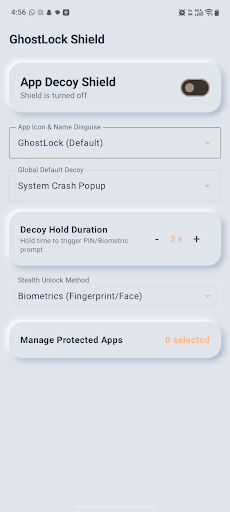
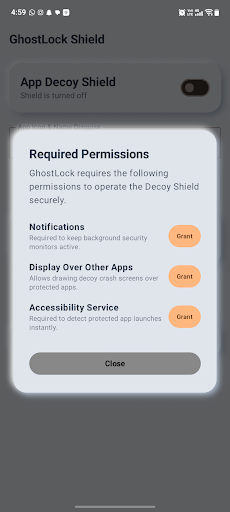
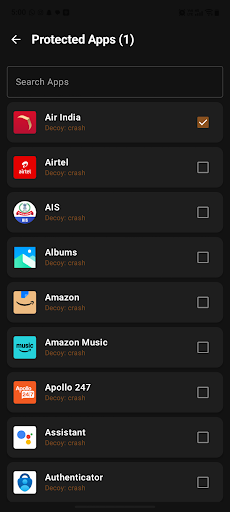
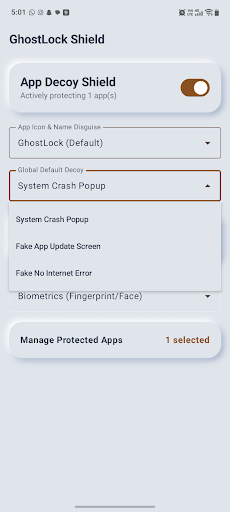
Protect your privacy with GhostLock
GhostLock is a lightweight, ad-free app protection tool that helps secure selected apps on your Android device using PIN or biometric authentication.
Your protection settings and app-lock configuration are stored locally on your device.
APP PROTECTION
Choose which installed apps you want to protect. When a selected protected app is opened, GhostLock detects the foreground app and displays a protection screen before access is allowed.
PIN & BIOMETRIC SECURITY
Protect access using your device’s supported biometric authentication or a locally stored 4-digit PIN.
PIN credentials are securely processed and stored on the device.
CUSTOM PROTECTION SCREEN
GhostLock provides configurable protection-screen styles that appear when a protected app is opened.
CAMOUFLAGE OPTION
GhostLock can optionally provide an alternate calculator-style launcher appearance. This feature is enabled and controlled by the user and can be changed from GhostLock settings.
ACCESSIBILITYSERVICE API USAGE
GhostLock uses Android’s AccessibilityService API as part of its core app-protection functionality.
Accessibility access is used to detect when an app selected by the user for protection becomes the foreground app. This allows GhostLock to display its protection screen at the appropriate time.
GhostLock does not use AccessibilityService to read messages, passwords, typed text, form contents, or private content inside other apps.
GhostLock does not use AccessibilityService to automatically click, type, modify settings, prevent uninstallation, or bypass Android privacy and security controls.
Accessibility access is used only to support the app-protection functionality selected by the user and can be disabled at any time from Android Accessibility Settings.
GhostLock is not an accessibility tool designed to assist users with disabilities.
PRIVACY
• No advertisements
• No behavioral tracking
• Protection configuration is stored locally on the device
• Users control which apps are protected
• Accessibility permission can be disabled at any time
Take control of access to your personal apps with GhostLock.
Tampilkan Lebih banyak

1. Unduh dan instal MEmu APP

2. Menjalankan MEmu lalu buka Google Play di halaman

3. Cari GhostLock di Google Play
Install
4. Unduh dan instal GhostLock
5. Setelah insatl APP selesai,klik ikon untuk mulai

6. Nikmati bermain GhostLock di PC dengan MEmu
MEmu Play adalah emulator Android gratis terbaik dan 50 Juta orang sudah menikmati pengalaman luar biasa dalam Aplikasi Android. Teknologi virtualisasi MEmu memberi kekuasaan untuk memainkan ribuan Aplikasi Android dengan lancar di PC anda, bahkan Aplikasi dengan grafis yang paling tinggi.
Layar lebih besar dengan grafis yang lebih baik; durasi panjang, tanpa batasan baterai atau data seluler.
Didukung penuh oleh Pemetaan tombol yang lengkap untuk keakuratan kontrol keyboard dan mouse maupun gamepad.
Membuka beberapa akun game atau tugas di waktu yang sama hanya pada satu PC, dengan Multi-Instance manager.
Use GhostLock on PC by following steps: