GhostLock
Đã cập nhật
Phiên bản hiện tại
1.1.0
Cung cấp bởi

Bạn không cần phải lo lắng về việc sạc quá mức khi sử dụng GhostLock trên điện thoại của bạn, không phải sử dụng trên màn hình nhỏ bé và tận hưởng ứng dụng trên màn hình lớn hơn rất nhiều. Từ bây giờ, bạn hãy trải nghiệm ứng dụng của bạn toàn màn hình bằng bàn phím và chuột. MEmu cung cấp cho bạn tất cả các tính năng đáng ngạc nhiên mà bạn mong đợi: cài đặt nhanh, cài đặt dễ dàng, điều khiển trực quan, không còn giới hạn về pin, dữ liệu di động và các cuộc gọi làm phiền. MEmu 9 hoàn toàn mới là sự lựa chọn tốt nhất để sử dụng GhostLock trên máy tính của bạn. Được mã hóa với sự hợp nhất của chúng tôi, trình quản lý multi-instance giúp mở 2 tài khoản trở lên cùng một lúc. Và điều quan trọng nhất là, công cụ mô phỏng độc quyền của chúng tôi có thể tận dụng hết toàn bộ tiềm năng trên PC của bạn, giúp mọi thứ vận hành trơn tru và thú vị.
Nhiều hơn
Tận hưởng trải nghiệm tuyệt vời khi sử dụng GhostLock trên PC với MEmu Play. Đây là trình giả lập Android miễn phí mạnh mẽ, cung cấp cho bạn hàng ngàn ứng dụng Android trên máy tính. Thỏa sức kết nối với bạn bè và hoàn thiện công việc với hiệu suất cao hơn! Protect your privacy with GhostLock.
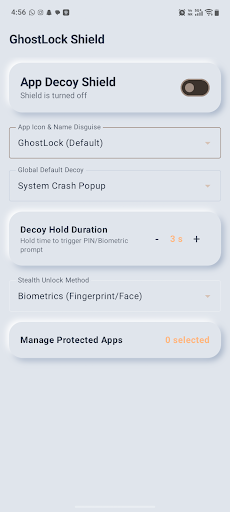
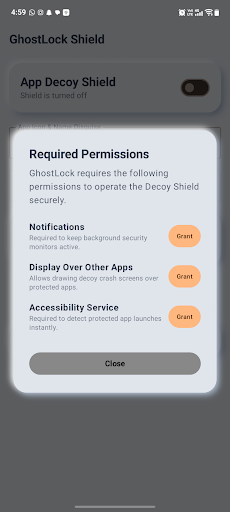
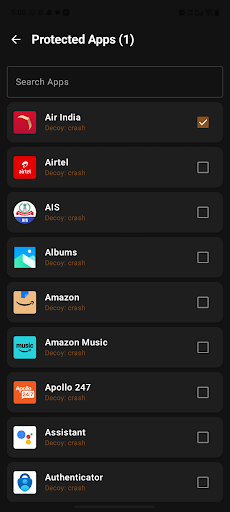
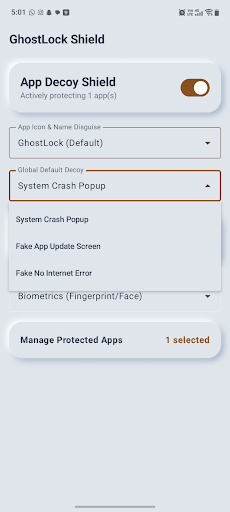
Protect your privacy with GhostLock
GhostLock is a lightweight, ad-free app protection tool that helps secure selected apps on your Android device using PIN or biometric authentication.
Your protection settings and app-lock configuration are stored locally on your device.
APP PROTECTION
Choose which installed apps you want to protect. When a selected protected app is opened, GhostLock detects the foreground app and displays a protection screen before access is allowed.
PIN & BIOMETRIC SECURITY
Protect access using your device’s supported biometric authentication or a locally stored 4-digit PIN.
PIN credentials are securely processed and stored on the device.
CUSTOM PROTECTION SCREEN
GhostLock provides configurable protection-screen styles that appear when a protected app is opened.
CAMOUFLAGE OPTION
GhostLock can optionally provide an alternate calculator-style launcher appearance. This feature is enabled and controlled by the user and can be changed from GhostLock settings.
ACCESSIBILITYSERVICE API USAGE
GhostLock uses Android’s AccessibilityService API as part of its core app-protection functionality.
Accessibility access is used to detect when an app selected by the user for protection becomes the foreground app. This allows GhostLock to display its protection screen at the appropriate time.
GhostLock does not use AccessibilityService to read messages, passwords, typed text, form contents, or private content inside other apps.
GhostLock does not use AccessibilityService to automatically click, type, modify settings, prevent uninstallation, or bypass Android privacy and security controls.
Accessibility access is used only to support the app-protection functionality selected by the user and can be disabled at any time from Android Accessibility Settings.
GhostLock is not an accessibility tool designed to assist users with disabilities.
PRIVACY
• No advertisements
• No behavioral tracking
• Protection configuration is stored locally on the device
• Users control which apps are protected
• Accessibility permission can be disabled at any time
Take control of access to your personal apps with GhostLock.
Nhiều hơn

1. Tải trình cài đặt MEmu và hoàn tất cài đặt

2. Khởi động MEmu, sau đó mở Google Play trên trang chủ

3. Tìm kiếm GhostLock trong Google Play
Install
4. Tải và Cài Đặt GhostLock
5. Khi cài đặt hoàn tất, nhấp vào biểu tượng để bắt đầu

6. Trải nghiệm GhostLock trên PC của bạn bằng MEmu
MEmu Play là trình giả lập Android miễn phí tốt nhất, với 50 triệu người dùng trải nghiệm ứng dụng Android tuyệt vời. Công nghệ ảo hóa của MEmu cho phép bạn chạy mượt mà hàng ngàn ứng dụng Android trên máy tính, ngay cả những ứng dụng đòi hỏi cấu hình cao nhất.
Màn hình lớn hơn cùng với đồ hoạ tốt hơn; thời lượng dài, không giới hạn về pin hoặc dữ liệu di động
Hỗ trợ đầy đủ Keymapping cho việc kiểm soát chính xác bàn phím và chuột hoặc gamepad
Nhiều tài khoản trò chơi hoặc tác vụ cùng lúc trên một PC với Quản lý Đa năng
Use GhostLock on PC by following steps: