
iNavX: Marine Navigation
Diupdate
Versi Saat Ini
1.6.6
Ditawarkan Oleh

Hentilah khawatir tentang biaya berlebihan saat menggunakan iNavX: Marine Navigation di ponsel Anda, bebaskan diri Anda dari layar kecil dan nikmati menggunakan aplikasi pada tampilan yang lebih besar. Mulai sekarang, dapatkan pengalaman full-screen di aplikasi Anda dengan keyboard dan mouse. MEmu menyediakan semua fitur mengejutkan yang Anda harapkan: cepat menginstal dan mudah menggunakan, kontrol intuitif, tidak ada lagi batasan baterai, data seluler dan panggilan yang mengganggu. MEmu 9 yang baru adalah pilihan terbaik untuk menggunakan iNavX: Marine Navigation di komputer Anda. Bersandi dengan absorpsi kami, manajer multi-instance memungkinkan pembukaan 2 akun atau lebih pada saat yang bersamaan. Dan yang paling penting, mesin emulasi eksklusif kami dapat melepaskan potensi penuh PC Anda, menjadikan semuanya lancar dan menyenangkan.
Tampilkan Lebih banyak
Unduh iNavX: Marine Navigation di PC dengan Emulator Android MEmu. Nikmati permainan pada layar yang besar. Marine navigation is made easy with iNavX - the world's #1 handheld Chartplotter.
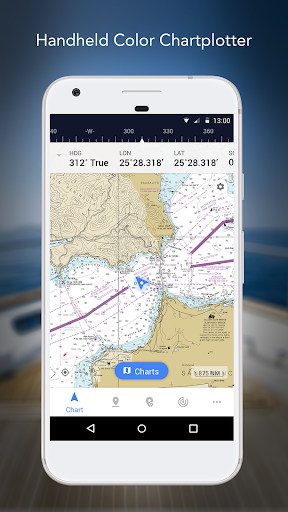
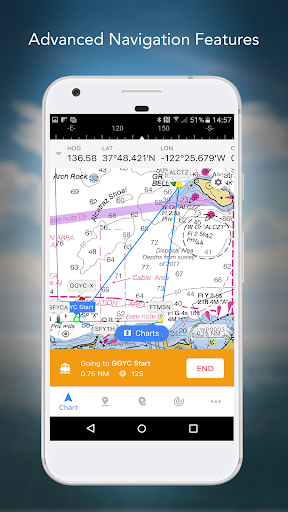
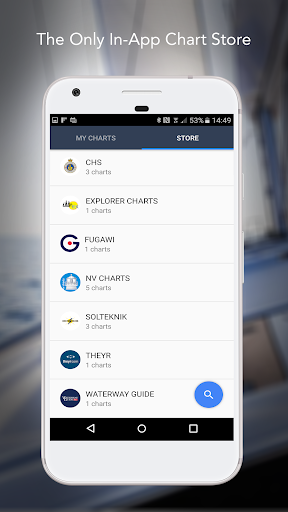
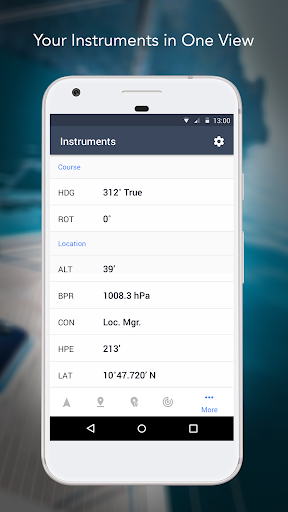
Marine navigation is made easy with iNavX - the world's #1 handheld Chartplotter. Access marine charts, maps, weather, AIS and more!
iNavX is the only app to give you complete worldwide chart coverage, from all your favorite charts providers, including the ALL NEW iNavX Professional+ Global Chart! Fully enabled with one-touch access, iNavX gives users access to the broadest set of marine charts and maps from multiple providers including:
• iNavX Professional+ Charts
• Blue Latitude
• Explorer
• Theyr Weather
• Waterway Guide
• … and more
How does iNavX take handheld marine navigation to the next level?
• Sailors - Plan sailing routes with waypoint and route management. Get proactive sail management with GRIB weather forecasts and then keep watch with AIS overlays and integration with your onboard systems. Plus, you can remember your great sailing locations by geotagging photos.
• Boaters - Stay up to date on boating conditions with forecasts that include currents, winds, and swells. Manage your boating equipment with nautical instrument integration and then save great boating routes to share with the track log.
• Anglers - Discover new fishing spots by scouting out holes and inlets. Locate the best fishing conditions by identifying cold fronts and save your best fishing spots with unlimited markers.
Advanced features - iNavX is the most feature rich app available for all sailing and boating needs at a great price:
Advanced Chart Plotter
• Plot your position in real-time using your device's built-in GPS
• Pan, zoom, and rotate charts (including course up)
• Print detailed charts to use in combination with the app
Advanced Navigation
• Create waypoints and plan routes to navigate between them
• Track log allows you to record your route
• Import/export data in KML (Google Earth) or GPX format
Advanced Instrumentation
• Supports NMEA data over TCP/IP (using Wifi)
• Integrates with external GPS, AIS receivers & transponders
• Connect nautical instruments: Depth, Speed, Wind, Engine, Batteries, etc.
Essential Toolkit
• GRIB weather forecast
• Tides/currents
• Anchor alarm
• AIS integration
• Port/navaid search
Download iNavX TODAY and automatically receive a complimentary copy of the official and up-to-date high-resolution NOAA RNC United States marine raster charts.
REVIEWS
“iNavX is the original and still one of the best navigation apps.”
– Practical Sailor
“The most full-featured navigation app around and viewed by many as the standard”
– Sail Magazine
"The #1 recommended marine charting app"
- iMarineApps
iNavX is Compatible with: C-MAP, Theyr Weather, Waterway Guide, AIS, Brookhouse, DigitalYacht, ShipModul, vYacht, Vesper Marine, NMEA 2000, Chetco and more.
NEW CHART STORE
Purchase all your favorite charts. Chart subscriptions vary by chart and provider from $9.99 to $199.99 annually, charged to your iTunes Account, which will automatically renew unless cancelled at least 24 hours before the end of the current period. Auto-renew can be turned off anytime by going to your Account Settings in iTunes after purchase. No cancellation of the current subscription is allowed during active subscription period.
NOTE: Continued use of GPS running in the background can dramatically decrease battery life.
MORE INFO
Website: http://inavx.com/
User's Guide: http://inavx.com/help/
Terms of Use: http://inavx.com/terms
Privacy Policy: http://inavx.com/privacy
Tampilkan Lebih banyak

1. Unduh dan instal MEmu APP

2. Menjalankan MEmu lalu buka Google Play di halaman

3. Cari iNavX: Marine Navigation di Google Play
Install
4. Unduh dan instal iNavX: Marine Navigation
5. Setelah insatl APP selesai,klik ikon untuk mulai

6. Nikmati bermain iNavX: Marine Navigation di PC dengan MEmu
MEmu Play adalah emulator Android gratis terbaik dan 50 Juta orang sudah menikmati pengalaman luar biasa dalam Aplikasi Android. Teknologi virtualisasi MEmu memberi kekuasaan untuk memainkan ribuan Aplikasi Android dengan lancar di PC anda, bahkan Aplikasi dengan grafis yang paling tinggi.
Layar lebih besar dengan grafis yang lebih baik; durasi panjang, tanpa batasan baterai atau data seluler.
Didukung penuh oleh Pemetaan tombol yang lengkap untuk keakuratan kontrol keyboard dan mouse maupun gamepad.
Membuka beberapa akun game atau tugas di waktu yang sama hanya pada satu PC, dengan Multi-Instance manager.
Use iNavX: Marine Navigation on PC by following steps: