iNavX: Marine Navigation
อัปเดตเมื่อ
เวอร์ชันปัจจุบัน
1.6.6
ให้บริการโดย

เมื่อใช้ iNavX: Marine Navigation บนโทรศัพท์ของคุณไม่ต้องกังวลกับการชาร์จไฟมากเกินไปปลดปล่อยตัวคุณเองจากหน้าจอขนาดเล็กและสนุกกับการใช้แอพนี้บนหน้าจอขนาดใหญ่ จากนี้ไปรับประสบการณ์เต็มหน้าจอของแอปพลิเคชันของคุณด้วยคีย์บอร์ดและเมาส์ MEmu มีคุณสมบัติที่น่าแปลกใจที่คุณคาดหวัง: การติดตั้งที่รวดเร็วและการตั้งค่าที่ง่ายควบคุมได้ง่ายไม่ จำกัด แบตเตอรี่ข้อมูลมือถือและการโทรที่รบกวน MEmu 9 ใหม่ล่าสุดเป็นตัวเลือกที่ดีที่สุดสำหรับการใช้ Meitu – โปรแกรมแก้ไขภาพแนวธรรมชาติ บนคอมพิวเตอร์ของคุณ ด้วยรหัสการดูดซึมของเราผู้จัดการหลายอินสแตนซ์ทำให้สามารถเปิดบัญชี 2 บัญชีขึ้นไปในเวลาเดียวกันได้ และที่สำคัญที่สุดเอ็นจิ้นจำลองพิเศษของเราสามารถปลดปล่อยศักยภาพของPCของคุณและทำให้ทุกอย่างราบรื่นและสนุกสนาน
แสดงเพิ่มเติม
ดาวน์โหลด iNavX: Marine Navigation บน PC ด้วย MEmu Android Emulator สนุกกับการเล่นบนหน้าจอขนาดใหญ่ Marine navigation is made easy with iNavX - the world's #1 handheld Chartplotter.
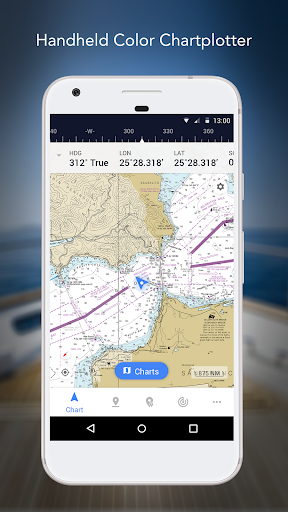
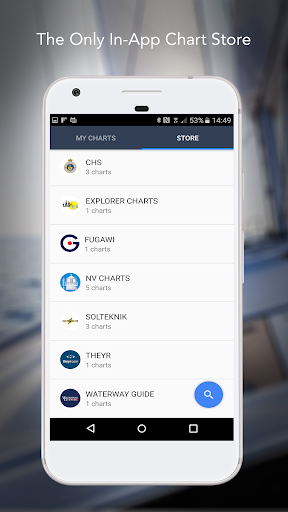
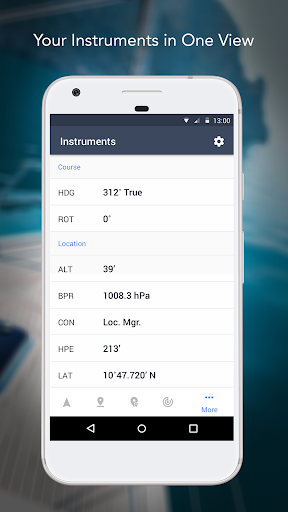
Marine navigation is made easy with iNavX - the world's #1 handheld Chartplotter. Access marine charts, maps, weather, AIS and more!
iNavX is the only app to give you complete worldwide chart coverage, from all your favorite charts providers, including the ALL NEW iNavX Professional+ Global Chart! Fully enabled with one-touch access, iNavX gives users access to the broadest set of marine charts and maps from multiple providers including:
• iNavX Professional+ Charts
• Blue Latitude
• Explorer
• Theyr Weather
• Waterway Guide
• … and more
How does iNavX take handheld marine navigation to the next level?
• Sailors - Plan sailing routes with waypoint and route management. Get proactive sail management with GRIB weather forecasts and then keep watch with AIS overlays and integration with your onboard systems. Plus, you can remember your great sailing locations by geotagging photos.
• Boaters - Stay up to date on boating conditions with forecasts that include currents, winds, and swells. Manage your boating equipment with nautical instrument integration and then save great boating routes to share with the track log.
• Anglers - Discover new fishing spots by scouting out holes and inlets. Locate the best fishing conditions by identifying cold fronts and save your best fishing spots with unlimited markers.
Advanced features - iNavX is the most feature rich app available for all sailing and boating needs at a great price:
Advanced Chart Plotter
• Plot your position in real-time using your device's built-in GPS
• Pan, zoom, and rotate charts (including course up)
• Print detailed charts to use in combination with the app
Advanced Navigation
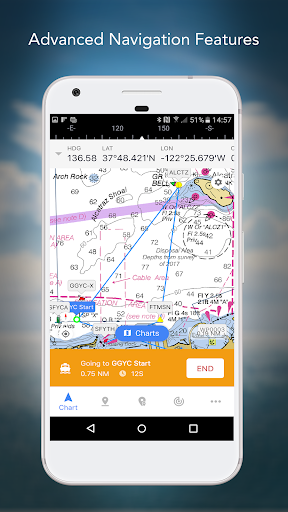
• Create waypoints and plan routes to navigate between them
• Track log allows you to record your route
• Import/export data in KML (Google Earth) or GPX format
Advanced Instrumentation
• Supports NMEA data over TCP/IP (using Wifi)
• Integrates with external GPS, AIS receivers & transponders
• Connect nautical instruments: Depth, Speed, Wind, Engine, Batteries, etc.
Essential Toolkit
• GRIB weather forecast
• Tides/currents
• Anchor alarm
• AIS integration
• Port/navaid search
Download iNavX TODAY and automatically receive a complimentary copy of the official and up-to-date high-resolution NOAA RNC United States marine raster charts.
REVIEWS
“iNavX is the original and still one of the best navigation apps.”
– Practical Sailor
“The most full-featured navigation app around and viewed by many as the standard”
– Sail Magazine
"The #1 recommended marine charting app"
- iMarineApps
iNavX is Compatible with: C-MAP, Theyr Weather, Waterway Guide, AIS, Brookhouse, DigitalYacht, ShipModul, vYacht, Vesper Marine, NMEA 2000, Chetco and more.
NEW CHART STORE
Purchase all your favorite charts. Chart subscriptions vary by chart and provider from $9.99 to $199.99 annually, charged to your iTunes Account, which will automatically renew unless cancelled at least 24 hours before the end of the current period. Auto-renew can be turned off anytime by going to your Account Settings in iTunes after purchase. No cancellation of the current subscription is allowed during active subscription period.
NOTE: Continued use of GPS running in the background can dramatically decrease battery life.
MORE INFO
Website: http://inavx.com/
User's Guide: http://inavx.com/help/
Terms of Use: http://inavx.com/terms
Privacy Policy: http://inavx.com/privacy
แสดงเพิ่มเติม

1. ดาวน์โหลดตัวติดตั้ง MEmu และสิ้นสุดการติดตั้ง

2. เริ่ม MEmu จากนั้นเปิด Google Play บนหน้าแรก

3. ค้นหา iNavX: Marine Navigation ใน Google Play
Install
4. ดาวน์โหลดและติดตั้ง iNavX: Marine Navigation
5. เมื่อติดตั้งเสร็จให้คลิกที่ไอคอนเพื่อเริ่มใช้งาน

6. ใช้ MEmu เพื่อสัมผัสประสบการณ์ iNavX: Marine Navigation บนคอมพิวเตอร์ของคุณ
MEmu Play คือโปรแกรมจำลอง Android ที่ดีที่สุด มีผู้ใช้มากกว่า 50 ล้านคน มอบประสบการณ์การใช้งานแอป Android ขั้นสุดยอดให้กับคุณ เทคโนโลยีจำลองเสมือนของ MEmu ช่วยให้คุณรันแอป Android หลายพันแอปบนคอมพิวเตอร์ได้อย่างราบรื่น แม้แอปที่กินทรัพยากรเครื่องสูงที่สุด
จอใหญ่และกราฟฟิกสวยกว่า; เล่นได้นาน, ไม่ต้องใช้แบตเตอรี่โทรศัพท์หรือเน็ตโทรศัพท์.
ระบบปรับแต่งปุ่มคีย์บอร์ดและเม้าส์ตามที่คุณเลือก
เล่นมากกว่าหนึ่งเกมบน PC ในเวลาเดียวกันด้วยระบบหลายจอหรือ Multi-Instance manager.
Use iNavX: Marine Navigation on PC by following steps: