KOSPET FIT
Diupdate
Versi Saat Ini
1.0.8.9
Ditawarkan Oleh

Hentilah khawatir tentang biaya berlebihan saat menggunakan KOSPET FIT di ponsel Anda, bebaskan diri Anda dari layar kecil dan nikmati menggunakan aplikasi pada tampilan yang lebih besar. Mulai sekarang, dapatkan pengalaman full-screen di aplikasi Anda dengan keyboard dan mouse. MEmu menyediakan semua fitur mengejutkan yang Anda harapkan: cepat menginstal dan mudah menggunakan, kontrol intuitif, tidak ada lagi batasan baterai, data seluler dan panggilan yang mengganggu. MEmu 9 yang baru adalah pilihan terbaik untuk menggunakan KOSPET FIT di komputer Anda. Bersandi dengan absorpsi kami, manajer multi-instance memungkinkan pembukaan 2 akun atau lebih pada saat yang bersamaan. Dan yang paling penting, mesin emulasi eksklusif kami dapat melepaskan potensi penuh PC Anda, menjadikan semuanya lancar dan menyenangkan.
Tampilkan Lebih banyak
Unduh KOSPET FIT di PC dengan Emulator Android MEmu. Nikmati permainan pada layar yang besar. The App KOSPET FIT, a brand-new smartwatch helper independently developed by KOSPET, not only monitors your health data and physical activities, but enables you to download numerous official watch faces and keep you informed of KOSPET’s latest and upcoming events and services.
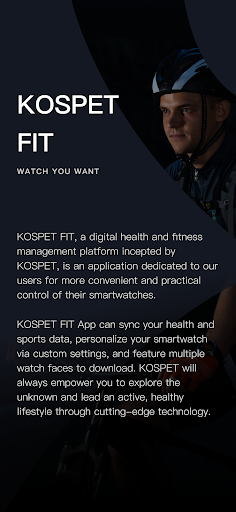
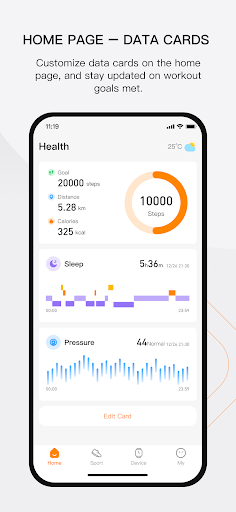
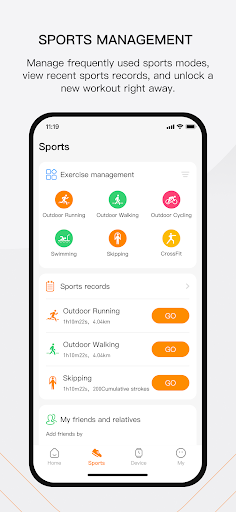
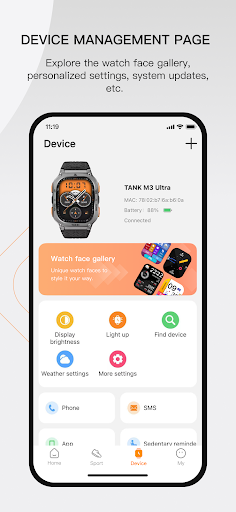
The App KOSPET FIT, a brand-new smartwatch helper independently developed by KOSPET, not only monitors your health data and physical activities, but enables you to download numerous official watch faces and keep you informed of KOSPET’s latest and upcoming events and services.
【Exercise & Physical Activity Tracking】
Once your daily goals are set, the progress is tracked in real time.
Records steps and calculates distance and calorie consumption.
Supports up to 70 sports modes with GPS.
【Health Monitoring】
Enables real-time detection of heart rate with personal settings.
Enables sleep monitoring and analysis of sleep quality that can be shared.
【Personal Settings】
Download multiple customized watch faces online
Settings on notifications of phone calls, SMS and SNS.
Quick settings on sedentary reminder, alarm clock and tilt to wake the screen.
【KOSPET Official Service】
Direct access to an update on KOSPET’s new arrivals.
Direct access to KOSPET’s official technical support and after-sales service.
【About App Permissions】
To ensure better product experience, KOSPET FIT will use the permissions to access your Bluetooth, location, phone calls, text messages, contacts, call history, and accessibility services, and the App will obtain the message push content through [Accessibility API], realize the message push function, and push the message content to the smart watch TANK M2 and TANK T2;
This aims for a faster and more convenient using experience of KOSPET FIT. KOSPET cannot view, upload or save any of your private information.
Notes:
KOSPET FIT is currently compatible with KOSPET TANK T2 and TANK M2 and it is expected to ensure compatibility with more upcoming models.
KOSPET FIT is not compatible with KOSPET TANK M1 series, TANK T1 series, MAGIC 3, MAGIC 3S, MAGIC 4, GTO or GTR.
Tampilkan Lebih banyak

1. Unduh dan instal MEmu APP

2. Menjalankan MEmu lalu buka Google Play di halaman

3. Cari KOSPET FIT di Google Play
Install
4. Unduh dan instal KOSPET FIT
5. Setelah insatl APP selesai,klik ikon untuk mulai

6. Nikmati bermain KOSPET FIT di PC dengan MEmu
MEmu Play adalah emulator Android gratis terbaik dan 50 Juta orang sudah menikmati pengalaman luar biasa dalam Aplikasi Android. Teknologi virtualisasi MEmu memberi kekuasaan untuk memainkan ribuan Aplikasi Android dengan lancar di PC anda, bahkan Aplikasi dengan grafis yang paling tinggi.
Layar lebih besar dengan grafis yang lebih baik; durasi panjang, tanpa batasan baterai atau data seluler.
Didukung penuh oleh Pemetaan tombol yang lengkap untuk keakuratan kontrol keyboard dan mouse maupun gamepad.
Membuka beberapa akun game atau tugas di waktu yang sama hanya pada satu PC, dengan Multi-Instance manager.
Use KOSPET FIT on PC by following steps: