Prescription Lens Scanner
Diupdate
Versi Saat Ini
5.40.1400
Ditawarkan Oleh

Hentilah khawatir tentang biaya berlebihan saat menggunakan Prescription Lens Scanner di ponsel Anda, bebaskan diri Anda dari layar kecil dan nikmati menggunakan aplikasi pada tampilan yang lebih besar. Mulai sekarang, dapatkan pengalaman full-screen di aplikasi Anda dengan keyboard dan mouse. MEmu menyediakan semua fitur mengejutkan yang Anda harapkan: cepat menginstal dan mudah menggunakan, kontrol intuitif, tidak ada lagi batasan baterai, data seluler dan panggilan yang mengganggu. MEmu 9 yang baru adalah pilihan terbaik untuk menggunakan Prescription Lens Scanner di komputer Anda. Bersandi dengan absorpsi kami, manajer multi-instance memungkinkan pembukaan 2 akun atau lebih pada saat yang bersamaan. Dan yang paling penting, mesin emulasi eksklusif kami dapat melepaskan potensi penuh PC Anda, menjadikan semuanya lancar dan menyenangkan.
Tampilkan Lebih banyak
Unduh Prescription Lens Scanner di PC dengan Emulator Android MEmu. Nikmati permainan pada layar yang besar. Need new glasses but can’t remember your prescription details?
Need new glasses but can’t remember your prescription details? Try the Vision Direct Prescription Lens Scanner app! Our free eyecare prescription app makes buying prescription glasses online easier than ever.
The Vision Direct Lens Scanner app is pioneering a new way of buying glasses online by providing users with the option to extract their glasses prescription from their phone, completely for free, anywhere and anytime! This service, which is CE listed, will help you save both time and money when buying your next pair of glasses, since you will no longer need to visit an optician to find your current glasses prescription.
Our Lens Scanner allows people who already have glasses, but don’t remember their prescription details, to extract their glasses prescription immediately through their phone, by providing an accurate reading of the glasses’ current prescription. Thanks to this new technology, eye care can be provided in a convenient and direct way, anywhere.
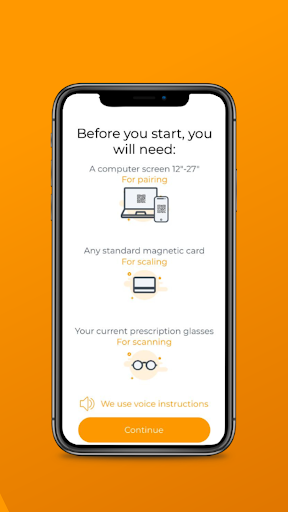
The process is very easy. You just need 4 things:
1. A smartphone with the Lens Scanner app installed
2. A laptop or computer (with a 12” screen or larger)
3. Your current pair of prescription eyeglasses
4. A standard size magnetic card for measurement
Key benefits:
Find your current prescription in less than 5 minutes
Save money - our lens scanner is FREE
CE listed
Ultra-convenient: use anywhere, anytime!
Shop prescription eyewear online easily
How does it work?
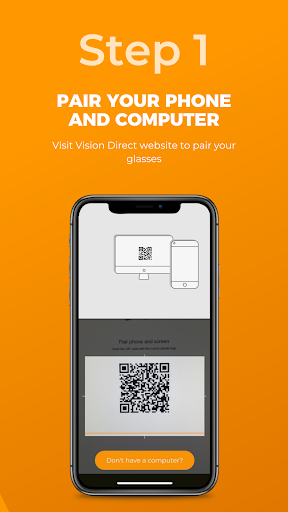
Download the Prescription Lens Scanner app & pair it with your computer
Scan your current prescription eyeglasses using your phone
Find your pupillary distance (PD)
Find your current glasses prescription details
Your glasses prescription will be saved to your account so you can easily start shopping RX glasses online
Disclaimer
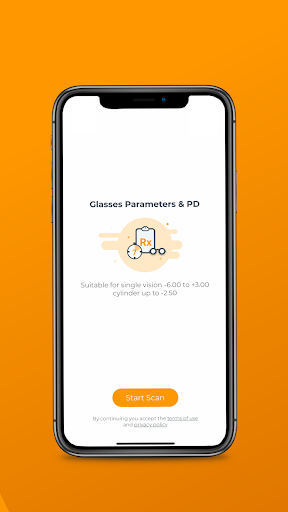
It is recommended that the Lens Scanner app is used by individuals 18 years old and above, with stable vision, and who are happy with their current prescription. Further requirements include cylinder measurement lower than -2.50 and single vision prescription between -6.00 and +3.00.
It is not recommended to use the Lens Scanner app if you:
• Have a progressive, multifocal, or bifocal prescription
• Have a prescription that includes a prism measurement
• Have a high single-vision or astigmatism prescription
• Take any medication that affects your vision
• Have any illness or condition that affects your eye health
Note: Please read our full terms of use. It includes, amongst other information, a detailed list of conditions and illnesses that may inhibit the lens scanner from producing accurate results.
About us
Vision Direct Optical Group is the world’s leading designer eyewear e-commerce company. With operations across Asia Pacific, Europe, and the Americas, we are market leaders in over 20 countries, including SmartBuyGlasses.co.uk in the UK and VisionDirect.com.au in Australia.
Tampilkan Lebih banyak

1. Unduh dan instal MEmu APP

2. Menjalankan MEmu lalu buka Google Play di halaman

3. Cari Prescription Lens Scanner di Google Play
Install
4. Unduh dan instal Prescription Lens Scanner
5. Setelah insatl APP selesai,klik ikon untuk mulai

6. Nikmati bermain Prescription Lens Scanner di PC dengan MEmu
MEmu Play adalah emulator Android gratis terbaik dan 50 Juta orang sudah menikmati pengalaman luar biasa dalam Aplikasi Android. Teknologi virtualisasi MEmu memberi kekuasaan untuk memainkan ribuan Aplikasi Android dengan lancar di PC anda, bahkan Aplikasi dengan grafis yang paling tinggi.
Layar lebih besar dengan grafis yang lebih baik; durasi panjang, tanpa batasan baterai atau data seluler.
Didukung penuh oleh Pemetaan tombol yang lengkap untuk keakuratan kontrol keyboard dan mouse maupun gamepad.
Membuka beberapa akun game atau tugas di waktu yang sama hanya pada satu PC, dengan Multi-Instance manager.
Use Prescription Lens Scanner on PC by following steps: