WRAL Weather
Diupdate
Versi Saat Ini
6.0.0
Ditawarkan Oleh

Hentilah khawatir tentang biaya berlebihan saat menggunakan WRAL Weather di ponsel Anda, bebaskan diri Anda dari layar kecil dan nikmati menggunakan aplikasi pada tampilan yang lebih besar. Mulai sekarang, dapatkan pengalaman full-screen di aplikasi Anda dengan keyboard dan mouse. MEmu menyediakan semua fitur mengejutkan yang Anda harapkan: cepat menginstal dan mudah menggunakan, kontrol intuitif, tidak ada lagi batasan baterai, data seluler dan panggilan yang mengganggu. MEmu 9 yang baru adalah pilihan terbaik untuk menggunakan WRAL Weather di komputer Anda. Bersandi dengan absorpsi kami, manajer multi-instance memungkinkan pembukaan 2 akun atau lebih pada saat yang bersamaan. Dan yang paling penting, mesin emulasi eksklusif kami dapat melepaskan potensi penuh PC Anda, menjadikan semuanya lancar dan menyenangkan.
Tampilkan Lebih banyak
Unduh WRAL Weather di PC dengan Emulator Android MEmu. Nikmati permainan pada layar yang besar. Important note with the 6.
Important note with the 6.0.0 update: With this update, you will need to reenter any saved locations you had in the previous version of the app.
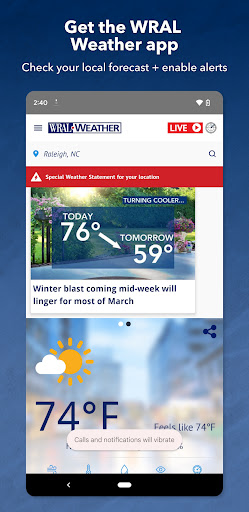
The WRAL Weather App is an incredible multi-function weather station you can access right on your phone. And each forecast is designed and assembled by a team of six full-time WRAL meteorologists who have in-depth knowledge of North Carolina’s weather.
In the WRAL Weather app, you’ll find weather forecasts for Raleigh, Durham, Chapel Hill, and Eastern North Carolina. Check the Raleigh weather this week or check the weather this weekend. Plus, the app can keep up with your current location and give the most accurate real-time forecast.
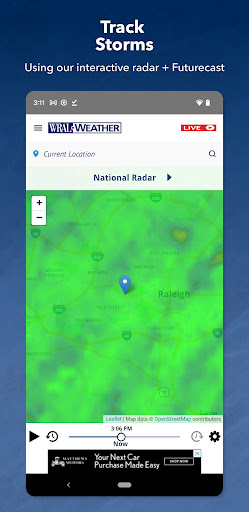
You can easily stay up to date on the weather by receiving forecast information and updates from the WRAL Severe Weather Center in Raleigh, directly through your phone or tablet. You can also find direct links to the Live Cam section of the website and see what’s happening outside right now near you. Get the latest weather forecast, keep track of the cloud cover and rainfall amounts nearby with your Futurecast, and receive severe weather alerts in your area with your exact location.
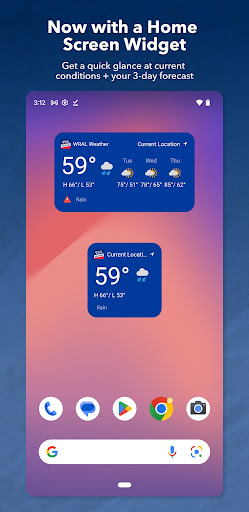
Add the new WRAL Weather app widgets to your phone or tablet’s home screen.
Get a quick glance at the current conditions, the 3-day forecast and active alerts for your current location.
You can change the location in the widget from your current location. Go into the app. Tap the search bar at the top of the homescreen. Enter another location and tap the star.
Allow push notifications for the app and you’ll enable critical weather alerts, right when you need them. Then, access the interactive iControl radar map and see where severe weather is headed next.
The WRAL App Features:
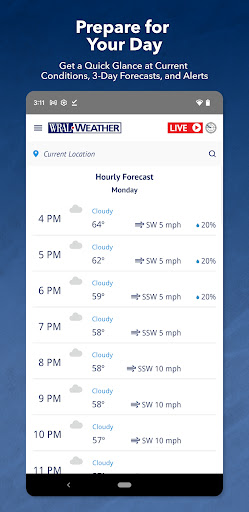
Today’s Weather Forecast
· Hourly forecasts for your current location.
· Accurate 7-day forecast.
· Written forecasts from the meteorologists you trust.
· Pre-recorded video forecasts are available on-demand
iControl Radar
· Radar updates in the palm of your hand.
· Customized for your current location.
Live
· Check the DualDoppler5000
· Watch live weather reports every 10 minutes on WRAL News+
Additional Features
· ReportIt – report weather you see
· Hurricane Center
· Live traffic and city cameras
· Weather news
· Around the state weather
· Almanac
· Closings & Delay
Tampilkan Lebih banyak

1. Unduh dan instal MEmu APP

2. Menjalankan MEmu lalu buka Google Play di halaman

3. Cari WRAL Weather di Google Play
Install
4. Unduh dan instal WRAL Weather
5. Setelah insatl APP selesai,klik ikon untuk mulai

6. Nikmati bermain WRAL Weather di PC dengan MEmu
MEmu Play adalah emulator Android gratis terbaik dan 50 Juta orang sudah menikmati pengalaman luar biasa dalam Aplikasi Android. Teknologi virtualisasi MEmu memberi kekuasaan untuk memainkan ribuan Aplikasi Android dengan lancar di PC anda, bahkan Aplikasi dengan grafis yang paling tinggi.
Layar lebih besar dengan grafis yang lebih baik; durasi panjang, tanpa batasan baterai atau data seluler.
Didukung penuh oleh Pemetaan tombol yang lengkap untuk keakuratan kontrol keyboard dan mouse maupun gamepad.
Membuka beberapa akun game atau tugas di waktu yang sama hanya pada satu PC, dengan Multi-Instance manager.
Use WRAL Weather on PC by following steps: