WRAL Weather
Đã cập nhật
Phiên bản hiện tại
6.0.0
Cung cấp bởi

Bạn không cần phải lo lắng về việc sạc quá mức khi sử dụng WRAL Weather trên điện thoại của bạn, không phải sử dụng trên màn hình nhỏ bé và tận hưởng ứng dụng trên màn hình lớn hơn rất nhiều. Từ bây giờ, bạn hãy trải nghiệm ứng dụng của bạn toàn màn hình bằng bàn phím và chuột. MEmu cung cấp cho bạn tất cả các tính năng đáng ngạc nhiên mà bạn mong đợi: cài đặt nhanh, cài đặt dễ dàng, điều khiển trực quan, không còn giới hạn về pin, dữ liệu di động và các cuộc gọi làm phiền. MEmu 9 hoàn toàn mới là sự lựa chọn tốt nhất để sử dụng WRAL Weather trên máy tính của bạn. Được mã hóa với sự hợp nhất của chúng tôi, trình quản lý multi-instance giúp mở 2 tài khoản trở lên cùng một lúc. Và điều quan trọng nhất là, công cụ mô phỏng độc quyền của chúng tôi có thể tận dụng hết toàn bộ tiềm năng trên PC của bạn, giúp mọi thứ vận hành trơn tru và thú vị.
Nhiều hơn
Tải WRAL Weather trên PC với Trình giả lập Android MEmu. Tận hưởng trải nghiệm chơi game trên màn hình lớn Important note with the 6.
Important note with the 6.0.0 update: With this update, you will need to reenter any saved locations you had in the previous version of the app.
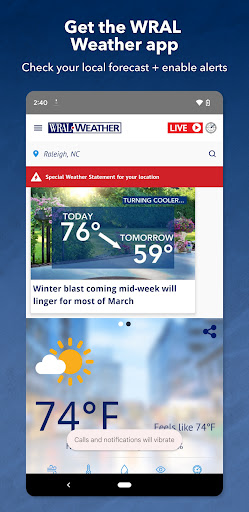
The WRAL Weather App is an incredible multi-function weather station you can access right on your phone. And each forecast is designed and assembled by a team of six full-time WRAL meteorologists who have in-depth knowledge of North Carolina’s weather.
In the WRAL Weather app, you’ll find weather forecasts for Raleigh, Durham, Chapel Hill, and Eastern North Carolina. Check the Raleigh weather this week or check the weather this weekend. Plus, the app can keep up with your current location and give the most accurate real-time forecast.
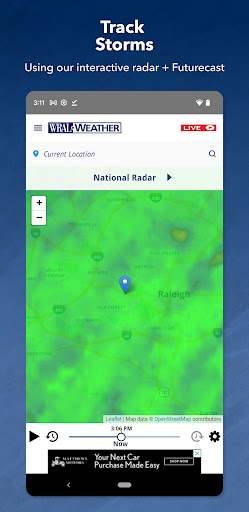
You can easily stay up to date on the weather by receiving forecast information and updates from the WRAL Severe Weather Center in Raleigh, directly through your phone or tablet. You can also find direct links to the Live Cam section of the website and see what’s happening outside right now near you. Get the latest weather forecast, keep track of the cloud cover and rainfall amounts nearby with your Futurecast, and receive severe weather alerts in your area with your exact location.
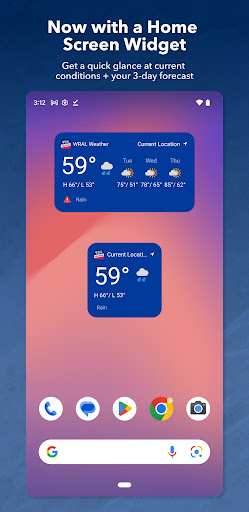
Add the new WRAL Weather app widgets to your phone or tablet’s home screen.
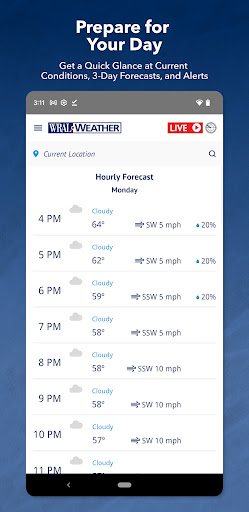
Get a quick glance at the current conditions, the 3-day forecast and active alerts for your current location.
You can change the location in the widget from your current location. Go into the app. Tap the search bar at the top of the homescreen. Enter another location and tap the star.
Allow push notifications for the app and you’ll enable critical weather alerts, right when you need them. Then, access the interactive iControl radar map and see where severe weather is headed next.
The WRAL App Features:
Today’s Weather Forecast
· Hourly forecasts for your current location.
· Accurate 7-day forecast.
· Written forecasts from the meteorologists you trust.
· Pre-recorded video forecasts are available on-demand
iControl Radar
· Radar updates in the palm of your hand.
· Customized for your current location.
Live
· Check the DualDoppler5000
· Watch live weather reports every 10 minutes on WRAL News+
Additional Features
· ReportIt – report weather you see
· Hurricane Center
· Live traffic and city cameras
· Weather news
· Around the state weather
· Almanac
· Closings & Delay
Nhiều hơn

1. Tải trình cài đặt MEmu và hoàn tất cài đặt

2. Khởi động MEmu, sau đó mở Google Play trên trang chủ

3. Tìm kiếm WRAL Weather trong Google Play
Install
4. Tải và Cài Đặt WRAL Weather
5. Khi cài đặt hoàn tất, nhấp vào biểu tượng để bắt đầu

6. Trải nghiệm WRAL Weather trên PC của bạn bằng MEmu
MEmu Play là trình giả lập Android miễn phí tốt nhất, với 50 triệu người dùng trải nghiệm ứng dụng Android tuyệt vời. Công nghệ ảo hóa của MEmu cho phép bạn chạy mượt mà hàng ngàn ứng dụng Android trên máy tính, ngay cả những ứng dụng đòi hỏi cấu hình cao nhất.
Màn hình lớn hơn cùng với đồ hoạ tốt hơn; thời lượng dài, không giới hạn về pin hoặc dữ liệu di động
Hỗ trợ đầy đủ Keymapping cho việc kiểm soát chính xác bàn phím và chuột hoặc gamepad
Nhiều tài khoản trò chơi hoặc tác vụ cùng lúc trên một PC với Quản lý Đa năng
Use WRAL Weather on PC by following steps: