YMusic - Video&Music
Diupdate
Versi Saat Ini
3.0.2
Ditawarkan Oleh

Hentilah khawatir tentang biaya berlebihan saat menggunakan YMusic - Video&Music di ponsel Anda, bebaskan diri Anda dari layar kecil dan nikmati menggunakan aplikasi pada tampilan yang lebih besar. Mulai sekarang, dapatkan pengalaman full-screen di aplikasi Anda dengan keyboard dan mouse. MEmu menyediakan semua fitur mengejutkan yang Anda harapkan: cepat menginstal dan mudah menggunakan, kontrol intuitif, tidak ada lagi batasan baterai, data seluler dan panggilan yang mengganggu. MEmu 9 yang baru adalah pilihan terbaik untuk menggunakan YMusic - Video&Music di komputer Anda. Bersandi dengan absorpsi kami, manajer multi-instance memungkinkan pembukaan 2 akun atau lebih pada saat yang bersamaan. Dan yang paling penting, mesin emulasi eksklusif kami dapat melepaskan potensi penuh PC Anda, menjadikan semuanya lancar dan menyenangkan.
Tampilkan Lebih banyak
Unduh YMusic - Video&Music di PC dengan Emulator Android MEmu. Nikmati permainan pada layar yang besar. Tired of wasting time on annoying video ads or music ads that cannot be skipped?
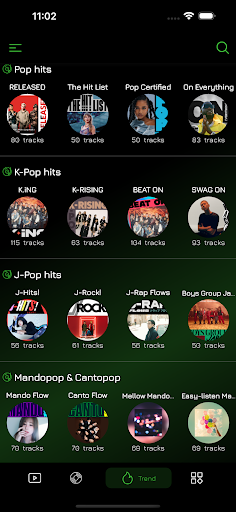
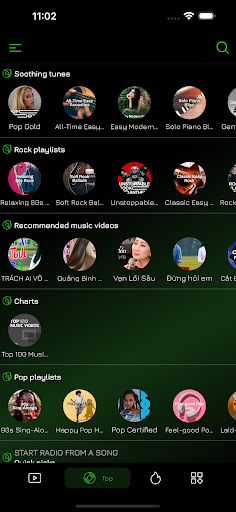
Tired of wasting time on annoying video ads or music ads that cannot be skipped?
Welcome to the ad-free era with all video & music ads blocked and pop-ups blocked automatically!
Install YMusic to skip ads for video and music, and enjoy smooth background play and floating popup play right now!
YMusic is an ad blocker for Android to enjoy free premium and blocks all ADs when watching tube videos and listening to music or audio.
Install NOW ⏬
FUNCTIONS IN DETAIL
Ad Blocker - Block Ads for Video & Music
Enjoy a smooth video and music-playing experience!
- Block Ads for Video & Music, the free premium has collected millions of ad-free videos through an AI engine, bringing you the unexpected watching & listening experience
- Ad Guard Video Player & Music Player, so that you can enjoy an ad-free experience when watching all the Tube videos or listening to music, songs, audio, etc.
- Ad Blocker for Pop-ups, this pop-up blocker also helps block pop-up ads. Turn on an ad blocker to remove all kinds of unwanted ads or annoying pop-ups!
- Auto skip ads, block adverts, and filter all video & music ads with an in-built free ad blocker
Background Video & Music Player
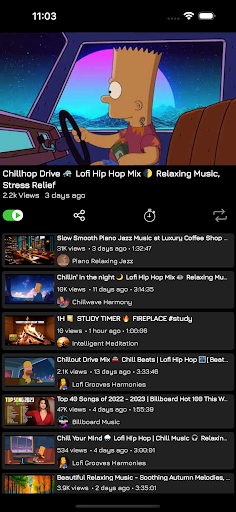
- Allows you to play videos & music or audio in the background, in which way the video & mp3 or audio will continue to play when you exit YMusic for other social media apps, such as Line, Messenger, WhatsApp, etc.
- Use the Minimize function to fit Tube videos & musics, on a small resizable, and movable window in the corner of your screen. Now you can play your favorite game, check your email or perform any other task!
Sleep Timer
Set a timer before going to sleep, then you can put the phone aside, close your eyes, enjoy the media, and fall asleep sweetly or focus on other things.
-No need to worry about the media will be played until dawn, turn it off regularly to save traffic quota and power. You can play popular ASMR, sleep aid songs, classical music, listen to story sessions, sing, etc.
- Some users will use the timer to help set the Pomodoro! Let the timer remind you to take a break while enjoying the background music, and enter the next Pomodoro in a better state.
Floating Video Player
- Allows you to play videos and mp3 music in Floating Popup Play Mode.
- Play in both full-screen or floating popup window mode as you wish
Up to 8K Resolution
- Maximum resolution of videos active by default.
- able to play videos or music videos with all resolutions from 144p to 8K, enjoy the best user experience.
FEATURE
Tampilkan Lebih banyak

1. Unduh dan instal MEmu APP

2. Menjalankan MEmu lalu buka Google Play di halaman

3. Cari YMusic - Video&Music di Google Play
Install
4. Unduh dan instal YMusic - Video&Music
5. Setelah insatl APP selesai,klik ikon untuk mulai

6. Nikmati bermain YMusic - Video&Music di PC dengan MEmu
MEmu Play adalah emulator Android gratis terbaik dan 50 Juta orang sudah menikmati pengalaman luar biasa dalam Aplikasi Android. Teknologi virtualisasi MEmu memberi kekuasaan untuk memainkan ribuan Aplikasi Android dengan lancar di PC anda, bahkan Aplikasi dengan grafis yang paling tinggi.
Layar lebih besar dengan grafis yang lebih baik; durasi panjang, tanpa batasan baterai atau data seluler.
Didukung penuh oleh Pemetaan tombol yang lengkap untuk keakuratan kontrol keyboard dan mouse maupun gamepad.
Membuka beberapa akun game atau tugas di waktu yang sama hanya pada satu PC, dengan Multi-Instance manager.
Use YMusic - Video&Music on PC by following steps: