Knock Knock: Room Defense
Aggiornata
Versione corrente
Offerta da

Vista tutta la passione dimostrata nel giocare a Knock Knock: Room Defense, le tue mani non dovrebbero essere limitate al minuscolo schermo di un telefono. Gioca come un professionista e ottieni il pieno controllo del gioco con tastiera e mouse. MEmu ti offre tutto ciò che ti aspetti. Scarica e gioca a Knock Knock: Room Defense su PC. Gioca quanto vuoi, niente più limitazioni di batteria, dati mobili e chiamate inquietanti. Il nuovissimo MEmu 9 è la scelta migliore per giocare a Knock Knock: Room Defense su PC. Realizzato sulla base della nostra esperienza, lo squisito sistema di mappatura dei tasti preimpostati rende Knock Knock: Room Defense un vero e proprio gioco per PC. MEmu è un gestore multi-instanza che permette di giocare con 2 o più account sullo stesso dispositivo. E la cosa più importante, il nostro esclusivo motore di emulazione può liberare tutto il potenziale del tuo PC, rendendo tutto fluido.
Mostra altro
Scarica Knock Knock: Room Defense su PC con MEmu Android Emulator. Divertiti giocando sul grande schermo. [Deluxe Preregistration Pack] Preregister to get 404 draws, character skin, random orange hero and limited decor now!
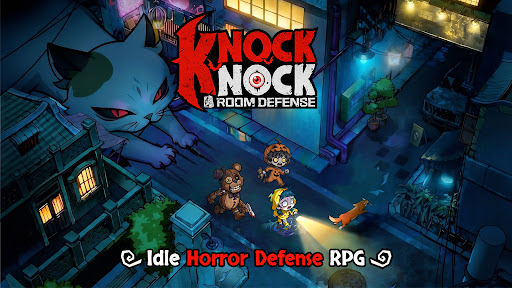
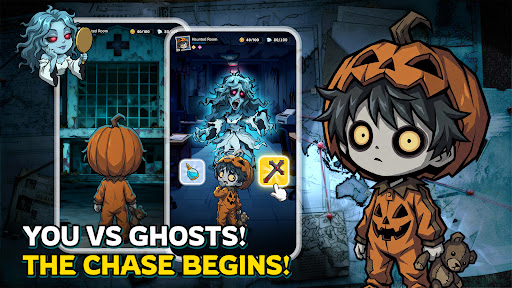

[Deluxe Preregistration Pack] Preregister to get 404 draws, character skin, random orange hero and limited decor now!
When your city becomes the hunting ground for ghosts and monsters... "Knock, knock." Someone's knocking on your door...
"Shh, don't make a sound, and don't open the door."
Creatures from age-old tales and urban legends are trying to break into your house. Your job? Close the door and defend it with your heroes as your heart pounds with excitement and no fear.
Schools, hospitals, hotels, streets, and office buildings—the most mundane locations become thrill-filled tower defense challenges. Get ready for stunning visuals and smooth controls in 5-minute matches!
[Five Main Features to Define New Horror Tower Defense]
※ Choose your room, close the door, relax, and level up!
Ghosts are here and there's no escape? Well—kick back and relax!
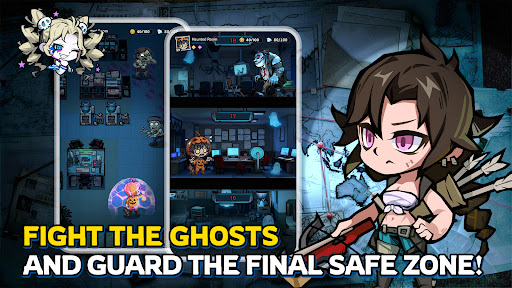
Choose your room, close the door, and kick back to level up in dreams and summon heroes to build your defense line! It's up to you to defend the ghosts and monsters at night!
※ Strategize to turn the table in the mind game
No risking your life, but more than hide-and-seek! Everything from the beds, doors, to your heroes can be leveled up, because the whole room is your defense line. Build the right lineup and plan wisely for every challenge and event. Every win is guaranteed to be rewarding.
※ Immersive visual experience
Dive into the immersive eerie world with a distinct gothic chibi-style aesthetic. Is it blood or wine in the cup held by the vampire? Why is the killer with a chainsaw wearing a cute bunny mask? A hundred unique and stylized heroes and ghosts with cute horror elements.
※ Wide selections of avatars and instances
Turn into a ghost hunter and explore all kinds of haunted locations—from a train with lingering phantoms, a dormitory echoing with singing at midnight, to a mysterious underground cave. Now, pick your avatar from a wide collection and brace yourself for the ghost chase.
※ Fast and exciting tower defense battle
Grab your phone and start a 5-minute no-stress match anytime, anywhere! Quality tower defense fun made simple and fast.
Mostra altro

1. Scarica il programma di installazione di MEmu e completa l'installazione

2. Avvia il Memu e apri il Google Play sulla homepage

3. Cerca Knock Knock: Room Defense in Google Play
Install
4. Scarica e installa Knock Knock: Room Defense
5. Al termine dell'installazione, fai clic sull'icona per avviar

6. Divertiti giocando a Knock Knock: Room Defense su PC con MEmu
MEmu App Player è il miglior emulatore Android gratuito, utilizzato da 50 milioni di persone per ottenere un'esperienza di gioco Android superba. La tecnilogia di virtualizzazione MEmu ti permette di giocare a migliaia di giochi Android con semplicità sul tuo computer, anche i giochi con la grafica più esigente.
Schermo più grande con una grafica migliore; Lunga durata, senza limitazione di batteria o dati mobili.
Supporto completo per mappa di tastiera per un controllo preciso di tastiera e mouse o gamepad.
Multipli account di gioco o attività su un singolo PC contemporaneamente con il gestore di multi istanza.
Play Knock Knock: Room Defense on PC by following steps: