Knock Knock: Room Defense
Aktualisiert
Aktuelle Version
Angeboten von

Bei all Ihrer Leidenschaft für das Spielen von Knock Knock: Room Defense sollten Ihre Hände nicht auf einen winzigen Bildschirm Ihres Telefons beschränkt sein. Spielen Sie wie ein Profi und übernehmen Sie die volle Kontrolle über Ihr Spiel mit Tastatur und Maus. MEmu bietet Ihnen all die Dinge, die Sie erwarten. Laden Sie Knock Knock: Room Defense herunter und spielen Sie es auf dem PC. Spielen Sie so lange, wie Sie wollen, ohne Grenzwerte für Akku, mobile Daten und störende Anrufe. Das brandneue MEmu 9 ist die beste Wahl, um Knock Knock: Room Defense auf dem PC zu spielen. Das exquisite voreingestellte Tastaturbelegungssystem, das mit unserem Fachwissen vorbereitet wurde, macht Knock Knock: Room Defense zu einem echten PC-Spiel. Der MEmu Multi-Instanz-Manager ermöglicht das Spielen von 2 oder mehr Konten auf demselben Gerät. Und das Wichtigste: Unsere exklusive Emulations-Engine kann das volle Potenzial Ihres PCs freisetzen und für reibungslose Abläufe sorgen.
Mehr anzeigen
Laden Sie Play Knock Knock: Room Defense auf dem PC mit MEmu Android Emulator. Viel Spaß beim Spielen auf großmundieren. [Deluxe Preregistration Pack] Preregister to get 404 draws, character skin, random orange hero and limited decor now!
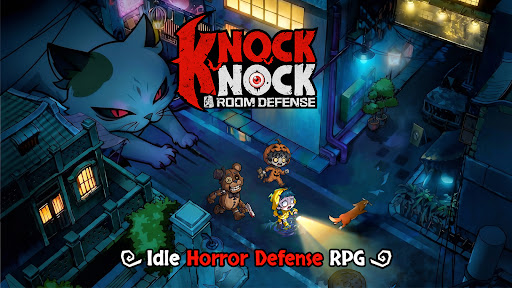
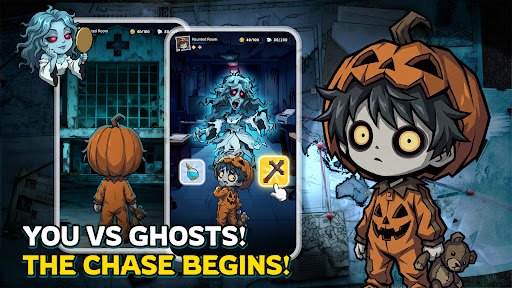
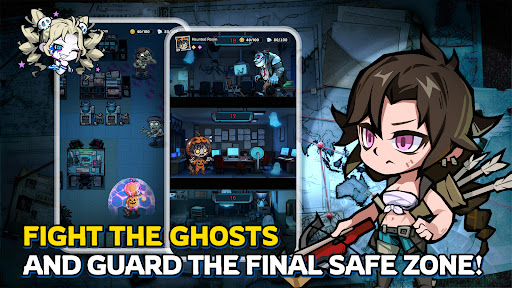

[Deluxe Preregistration Pack] Preregister to get 404 draws, character skin, random orange hero and limited decor now!
When your city becomes the hunting ground for ghosts and monsters... "Knock, knock." Someone's knocking on your door...
"Shh, don't make a sound, and don't open the door."
Creatures from age-old tales and urban legends are trying to break into your house. Your job? Close the door and defend it with your heroes as your heart pounds with excitement and no fear.
Schools, hospitals, hotels, streets, and office buildings—the most mundane locations become thrill-filled tower defense challenges. Get ready for stunning visuals and smooth controls in 5-minute matches!
[Five Main Features to Define New Horror Tower Defense]
※ Choose your room, close the door, relax, and level up!
Ghosts are here and there's no escape? Well—kick back and relax!
Choose your room, close the door, and kick back to level up in dreams and summon heroes to build your defense line! It's up to you to defend the ghosts and monsters at night!
※ Strategize to turn the table in the mind game
No risking your life, but more than hide-and-seek! Everything from the beds, doors, to your heroes can be leveled up, because the whole room is your defense line. Build the right lineup and plan wisely for every challenge and event. Every win is guaranteed to be rewarding.
※ Immersive visual experience
Dive into the immersive eerie world with a distinct gothic chibi-style aesthetic. Is it blood or wine in the cup held by the vampire? Why is the killer with a chainsaw wearing a cute bunny mask? A hundred unique and stylized heroes and ghosts with cute horror elements.
※ Wide selections of avatars and instances
Turn into a ghost hunter and explore all kinds of haunted locations—from a train with lingering phantoms, a dormitory echoing with singing at midnight, to a mysterious underground cave. Now, pick your avatar from a wide collection and brace yourself for the ghost chase.
※ Fast and exciting tower defense battle
Grab your phone and start a 5-minute no-stress match anytime, anywhere! Quality tower defense fun made simple and fast.
Mehr anzeigen

1. Laden das MEmu-Installationsprogramm herunter und beenden die Installation

2. MEmu starten und Google Play auf der Homepage öffnen

3. Suchen Knock Knock: Room Defense in Google Play
Install
4. Herunterladen und Installieren Knock Knock: Room Defense
5. Klicken nach Abschluss der Installation auf das Symbol, um es zu starten

6. Viel Spaß beim Spielen von Knock Knock: Room Defense auf dem PC mit MEmu
MEmu App Player ist der beste kostenlose Android-Emulator und 50 Millionen Menschen genießen bereits seine hervorragende Android-Gaming-Erfahrung. Mit der MEmu-Virtualisierungstechnologie können Sie Tausende von Android-Spielen problemlos auf Ihrem PC spielen, selbst bei grafikintensiven Spielen.
BGrößeres Bild mit besserer Grafik; Keine unterbrechungen, keine sorgen um Akku
Komplette Tastenbelegung unterstützt mit Maus und Tastatur oder Controller
Mit dem „Multi-Instance-Manager“ können Sie mehrere Spielkonten oder Spiele gleichzeitig auf einem PC ausführen.
Play Knock Knock: Room Defense on PC by following steps: