
Knock Knock: Room Defense
Updated
Current Version
Offered By

With your passion for Knock Knock: Room Defense, you shouldn’t have to limit yourself to the small screen of a phone. Play like a pro and take full control of the game using a keyboard and mouse. MEmu gives you everything you’re looking for. Download and play Knock Knock: Room Defense on PC. Play as long as you want — no more worries about battery life, mobile data, or unexpected calls. The all-new MEmu 9 is the best way to play Knock Knock: Room Defense on PC. With our expertly designed keymapping system, Knock Knock: Room Defense feels just like a real PC game. The MEmu multi-instance manager lets you run two or more accounts on the same device at the same time. Most importantly, our exclusive emulation engine unlocks your PC’s full potential, delivering smooth and seamless performance.
Show more
Download Knock Knock: Room Defense on PC with MEmu Android Emulator. Enjoy playing on big screen. [Deluxe Preregistration Pack] Preregister to get 404 draws, character skin, random orange hero and limited decor now!
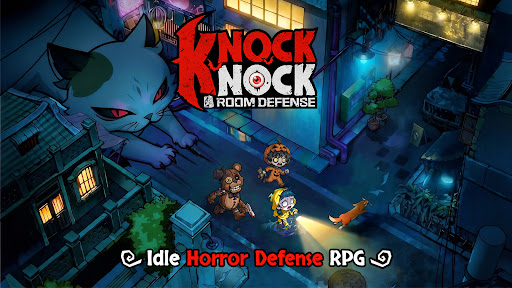



[Deluxe Preregistration Pack] Preregister to get 404 draws, character skin, random orange hero and limited decor now!
When your city becomes the hunting ground for ghosts and monsters... "Knock, knock." Someone's knocking on your door...
"Shh, don't make a sound, and don't open the door."
Creatures from age-old tales and urban legends are trying to break into your house. Your job? Close the door and defend it with your heroes as your heart pounds with excitement and no fear.
Schools, hospitals, hotels, streets, and office buildings—the most mundane locations become thrill-filled tower defense challenges. Get ready for stunning visuals and smooth controls in 5-minute matches!
[Five Main Features to Define New Horror Tower Defense]
※ Choose your room, close the door, relax, and level up!
Ghosts are here and there's no escape? Well—kick back and relax!
Choose your room, close the door, and kick back to level up in dreams and summon heroes to build your defense line! It's up to you to defend the ghosts and monsters at night!
※ Strategize to turn the table in the mind game
No risking your life, but more than hide-and-seek! Everything from the beds, doors, to your heroes can be leveled up, because the whole room is your defense line. Build the right lineup and plan wisely for every challenge and event. Every win is guaranteed to be rewarding.
※ Immersive visual experience
Dive into the immersive eerie world with a distinct gothic chibi-style aesthetic. Is it blood or wine in the cup held by the vampire? Why is the killer with a chainsaw wearing a cute bunny mask? A hundred unique and stylized heroes and ghosts with cute horror elements.
※ Wide selections of avatars and instances
Turn into a ghost hunter and explore all kinds of haunted locations—from a train with lingering phantoms, a dormitory echoing with singing at midnight, to a mysterious underground cave. Now, pick your avatar from a wide collection and brace yourself for the ghost chase.
※ Fast and exciting tower defense battle
Grab your phone and start a 5-minute no-stress match anytime, anywhere! Quality tower defense fun made simple and fast.
Show more

1. Download MEmu installer and finish the setup

2. Start MEmu then open Google Play on the desktop

3. Search Knock Knock: Room Defense in Google Play
Install
4. Download and Install Knock Knock: Room Defense
5. On install completion click the icon to start

6. Enjoy playing Knock Knock: Room Defense on PC with MEmu
MEmu Play is the best Android emulator and 100 million people already enjoy its superb Android gaming experience. The MEmu virtualization technology empowers you to play thousands of Android games smoothly on your PC, even the most graphic-intensive ones.
Bigger screen with better graphics; Long duration, without limitation of battery or mobile data.
Full Keymapping support for precise control of keyboard and mouse or gamepad.
Multiple game accounts or tasks on single PC at one time with Multi-Instance manager.
Play Knock Knock: Room Defense on PC by following steps: