Kungpow Granny's Revenge
Aggiornata
Versione corrente
1.1.3
Offerta da

Vista tutta la passione dimostrata nel giocare a Kungpow Granny's Revenge, le tue mani non dovrebbero essere limitate al minuscolo schermo di un telefono. Gioca come un professionista e ottieni il pieno controllo del gioco con tastiera e mouse. MEmu ti offre tutto ciò che ti aspetti. Scarica e gioca a Kungpow Granny's Revenge su PC. Gioca quanto vuoi, niente più limitazioni di batteria, dati mobili e chiamate inquietanti. Il nuovissimo MEmu 9 è la scelta migliore per giocare a Kungpow Granny's Revenge su PC. Realizzato sulla base della nostra esperienza, lo squisito sistema di mappatura dei tasti preimpostati rende Kungpow Granny's Revenge un vero e proprio gioco per PC. MEmu è un gestore multi-instanza che permette di giocare con 2 o più account sullo stesso dispositivo. E la cosa più importante, il nostro esclusivo motore di emulazione può liberare tutto il potenziale del tuo PC, rendendo tutto fluido.
Mostra altro
Scarica Kungpow Granny's Revenge su PC con MEmu Android Emulator. Divertiti giocando sul grande schermo. Un dungeon pieno di pericoli.
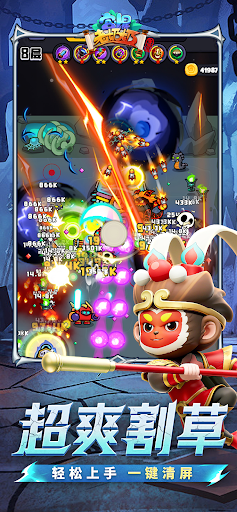



Un dungeon pieno di pericoli. Uno sciame di mostri tutt'altro che facili da sconfiggere. Sei pronto a lanciarti all'attacco con la nonna più tosta in circolazione?
Kung Pow Granny è un gioco di sopravvivenza e azione verticale in cui controlli la nonna mentre schiva ondate di mostri, raccoglie potenti abilità, potenzia le armi, si allea con i suoi animali domestici e affronta nemici impegnativi e potenti boss.
Comandi con una sola mano, azione immediata
Progettato per il gioco verticale, il gioco rende fluidi e intuitivi i movimenti, le schivate, la raccolta e i contrattacchi. Che tu stia giocando per una sessione veloce o affrontando livelli più difficili, puoi entrare subito in azione e iniziare a combattere.
Combo di abilità roguelite, nuove build a ogni partita
Ghiaccio Artico, Sfera Tempesta Magnetica, Scarpe Rimbalzanti, Bastone del Ciclone, Dentiera Furiosa e molte altre abilità incredibili ti aspettano. Ogni potenziamento può cambiare la battaglia, permettendoti di creare il tuo stile di combattimento a ogni partita.
Sopravvivenza nel dungeon con mostri carini ma insidiosi
Il dungeon in stile cartone animato può sembrare spensierato, ma questi mostri non sono qui solo per essere carini. Ogni nemico ha i suoi schemi di movimento e il suo stile di attacco. Per sopravvivere ad imboscate, sciami e alla pressione del boss, avrai bisogno di schivate intelligenti e scelte di potenziamento astute.
Potenzia le armi e aumenta la tua potenza di fuoco
Scegli tra armi come la pistola a pallini, la spada Tang e la balestra. Continua a potenziare le tue armi e abilità per trasformare Nonna da una sopravvissuta circondata in una vera e propria macchina da guerra ammazza-mostri.
Compagni animali, avventura insieme
Porta con te compagni come il Fratello Pollo, il Cucciolo di Drago di Fuoco e la Piccola Folletta. Ogni animale domestico offre diverse abilità di supporto, aiutando con i danni, il controllo o la sopravvivenza e rendendo ogni incursione nel dungeon più varia.
Molteplici modalità, sfide infinite
Affronta i livelli della storia, sfide infinite e varie modalità dungeon. Prova diverse combinazioni di armi, abilità e animali domestici, spingiti oltre i tuoi limiti e affronta ondate di nemici ancora più numerose.
Pronto a entrare nel dungeon? Controlla questa imprevedibile nonnina, schiva ondate di mostri, scatena abilità incredibili, combatti al fianco di fedeli compagni e crea la tua leggenda di sopravvivenza nel dungeon!
Mostra altro

1. Scarica il programma di installazione di MEmu e completa l'installazione

2. Avvia il Memu e apri il Google Play sulla homepage

3. Cerca Kungpow Granny's Revenge in Google Play
Install
4. Scarica e installa Kungpow Granny's Revenge
5. Al termine dell'installazione, fai clic sull'icona per avviar

6. Divertiti giocando a Kungpow Granny's Revenge su PC con MEmu
MEmu App Player è il miglior emulatore Android gratuito, utilizzato da 50 milioni di persone per ottenere un'esperienza di gioco Android superba. La tecnilogia di virtualizzazione MEmu ti permette di giocare a migliaia di giochi Android con semplicità sul tuo computer, anche i giochi con la grafica più esigente.
Schermo più grande con una grafica migliore; Lunga durata, senza limitazione di batteria o dati mobili.
Supporto completo per mappa di tastiera per un controllo preciso di tastiera e mouse o gamepad.
Multipli account di gioco o attività su un singolo PC contemporaneamente con il gestore di multi istanza.
Play Kungpow Granny's Revenge on PC by following steps: