Kungpow Granny's Revenge
อัปเดตเมื่อ
เวอร์ชันปัจจุบัน
1.1.3
ให้บริการโดย

เวลาคุณเล่น Kungpow Granny's Revenge, คุณอาจรู้สึกว่ามือคุณอาจบังจอแล้วทำให้ไม่ได้เล่นแบบเต็มที่. เล่นแบบไร้ขีดจำกัดด้วยเม้าส์และคีย์บอร์ด. MEmu มีตัวเลือกหลายอย่างให้คุณใช้งานเกมที่คุณเล่นแบบที่คุณต้องการ. ดาวน์โหลดและเล่น Kungpow Granny's Revenge บน PC. เล่นนานแค่ไหนก็ได้, ไม่ต้องชาร์จแบตเตอรี่, หรือเจอคนโทรเข้ามาระหว่างเล่น. MEmu 9 เป็นตัวเลือกสำหรับการเล่น Kungpow Granny's Revenge บน PC. ทางทีมงานเราได้ปรับแต่งเกม, ปรับให้เล่นเกมบางเกมได้เหมือนเล่น Kungpow Granny's Revenge เป็นเกม PC เช่นเล็งด้วยเม้าส์หรือใช้คีย์บอร์ด. ระบบของเรายังทำให้คุณสามารถเปิดเล่นได้มากกว่า 2 เกมพร้อมๆกันในคอมของคุณ. และที่สำคัญที่สุด, ระบบโปรแกรมของเราสามารถทำให้คุณใช้ระบบของ PC ทำให้เกมลื่นเหมือนกับใช้โทรศัพท์รุ่นล่าสุด. เราไม่ได้ดูแลเรื่องการเล่นเกม, แต่เราดูแลถึงความสนุกสนานที่คุณได้จากการเล่นด้วย.
แสดงเพิ่มเติม
ดาวน์โหลด Kungpow Granny's Revenge บน PC ด้วย MEmu Android Emulator สนุกกับการเล่นบนหน้าจอขนาดใหญ่ ดันเจี้ยนที่เต็มไปด้วยอันตราย ฝูงมอนสเตอร์ที่ไม่ธรรมดา คุณพร้อมที่จะบุกตะลุยไปกับคุณยายที่แข็งแกร่งที่สุดแล้วหรือยัง?
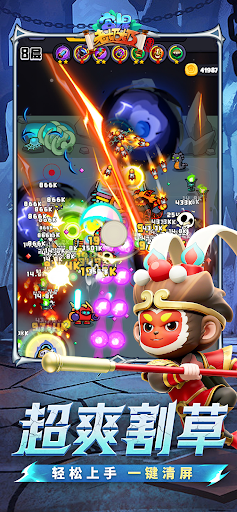



ดันเจี้ยนที่เต็มไปด้วยอันตราย ฝูงมอนสเตอร์ที่ไม่ธรรมดา คุณพร้อมที่จะบุกตะลุยไปกับคุณยายที่แข็งแกร่งที่สุดแล้วหรือยัง?
Kung Pow Granny เป็นเกมเอาชีวิตรอดแบบแอ็กชั่นแนวตั้งที่คุณควบคุมคุณยายในการหลบหลีกฝูงมอนสเตอร์ รวบรวมทักษะอันทรงพลัง อัปเกรดอาวุธ ร่วมทีมกับสัตว์เลี้ยง และเผชิญหน้ากับศัตรูที่ท้าทายและบอสที่ทรงพลัง
การควบคุมด้วยมือเดียว แอ็กชั่นทันที
ออกแบบมาสำหรับการเล่นแนวตั้ง เกมทำให้การเคลื่อนไหว การหลบหลีก การรวบรวม และการโจมตีสวนกลับรู้สึกราบรื่นและใช้งานง่าย ไม่ว่าคุณจะเล่นเพื่อความสนุกสนานหรือเล่นด่านที่ยากขึ้น คุณก็สามารถเริ่มต่อสู้ได้ทันที
คอมโบสกิลแบบ Roguelite สร้างตัวละครใหม่ทุกรอบ
Arctic Freeze, Magnetic Storm Orb, Bouncing Shoes, Cyclone Cane, Rampaging Dentures และสกิลสุดเจ๋งอีกมากมายรอคุณอยู่ การอัปเกรดแต่ละครั้งสามารถเปลี่ยนการต่อสู้ได้ ทำให้คุณสร้างสไตล์การต่อสู้ของคุณเองได้ในแต่ละรอบ
เอาชีวิตรอดในดันเจี้ยนกับมอนสเตอร์น่ารักแต่เจ้าเล่ห์
ดันเจี้ยนสไตล์การ์ตูนอาจดูสนุกสนาน แต่เหล่ามอนสเตอร์เหล่านี้ไม่ได้มีไว้แค่ให้ดูน่ารักเท่านั้น ศัตรูแต่ละตัวมีรูปแบบการเคลื่อนไหวและสไตล์การโจมตีเฉพาะตัว เพื่อเอาชีวิตรอดจากการซุ่มโจมตี ฝูงมอนสเตอร์ และแรงกดดันจากบอส คุณจะต้องหลบหลีกอย่างชาญฉลาดและเลือกอัพเกรดอย่างถูกวิธี
อัพเกรดอาวุธและเพิ่มพลังการยิงของคุณ
เลือกอาวุธได้หลากหลาย เช่น ปืนบีบีกัน ดาบถัง และหน้าไม้ อัพเกรดอาวุธและความสามารถของคุณอย่างต่อเนื่องเพื่อเปลี่ยนคุณยายจากผู้รอดชีวิตที่ถูกล้อมรอบให้กลายเป็นนักล่ามอนสเตอร์ตัวจริง
สัตว์เลี้ยงคู่ใจ ผจญภัยไปด้วยกัน
พาสัตว์เลี้ยงคู่ใจอย่าง ไก่บราเธอร์ มังกรไฟน้อย และภูตน้อย ไปด้วย สัตว์เลี้ยงแต่ละตัวมีความสามารถสนับสนุนที่แตกต่างกัน ช่วยในการโจมตี ควบคุม หรือเอาชีวิตรอด ทำให้การลงดันเจี้ยนแต่ละครั้งมีความหลากหลายมากขึ้น
โหมดหลากหลาย ความท้าทายไม่รู้จบ
เล่นด่านเนื้อเรื่อง ความท้าทายไม่รู้จบ และโหมดดันเจี้ยนต่างๆ ลองใช้การผสมผสานอาวุธ ทักษะ และสัตว์เลี้ยงที่แตกต่างกัน ผลักดันขีดจำกัดของคุณ และเผชิญหน้ากับคลื่นศัตรูที่ใหญ่ขึ้นกว่าเดิม
พร้อมที่จะเข้าสู่ดันเจี้ยนแล้วหรือยัง? ควบคุมคุณยายที่คาดเดาไม่ได้คนนี้ หลบหลีกคลื่นมอนสเตอร์ ปลดปล่อยทักษะสุดบ้าคลั่ง ต่อสู้เคียงข้างสหายผู้ภักดี และสร้างตำนานการเอาชีวิตรอดในดันเจี้ยนของคุณเอง!
แสดงเพิ่มเติม

1. ดาวน์โหลดตัวติดตั้ง MEmu และสิ้นสุดการติดตั้ง

2. เริ่ม MEmu จากนั้นเปิด Google Play บนหน้าแรก

3. ค้นหา Kungpow Granny's Revenge ใน Google Play
Install
4. ดาวน์โหลดและติดตั้ง Kungpow Granny's Revenge
5. เมื่อติดตั้งเสร็จให้คลิกที่ไอคอนเพื่อเริ่มใช้งาน

6. สนุกกับการเล่น Kungpow Granny's Revenge บนพีซีด้วย MEmu
MEmu App Player เป็นอีมูเลเตอร์ Android ที่ดีที่สุดและผู้คนกว่า 50 ล้านคนเพลิดเพลินไปกับประสบการณ์การเล่นเกม Android ที่ยอดเยี่ยม เทคโนโลยีการจำลองเสมือนของ MEmu ช่วยให้คุณเล่นเกม Android หลายพันเกมได้อย่างราบรื่นบนพีซีของคุณแม้แต่เกมที่ต้องใช้กราฟิกมากที่สุด
จอใหญ่และกราฟฟิกสวยกว่า; เล่นได้นาน, ไม่ต้องใช้แบตเตอรี่โทรศัพท์หรือเน็ตโทรศัพท์.
ระบบปรับแต่งปุ่มคีย์บอร์ดและเม้าส์ตามที่คุณเลือก
เล่นมากกว่าหนึ่งเกมบน PC ในเวลาเดียวกันด้วยระบบหลายจอหรือ Multi-Instance manager.
Play Kungpow Granny's Revenge on PC by following steps: