GeoDip - Clinometer
Aggiornata
Versione corrente
1.0.3
Offerta da

Non devi più preoccuparti dei sovraccarichi durante l'utilizzo di GeoDip - Clinometer sul tuo cellulare, liberati dal piccolo schermo e goditi dell'App su uno schermo molto più grande. D'ora in poi, sperimenta la tua App a schermo intero con tastiera e mouse. MEmu ti offre tutte le sorprendenti funzioni che ti aspettavi: installazione rapida e impostazione semplice, controlli intuitivi, niente più limitazioni di batteria, dati mobili e chiamate fastidiose. Il MEmu 9 nuovo di zecca è la prima scelta per utilizzare GeoDip - Clinometer sul tuo computer. Codificato con il nostro assorbimento, il gestore multi-istanza consente di aprire 2 o più account contemporaneamente. E soprattutto, il nostro esclusivo motore di emulazione può sbloccare il pieno potenziale del tuo PC, rendendo tutto liscio e piacevole.
Mostra altro
Goditi un'esperienza straordinaria con GeoDip - Clinometer su PC con MEmu Play. È un potente emulatore Android gratuito che ti offre migliaia di app Android per la versione desktop. Divertiti a connetterti con gli amici e a perfezionare il tuo lavoro con maggiore efficienza! GeoDip is a professional clinometer and field geology app for strike and dip measurement, dip direction logging, trend and plunge capture, GPS field notes, geology maps, and geology mapping workflows on Android.
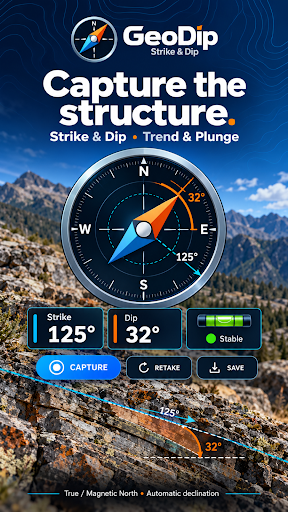
GeoDip is a professional clinometer and field geology app for strike and dip measurement, dip direction logging, trend and plunge capture, GPS field notes, geology maps, and geology mapping workflows on Android. Whether you work in structural geology, engineering geology, exploration geology, mining, geotechnical logging, or academic field mapping, GeoDip helps you record, review, analyze, and export geological measurements with speed and consistency.
Use GeoDip as a digital clinometer for strike and dip, dip direction, trend and plunge, bedding, joints, faults, fractures, foliation, veins, contacts, shear zones, and other structural features. Capture readings in the field, organize them into projects, attach notes and photos, review them on geology maps, and generate reports for office review, project documentation, and team sharing.
GeoDip is designed for practical geology mapping. Instead of juggling a notebook, a separate clinometer, GPS tools, spreadsheets, and map viewers, you can keep your geology mapping workflow in one app. Collect structural data, store project details, view measurements spatially, and export results in standard formats used by geologists, consultants, students, and field teams.
Key field features:
• Clinometer-based strike and dip measurement
• Strike, dip direction, trend and plunge capture
• GPS coordinate saving with readings
• True north and magnetic north options
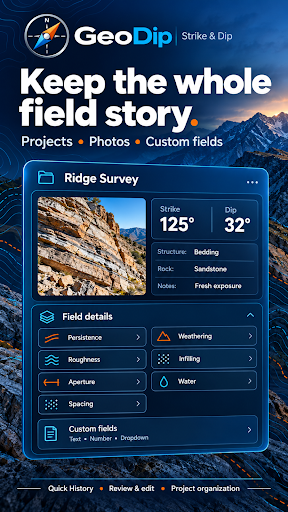
• Project-based organization for sites, traverses, benches, outcrops, and campaigns
• Company, area, weather, notes, and project photo support
• Custom fields for geology mapping, geotechnical logging, and field documentation
• Quick editing and measurement management
Map and geology tools:
• Interactive map view for project measurements
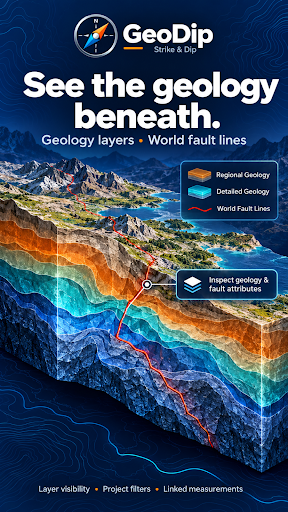
• Geology maps and geology mapping overlays
• Regional geology overlay
• Detailed geology overlay
• World fault line overlay
• Open measurements directly from the map
• Spatial review for field validation and office follow-up
Analytics and reporting:
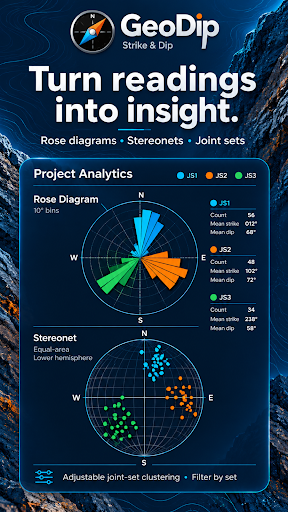
• Rose diagram visualization
• Stereonet plotting
• Joint set summaries and structural review
• Project analytics for orientation data
• Export CSV for spreadsheets and databases
• Export Excel for reporting and data exchange
• Export PDF for polished field reports
• Export KMZ for Google Earth and compatible GIS tools
GeoDip works well for field geologists who need a reliable clinometer app, strike and dip logger, GPS geology app, geology mapping app, or geology maps companion for field data collection. It is suitable for measuring bedding orientation, joint sets, structural discontinuities, foliation, fracture networks, and other planar or linear geological observations.
If you are searching for a clinometer, strike and dip app, geology maps app, geology mapping tool, GPS geology logger, dip strike recorder, structural geology app, outcrop mapping app, or field geology report app, GeoDip is built for that workflow. It helps reduce manual transcription, keeps project data organized, and makes it easier to move from field capture to map review to final reporting.
GeoDip supports quarry mapping, slope mapping, geotechnical investigations, mining geology, structural data collection, engineering geology site work, student field exercises, and general field documentation. With project organization, measurement editing, GPS support, geology maps, analytics, and export tools in one place, you can capture better geological data and turn it into usable reports faster.
Why geologists use GeoDip:
• Faster field capture than paper-only workflows
• Better organization for multi-project geology mapping
• Useful clinometer and GPS tools in one app
• Easier review on geology maps
• Clean export options for CSV, Excel, PDF, and KMZ
• Practical reporting for field teams, consultants, and students
GeoDip brings clinometer measurement, GPS capture, geology maps, geology mapping, strike and dip logging, and reporting into one Android app for geological fieldwork.
Mostra altro

1. Scarica il programma di installazione di MEmu e completa l'installazione

2. Avvia il Memu e apri il Google Play sulla homepage

3. Cerca GeoDip - Clinometer in Google Play
Install
4. Scarica e installa GeoDip - Clinometer
5. Al termine dell'installazione, fai clic sull'icona per avviar

6. Divertiti giocando a GeoDip - Clinometer su PC con MEmu
MEmu App Player è il miglior emulatore Android gratuito, utilizzato da 50 milioni di persone per ottenere un'esperienza di gioco Android superba. La tecnilogia di virtualizzazione MEmu ti permette di giocare a migliaia di giochi Android con semplicità sul tuo computer, anche i giochi con la grafica più esigente.
Schermo più grande con una grafica migliore; Lunga durata, senza limitazione di batteria o dati mobili.
Supporto completo per mappa di tastiera per un controllo preciso di tastiera e mouse o gamepad.
Multipli account di gioco o attività su un singolo PC contemporaneamente con il gestore di multi istanza.
Use GeoDip - Clinometer on PC by following steps: