Launcher 10
Aggiornata
Versione corrente
2.8.2
Offerta da

Non devi più preoccuparti dei sovraccarichi durante l'utilizzo di Launcher 10 sul tuo cellulare, liberati dal piccolo schermo e goditi dell'App su uno schermo molto più grande. D'ora in poi, sperimenta la tua App a schermo intero con tastiera e mouse. MEmu ti offre tutte le sorprendenti funzioni che ti aspettavi: installazione rapida e impostazione semplice, controlli intuitivi, niente più limitazioni di batteria, dati mobili e chiamate fastidiose. Il MEmu 9 nuovo di zecca è la prima scelta per utilizzare Launcher 10 sul tuo computer. Codificato con il nostro assorbimento, il gestore multi-istanza consente di aprire 2 o più account contemporaneamente. E soprattutto, il nostro esclusivo motore di emulazione può sbloccare il pieno potenziale del tuo PC, rendendo tutto liscio e piacevole.
Mostra altro
Scarica Launcher 10 su PC con MEmu Android Emulator. Divertiti giocando sul grande schermo. Launcher 10 is a fast and highly customisable launcher for Android which is styled similar to Windows Mobile devices.
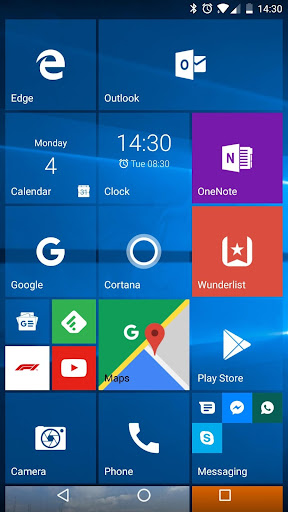
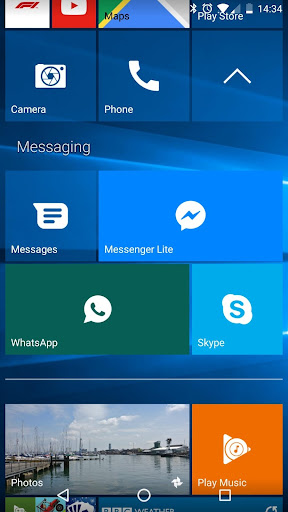
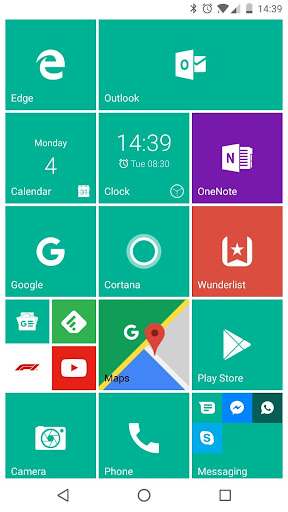
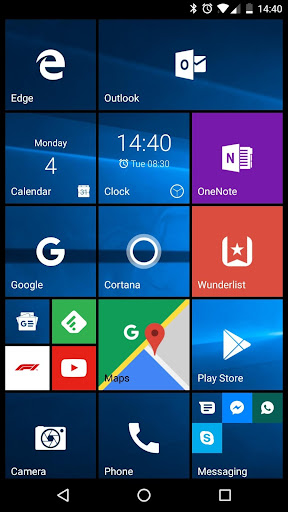
Launcher 10 is a fast and highly customisable launcher for Android which is styled similar to Windows Mobile devices. This app will change your home screen to look like a Windows device.
Features:
Premium features (requires in app purchase)
- Live tiles (to show notification content in tiles as well as contacts, calendar, clock and gallery)
- Tile badges (to show number of missed calls, unread messages, etc)
Start Screen
- Pin apps as tiles to your home screen
- Add widgets to your home screen
- Folders (to group tiles together)
All Apps Screen
- View all apps installed by swiping over to the All Apps list
- Search through your installed apps
- Recently added apps section
- Hide apps
Customisation
- Icon pack support
- Edit any tile on your start screen and choose a custom icon, background, size and more
- Landscape mode
- Change your wallpaper
- Change between light and dark mode
- Choose your default tile colour
- Change the tile transparency
- Choose to show white icons (for known apps) or system/icon pack icons
- Enable or disable scrolling wallpaper
- Plus loads more options... Download now to transform your home screen!
For more details please visit http://www.nfwebdev.co.uk/launcher-10
Mostra altro

1. Scarica il programma di installazione di MEmu e completa l'installazione

2. Avvia il Memu e apri il Google Play sulla homepage

3. Cerca Launcher 10 in Google Play
Install
4. Scarica e installa Launcher 10
5. Al termine dell'installazione, fai clic sull'icona per avviar

6. Divertiti giocando a Launcher 10 su PC con MEmu
MEmu App Player è il miglior emulatore Android gratuito, utilizzato da 50 milioni di persone per ottenere un'esperienza di gioco Android superba. La tecnilogia di virtualizzazione MEmu ti permette di giocare a migliaia di giochi Android con semplicità sul tuo computer, anche i giochi con la grafica più esigente.
Schermo più grande con una grafica migliore; Lunga durata, senza limitazione di batteria o dati mobili.
Supporto completo per mappa di tastiera per un controllo preciso di tastiera e mouse o gamepad.
Multipli account di gioco o attività su un singolo PC contemporaneamente con il gestore di multi istanza.
Use Launcher 10 on PC by following steps: