OpenWeather
Aktualisiert
Aktuelle Version
1.1.7
Angeboten von

Machen Sie sich keine Sorgen mehr über überhöhte Gebühren, wenn Sie OpenWeather auf Ihrem Mobiltelefon verwenden, befreien Sie sich von dem winzigen Bildschirm und genießen Sie die Nutzung der App auf einem viel größeren Display. Von nun an können Sie Ihre App mit Tastatur und Maus im Vollbildmodus nutzen. MEmu bietet Ihnen all die überraschenden Funktionen, die Sie erwartet haben: schnelle Installation und einfache Einrichtung, intuitive Steuerung, keine Einschränkungen mehr durch Batterie, mobile Daten und störende Anrufe. Der brandneue MEmu 9 ist die beste Wahl für die Nutzung von OpenWeather auf Ihrem Computer. Mit unserer Absorption kodiert, ermöglicht der Multi-Instanz-Manager die Eröffnung von 2 oder mehr Konten zur gleichen Zeit. Und das Wichtigste, unsere exklusive Emulations-Engine kann das volle Potenzial Ihres PCs freisetzen und alles reibungslos und angenehm gestalten.
Mehr anzeigen
Laden Sie Play OpenWeather auf dem PC mit MEmu Android Emulator. Viel Spaß beim Spielen auf großmundieren. A scientific yet simple approach to weather forecast .
A scientific yet simple approach to weather forecast
OpenWeather App is an ad-free & free-to-use application that will help you plan your time around the weather in a concise and minimalistic manner. Be aware of any precipitation within an hour with a minute precision or plan your activities for the next Sunday morning. OpenWeather App can tell you, which part of the day is going to have a clear sky and light breeze perfect for a run or bike ride for 7 days ahead.
Who uses OpenWeather?
The data from OpenWeather is used by millions of developers and businesses worldwide. Most likely, you already see our data through your weather application. Now you can obtain your weather report from its inception, through OpenWeather App.
8 reasons to love OpenWeather App
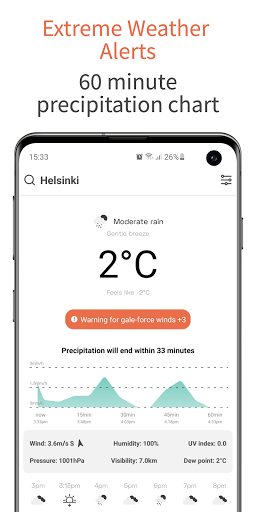
1. Minimalistic design that gives you all the weather information you need including: feels Like, wind speed; wind direction; atmospheric pressure; humidity; UV index and visibility;
2. Never get caught by rain or show with the 60 minute chart that indicates any precipitation and it’s intensity in your area;
3. Intuitively clear icons that tell you the weather conditions for 48 hours straight;
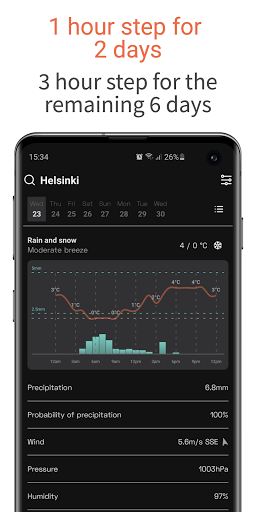
4. Hourly weather chart for the first 2 days and for every 3 hours in the following 6 days;
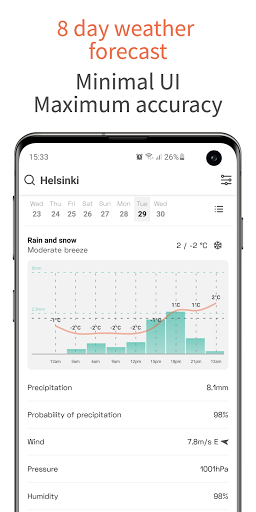
5. Expand any day of the week and get a visual chart on temperature and detailed weather information for the day, plus Sunset/Sunrise time. The first 2 days come with an hourly temperature fluctuation chart;
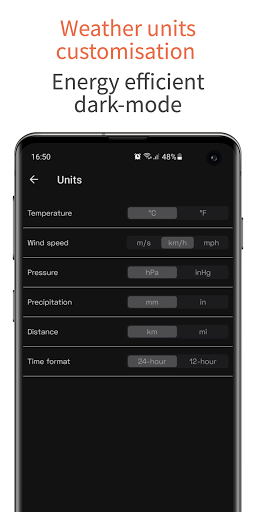
6. Customisation feature for weather measurement units. Construct your own set of preferred measurements for temperature (°C/°F), distance (km/mi), precipitation (mm/in) and more;
7. Ad-free & free-to-use;
8. Dark-mode.
Other features:
- Add up to 6 cities to your favourites and get the accurate weather forecast for any location;
- Is the weather different? - You can always tell us what the actual weather is in your location.
The magic behind the OpenWeather App
All the data for OpenWeather App is provided by One Call API™. OpenWeather aggregates and processes meteorological data from tens of thousands of weather stations, on-ground radars and satellites to bring their users accurate and actionable weather data for any location worldwide.
Mehr anzeigen

1. Laden das MEmu-Installationsprogramm herunter und beenden die Installation

2. MEmu starten und Google Play auf der Homepage öffnen

3. Suchen OpenWeather in Google Play
Install
4. Herunterladen und Installieren OpenWeather
5. Klicken nach Abschluss der Installation auf das Symbol, um es zu starten

6. Verwenden Sie MEmu, um OpenWeather auf Ihrem PC zu nutzen
MEmu Play ist aktuell der beste kostenlose Android-Emulator und bietet 50 Millionen Nutzern ein überragendes Android-App-Erlebnis. Dank der Virtualisierungstechnologie von MEmu können Sie Tausende von Android-Apps problemlos auf Ihrem Computer nutzen, selbst solche mit hohen Grafikanforderungen.
BGrößeres Bild mit besserer Grafik; Keine unterbrechungen, keine sorgen um Akku
Komplette Tastenbelegung unterstützt mit Maus und Tastatur oder Controller
Mit dem „Multi-Instance-Manager“ können Sie mehrere Spielkonten oder Spiele gleichzeitig auf einem PC ausführen.
Use OpenWeather on PC by following steps: